
Hi, Elin here. The first trap with an image model is that the demo feels like the product. You type a prompt, get a glossy result, and suddenly it looks like the app is basically done. It is not. Nano Banana 2 can help with the image layer, but the founder still has to design the part users actually live in: uploads, projects, credits, saved versions, downloads, rights notes, and support when something goes sideways.
Google's Gemini API docs describe Nano Banana 2 as Gemini 3.1 Flash Image, part of the Nano Banana image model family for image generation, editing, and iteration through the Gemini API image generation documentation. That is a strong starting point. Just do not mistake a strong model for a finished AI image app.
What Nano Banana 2 Gives AI Image App Builders
Nano Banana 2 gives founders a capable image layer to build around. According to Google's docs, Nano Banana refers to Gemini's native image generation capabilities, and Gemini can generate, process, edit, and iterate on visuals using text, images, or both.
For a founder, that means Nano Banana 2 can support the creative engine behind an image generation app. It can help users move from prompt to image, from source image to edited image, and from first draft to revised version.
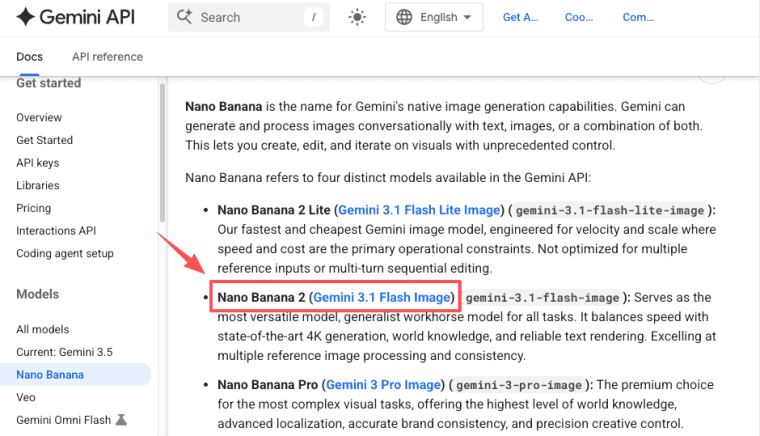
Gemini API image generation, image editing, multi-turn iteration, and model choices
Google's docs list Nano Banana 2 as gemini-3.1-flash-image and describe it as a versatile generalist image model. The same page also lists Nano Banana 2 Lite, Nano Banana Pro, and the earlier Nano Banana model, so founders should treat model choice as a product decision, not just a branding decision.
Nano Banana 2 can be used for text-to-image generation and image editing. The docs also describe multi-turn image editing, where the previous interaction can be used to continue editing an image conversationally. That matters because many users do not get the right image on the first try. A good AI image app should expect iteration. The product should support "try again," "change only this part," "restore the old version," and "compare outputs" as normal behavior.
What the Model Does Not Make Product-Ready
Nano Banana 2 can power the visual result, but it does not automatically make the business usable. This is the part that feels less exciting than the model. It is also the part users notice first when it is missing. If they cannot save a project, reuse an uploaded image, understand credit usage, download the right file type, or recover a previous version, they may blame the app even if the model is doing its job.
User accounts, project history, credits, billing, permissions, SEO, exports, and support
A launch-ready AI image app needs user accounts so people can return. It needs project history so work is not lost. It needs credits or usage limits because image generation has a cost. It needs billing if users pay. It needs permissions if teams, clients, designers, or agencies collaborate.
It also needs export controls. A user making product photos may need square images, web-optimized files, or transparent backgrounds. A marketer may need ad-ready sizes. A designer may need versioned outputs for review.

SEO also matters. If the app targets searches like "AI product image generator" or "AI ad creative tool," the product page needs clear positioning. Google's SEO Starter Guide is a useful baseline for public pages.
Product Stack Around Nano Banana 2
The product stack around Nano Banana 2 should turn image generation into a repeatable workflow. That means the app needs more than a prompt field. It needs upload flow, prompt input, queue status, regeneration history, saved versions, and clear download formats.
If you want to build those layers without getting stuck at the model-wrapper stage, you can use an AI app builder like HappySeeds to turn the workflow into a usable product. The model creates the image. The app builder helps you package accounts, projects, payments, and iterations into something users can return to.
Upload flow, prompt input, generation queue, regeneration, saved versions, and download formats
Start with the upload flow. Users may upload product photos, sketches, brand references, campaign visuals, or images they want edited. The app should explain what uploads are used for and remind users that they need the necessary rights. Prompt input should guide users instead of leaving them alone with a blank box. Ask for subject, purpose, style, constraints, format, audience, and what should not change.
The generation needs queue status. Image tasks can take time, fail, or require retries. Users should see whether the image is waiting, processing, complete, failed, or under review.
Regeneration needs careful design. Do not overwrite the previous output. Save the original prompt, source image, settings, generated result, timestamp, and parent version. Users should be able to compare versions, restore an earlier result, and download the selected one.
Trust, Rights, and Policy Layers
Trust is not optional for image apps. Users may upload client assets, product photos, brand references, faces, locations, licensed images, or sensitive materials. Your app needs plain language explaining what users may upload, how generated outputs should be reviewed, and where responsibility sits.
Source image rights, user disclosures, moderation, SynthID awareness, and prohibited-use boundaries
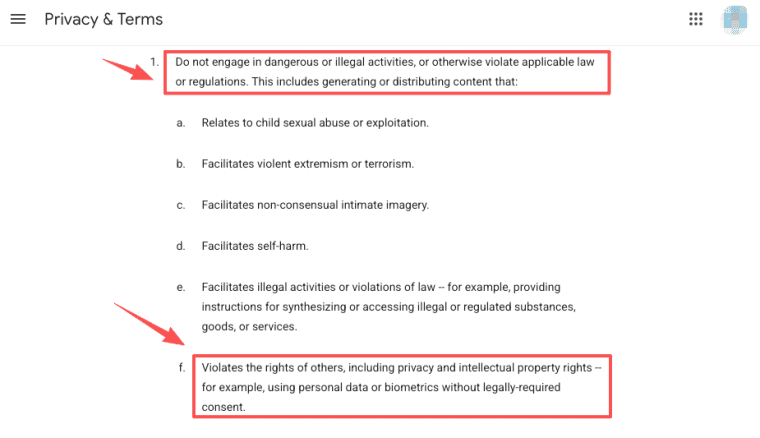
Google's Gemini image docs include a clear reminder: users should have the necessary rights to uploaded images and should not generate content that infringes on others' rights or deceives, harasses, or harms. The same docs link usage to Google's Prohibited Use Policy.
Your app should repeat this in simpler product language. Users should confirm they have the rights to source images. Commercial usage should not be promised unless the current official terms support it for your exact setup. Moderation rules should define when output is hidden, reviewed, or blocked.
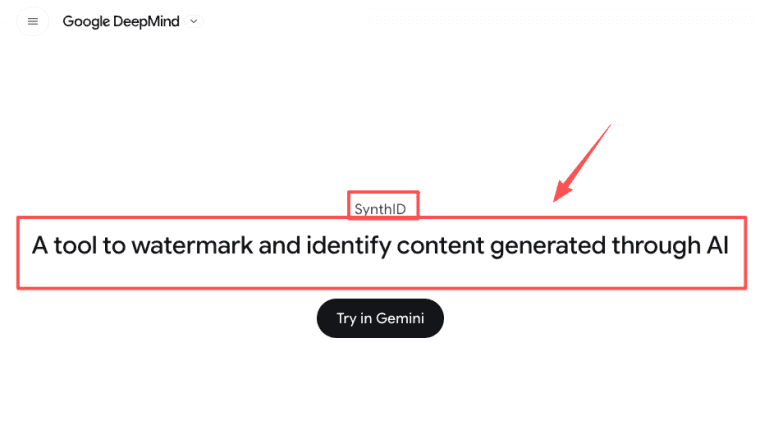
SynthID also matters. Google's Nano Banana docs say generated images include a SynthID watermark, and Google DeepMind describes SynthID as a watermarking tool for identifying AI-generated or altered content. Founders should mention SynthID awareness without pretending it removes all trust or rights risk.
MVP Launch Checklist for Founders
The best MVP is narrow. Do not start with "generate any image for anyone." That is too broad to position, price, moderate, and support. Pick one workflow. Product photos for ecommerce sellers. Ad variations for small brands. Social visuals for creators. Real estate listing images. Moodboard generation for agencies. Then build only the product layers needed for that job.
One visual workflow, credit logic, storage cost, feedback capture, analytics, and rollback plan
Start with one visual workflow and define what success looks like. For example, a user uploads a product image, adds a style direction, generates four options, saves one, and downloads a web-ready asset. Credit logic should match cost. A generation, edit, upscale, or export may not have the same cost. Do not guess forever. Check current Gemini API pricing on the official Gemini API pricing page before launch.
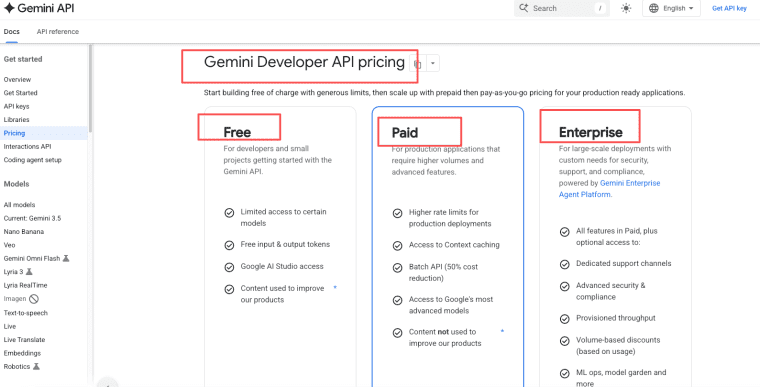
Storage cost matters because images are heavier than text. Source uploads, generated versions, thumbnails, exports, and deleted items all need rules.
Feedback capture should be built into the product. Track what users keep, delete, regenerate, export, or report. Add analytics so you can see activation, repeat use, credit burn, and completed workflows.
Finally, create a rollback plan. If a model behavior changes, if quality drops, or if a policy review starts hiding more images, you need a way to pause, switch models, or revert a workflow.
Limits and Trade-Offs
Nano Banana 2 can be useful, but founders should not sell it as magic. Image apps have real operational trade-offs: API cost, latency, inconsistent outputs, policy review, user complaints, and provider dependency. The model can improve, but your product still needs guardrails.
API cost, latency, inconsistent outputs, policy review, user complaints, and provider dependency
API cost is not just the generation cost. Failed edits, retries, regenerations, high-resolution exports, and stored versions can all affect margins. Latency affects the product experience. If users wait, show useful status. If the result fails, show a clear retry path.
Inconsistent outputs are normal in generative products. Your app should help users compare versions and recover good results. Policy review can also affect what gets shown, especially with sensitive uploads, likenesses, brands, or prohibited content. Provider dependency is the final trade-off. If your app depends on one model, design logs, evals, and fallback options early.
Explore More Topics:
FAQ
What happens when users delete source images?
When users delete source images, the app should define what happens to generated versions, thumbnails, exports, and regeneration history. Some products may delete everything linked to the source. Others may keep exported assets but remove the original upload. The key is to make this policy clear before users trust the app with brand or client images.
How should takedown requests be handled?
Create a takedown process before launch. The app should provide a contact path, required evidence, response timing, review owner, and escalation rule. If the output may involve rights, likeness, private material, or brand misuse, the product should be able to hide it while the request is reviewed.
When should generated outputs be hidden?
Generated outputs should be hidden when they appear unsafe, infringing, private, misleading, outside the app's use case, or blocked by policy. The user should see a clear status, not a silent failure. A hidden output should also create an internal review record so the team can improve prompts, moderation, and support copy.
Should the app support multiple image models?
Multiple models can be useful, but not on day one for every founder. Start with one model if the workflow is narrow. Add another model only when users need a clear difference, such as lower cost, better text rendering, faster drafts, or higher-quality final outputs. Multi-model support should not become a distraction from workflow validation.
How should teams review failed edits?
Failed edits should be reviewed by looking at the source image, prompt, model used, policy status, error message, and user expectation. The team should classify whether the failure came from unclear input, unsupported request, model weakness, policy filtering, or product UI confusion. That review loop is what turns an image generation app into a product that improves.


