Last reviewed: September 15, 2026
Low code no code app development sounds like a tooling choice until you are halfway through an app and someone asks, “Okay, but who changes this now?” That is usually the real difference.
No-code is often the better route when you have a clear workflow and want the person closest to the work to keep improving it. Low-code becomes more useful when the app needs custom code, developer-owned extensions, formal deployment, or technical governance that should not live inside one long visual rule.
I’m Elin. I used to assume “more control” was always safer. Then I watched a tiny client-service team turn a straightforward portal idea into a weeks-long architecture discussion. Their first app only needed a client intake form, file uploads, project status, approvals, and payment reminders. They did not need an enterprise platform. They needed something their operations lead could actually maintain after launch.
The question is not whether low-code or no-code is better in general. It is which route gives your team enough control without creating a system nobody can carry forward.
Quick Verdict: Low-Code or No-Code?
Choose no-code when the app follows a known workflow and routine changes should stay with founders, operators, consultants, or other nontechnical owners.
That could be a client portal, booking flow, internal request tracker, approval board, lightweight CRM, directory, or paid resource hub. The work is real, but the underlying rules are understandable: create a record, assign an owner, update a status, notify someone, collect a payment, or let a customer review the outcome.
Choose low-code when custom technical work is part of the app’s real future. That may mean a proprietary API, custom calculations, unusual user interfaces, tightly controlled releases, complex identity requirements, or a system that developers need to package and support across environments.
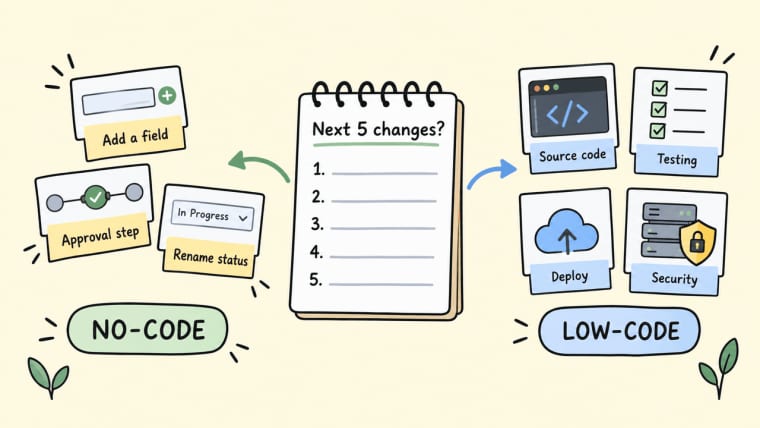
The useful test is boring: list the next five changes you expect after launch.
If most of them are “add a field,” “change an approval step,” or “rename a status,” no-code is probably enough. If several changes require source code, developer testing, deployment, or security review, low-code app development may be worth the extra complexity.
How Low-Code and No-Code Differ
No-code focuses on configuration. You use visual rules, data tables, templates, forms, automations, and supported integrations to create an app without writing the usual application code yourself.
Low-code still gives teams visual building blocks, but it deliberately leaves space for developers to extend the app with code. That is useful when a visual builder gets you most of the way there but the final 20 percent contains the hard business logic.
Microsoft’s Power Apps Component Framework is a clear example of this route: makers and developers can create reusable code components and package them for use across apps and environments. Its component model shows why low-code can be useful when a visual configuration stops being enough.
Neither route removes responsibility. No-code does not mean “no maintenance.” Low-code does not mean “the developer owns every small edit.” The difference is where changes live when the business evolves.
Who Changes the Logic and How
Imagine the client-service app again.
A client submits a brief. The team assigns an owner. A project moves from “new” to “in progress” to “waiting for client” to “approved.” A client receives a reminder if payment is still outstanding.
In a no-code version, the operations lead can often change those states, add a required field, adjust a form, or update the reminder condition directly. That is exactly what no-code is good at: turning visible business rules into something the process owner can update.
In a low-code version, the operations lead may still own many of those day-to-day changes. But a developer takes responsibility when the change involves custom services, nonstandard data handling, specialized user interfaces, or logic that needs code review.
The practical boundary is not technical pride. It is risk.
“Ask every client for their preferred launch date” should not require a software release. “Calculate a payment split across different contracts, regions, and exceptions” may deserve one.
Extension Paths and Technical Ownership
Low-code becomes valuable when the team needs a clear extension path instead of a growing pile of difficult visual rules.
A developer can own source files, tests, code reviews, release packages, and reusable components. An operator can still own the workflow, wording, data fields, and routine process changes. This can work well for small teams that have both business knowledge and occasional engineering support.
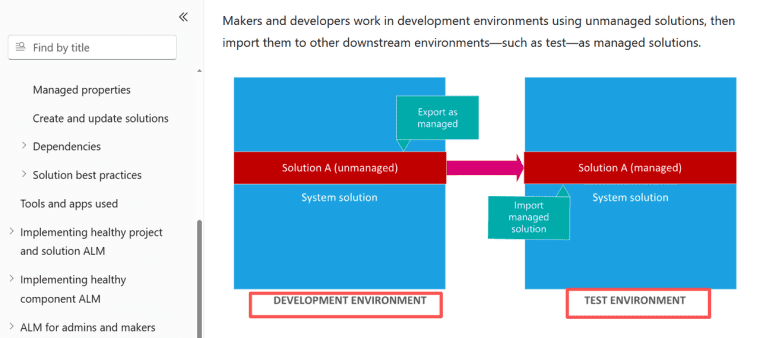
Power Platform’s solution model is built around that kind of handoff. Apps, flows, tables, and other components can be packaged for application lifecycle management, and unmanaged solutions can be exported to source control. That creates a more formal route from development to testing and production.
No-code needs a different kind of handoff discipline. Document the app owner, data source, roles, automations, payment account, domain, and test path. A visual builder is easier to open than a codebase, but it can still become confusing when nobody knows why a certain rule exists.
Compare the Same Business App Scenario
Let’s keep the same client operations app instead of comparing vague feature lists.
The agency needs a place where clients can submit a brief and files, check the status of a project, approve work, and receive a payment reminder. Staff need to assign work, request missing details, handle exceptions, and see what is stuck.
For a first version, a no-code route is probably the cleanest choice. The app follows a recognizable workflow, and the person changing it most often is likely the operations lead rather than a developer.
Low-code becomes more attractive if the agency later needs to connect with a private client system, calculate custom commercial terms, distribute a controlled version of the app to multiple organizations, or run a release process across test and production environments.
Build, Integrate, Test, and Handoff
I mapped this workflow using 12 synthetic client requests—not production data, just a way to follow the same process through both routes.
Both a no-code build and a low-code build could handle the basic records: client, project, brief, upload, status, approval, and payment reminder.
The difference appeared when something changed.
| Work | No-code route | Low-code route |
| First version | Configure forms, data, roles, statuses, and reminders | Configure the core workflow and add code only where needed |
| New field | Operations owner updates the form and tests it | Usually simple, unless tied to custom logic |
| New integration | Use a supported connector or keep a manual review step | Build and maintain a custom connector or service if needed |
| Testing | Test client and staff journeys with sample accounts | Test journeys, custom code, deployment, and environment settings |
| Handoff | Workflow map, ownership list, data notes, test checklist | Code, package, dependencies, environments, release notes |
| Ongoing maintenance | Keep rules visible and remove abandoned automations | Maintain code, credentials, upgrades, and release discipline |
The no-code route kept ordinary changes close to the person running the workflow. The low-code route only became necessary when we introduced custom external logic that could not be represented safely as a visible rule.
That is the comparison to make with your own app. Do not only test the happy path. Submit an incomplete form. Give the wrong role access. Cancel an approval after an automation has started. Then ask who can understand and fix what happened.
When No-Code Is the Better Fit
No-code is the better fit when your first job is proving that a workflow should exist at all.
Use it when you are replacing a spreadsheet, giving customers a simple self-service route, validating a small SaaS idea, or creating a focused internal tool. The value is not that it makes the work “easy.” The value is that it lets the person who understands the business test a real version without waiting for a full engineering cycle.
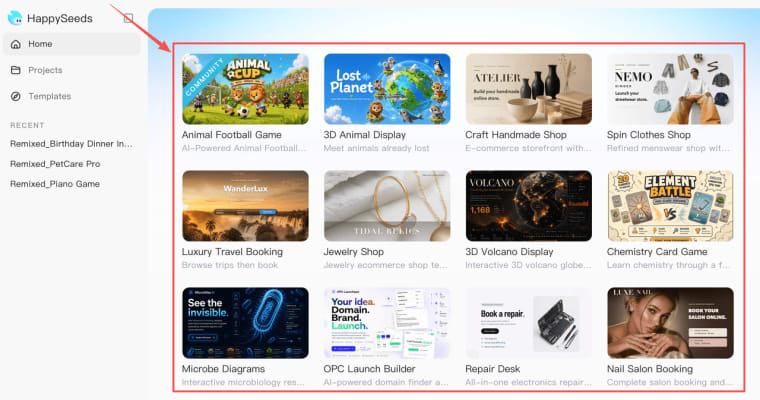
Prompt-to-app tools fit naturally here. Instead of assembling every field and screen from an empty canvas, a founder can describe the user, workflow, data, and intended outcome, then review what appears.
HappySeeds fits this no-code and prompt-to-app route when a founder has a focused workflow but does not want to begin with an empty technical setup. It should be treated as a way to get a testable first app into review, not as an automatic answer to every future enterprise requirement. If you are still defining users, saved data, launch needs, and maintenance responsibilities, start with No-Code App Development: From Idea to Launch.
The good no-code project is not the one with the most screens. It is the one your team can explain, change, and support.
When Low-Code Is Worth the Extra Complexity
Low-code is worth it when custom technical work is predictable rather than occasional.
That may include a proprietary service, complex calculations, code-based interface requirements, formal deployment controls, custom identity handling, or repeated client editions that need governed releases. These are not reasons to make a first version complicated. They are reasons to create a deliberate technical boundary once the app has earned it.
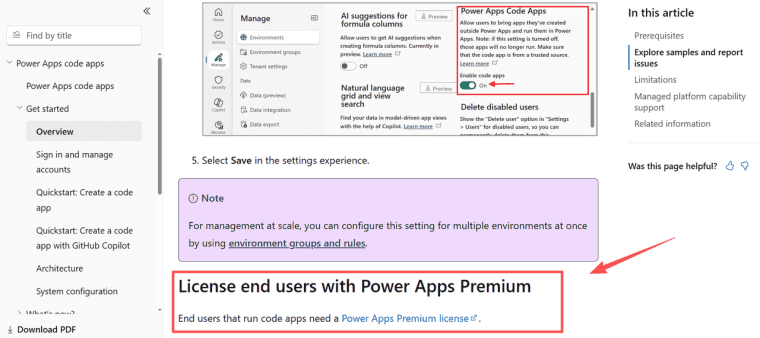
Identity, permissions, and governance can be a real trigger. Power Apps code apps support Microsoft Entra authentication and authorization, managed platform policies, connectors, and production deployment. Those capabilities also come with developer prerequisites and end-user licensing requirements, which is why a team should evaluate them as an operating commitment rather than a feature checkbox.
Low-code works best when everyone agrees on the split: the business owner owns the workflow; the developer owns the custom technical surface.
Where AI Prompt-to-App Fits
AI prompt-to-app changes how the first version begins. It does not remove the choices between low-code and no-code.
A founder starts by describing what users do, what the app remembers, what should happen next, and where the workflow can fail. The tool can generate a starting point, but the founder still needs to inspect the result.
Does the right person see the right data? Can a customer recover from a bad upload? Are approvals visible? Does a payment reminder run at the correct moment? Can someone explain what the app does when the original builder is not around?
That is why AI prompt-to-app is most useful as a faster route into review. It can help a nontechnical founder move from a rough idea to a working first version, but it should not be positioned as a like-for-like replacement for enterprise low-code governance.
If a prompt-built client portal grows into a business-critical operations system, revisit the boundary. You may need more technical ownership later. You do not need to pretend you needed it on day one. For a related decision, see when a workflow is ready to become an internal tool.
Trade-Offs and Migration Risks
No-code can create dependency on a platform’s data model, connectors, formulas, billing, and account ownership. Low-code creates a different risk: a small codebase that only one developer understands.
Neither route makes migration disappear.
Before launch, write down what you own and where it lives: data, uploaded files, domains, payment accounts, credentials, automations, integrations, and access roles. If a platform offers export or copying, verify what that actually includes. App definition, live data, uploaded files, automation, secrets, and billing are often separate things.
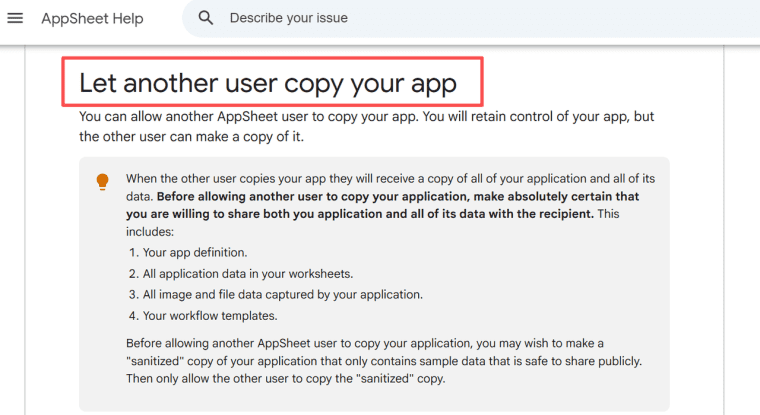
AppSheet, for example, lets users copy apps, but its guidance notes that copied apps can include the definition, application data, image and file data, and workflow templates. A sanitized template is safer than casually sharing a live client app.
Plan migration as a business event: export what you can, test the new route with sample users, redirect integrations, confirm scheduled jobs, and keep the old version recoverable until the new one works.
Build for the Changes You Can Actually Own
Choose no-code when the workflow is known and the people doing the work should be able to improve it. Choose low-code when custom extensions, deployment discipline, and developer ownership are part of the app’s actual future.
For most founders and small teams, the safest first move is not building the most flexible system. It is building the smallest useful system, seeing what users ask for next, and adding technical complexity only when the workflow earns it.
The app does not need to be perfect before it exists. It needs a real user, a clear job, an owner, and a way to change without becoming a mystery.
Explore More Topics:
FAQ
Are developer seats priced separately from end-user access?
Sometimes. Pricing depends on the platform, plan, connector type, environment, and user role. Do not assume that a maker license covers every person who uses a live app. In Power Apps, connector and component choices can affect the app’s license designation and end-user requirements. Check the current licensing guidance before committing.
Can both routes use the organization's existing single sign-on provider?
Potentially, but SSO is a platform-and-plan question rather than a category promise. Both no-code and low-code products may support organizational identity providers, yet user provisioning, external access, authentication methods, and licensing rules can vary. Test your exact provider and user population before offering SSO as part of a customer promise.
Can either route duplicate one app into separate client editions?
Yes, but copying is not the same as a multi-tenant product strategy. Separate copies can give each client independent branding, rules, and data. They also multiply maintenance. If clients only need isolated records, one app with carefully controlled access may be easier to maintain.
Which route lets a small team reuse approved components across projects?
Low-code usually provides a stronger formal path when reusable components need versioning, code review, packaging, and controlled deployment. No-code can still reuse templates, screens, and workflow patterns well when those components remain visible and documented.
Which route supports scheduled jobs that run without a user session?
Both can, depending on the platform, subscription, credentials, and automation setup. AppSheet supports scheduled automation events, although some features require an appropriate subscription to execute. Verify schedules, retries, ownership, and failure alerts before relying on any unattended job.