
Hi, I'm Elin. A personal AI app needs a product plan before it needs a longer prompt. Open Minis is useful because it shows the stack founders now have to think about: model access, local runtime, agent memory, device permissions, skills, user control, and support.
What Open Minis Signals About Personal AI Apps
As of August 3, 2026, a private, on-device AI agent for iOS and Android is one public example: model access, a Linux shell, browser automation, skills, persistent memory, and device integrations now sit in one user-facing product.
On-device execution, model access, skills, memory, and system tools are separate product layers
Do not read "on-device" as meaning that every model inference or data process happens locally. Open Minis can connect to Claude, GPT, Gemini, OpenRouter, and compatible endpoints, while some parts of the agent environment, tools, and user experience can run on the device. That distinction matters.
For your own AI assistant app, map each layer separately: where the agent runs, which model answers, what tools it can touch, how memory is stored, and what the user can revoke.
Define One Personal Job Before Adding Features
Start with one repeated job, not a general personal agent. Non-technical founders often overbuild here because "assistant" sounds broad. A sharper first product is easier to trust, test, and explain.
Choose the user, repeated task, required context, action boundary, and success condition
Write one sentence: "This app helps [user] do [task] using [context], but it must ask before [action]." For example, a consultant's personal AI agent might turn meeting notes into client tasks, but never email the client without approval. Success is not "the agent worked." Success is a visible saved task, calendar draft, report, or file the user can inspect.
Design the User-Visible Agent Loop
The agent loop should be visible enough for trust. If users cannot see what the agent plans to do, they will either block every permission or grant too much at once.
Intake, plan, permission request, action, confirmation, history, and recovery
Use this loop: intake the request, show a short plan, request the narrow permission, act, confirm the result, save history, and offer recovery. Recovery can be undo, restore previous file, cancel scheduled run, or mark memory as wrong. This is where an AI assistant app becomes a product instead of a chat box with tools.
Add the Product Layers Around the Agent
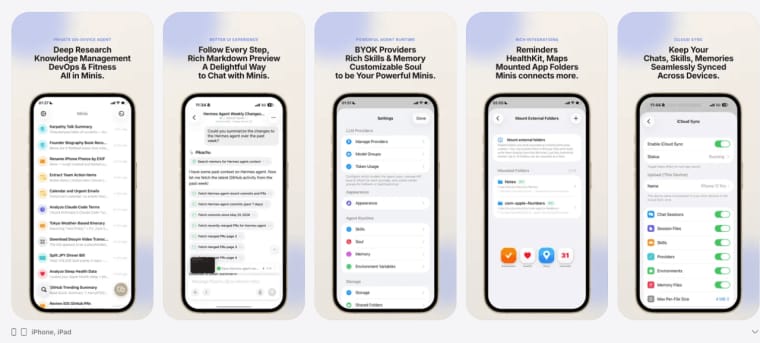
A launch-ready app needs boring product surfaces around the clever loop. Current iPhone and iPad distribution shows that packaging, privacy language, permissions, updates, and support are part of the product experience.
Onboarding, accounts, model choice, usage controls, updates, and support
Onboarding should collect the minimum: the job, default workspace, preferred model path, and permission choices. Model choice should explain trade-offs without drowning a founder in API language: local endpoint when available, provider key when needed, fallback when a request fails. Usage controls should show model calls, tool runs, memory events, and cost-sensitive actions before they surprise the user.
Decide What Stays Local and What Uses the Cloud
Privacy is a design decision, not a slogan. On-device AI can mean local files, local tool execution, local memory, local inference, or all of them. Treat each claim separately in your product copy and settings.
Data sensitivity, offline needs, latency, device limits, provider calls, and fallback behavior
Keep sensitive context local when possible: personal notes, identity details, raw health exports, private contacts, and unfinished drafts. Use the cloud when the model quality, context window, or multimodal capability is necessary. If the device is offline, hot, low on battery, or missing a local model, the app should degrade clearly: draft only, queue for later, switch provider after approval, or stop.
Limits and Trust Risks
Trust breaks fastest when an agent acts outside the user's mental model. Public Android APK releases also show why agent products need frequent fixes: tool calls, providers, UI state, and device differences all create moving parts.
Incorrect actions, excessive permissions, operating-system limits, battery use, and changing provider terms
Plan for wrong actions before launch. Limit destructive tools, require confirmation for external messages and purchases, and log what changed. Mobile operating systems restrict background work, file access, and automation, so promise less than your prototype can do on a perfect test device. Provider terms, model availability, and review rules can also change; keep policy links, disclosures, and app review notes current before every release.
Build the Product Layer First
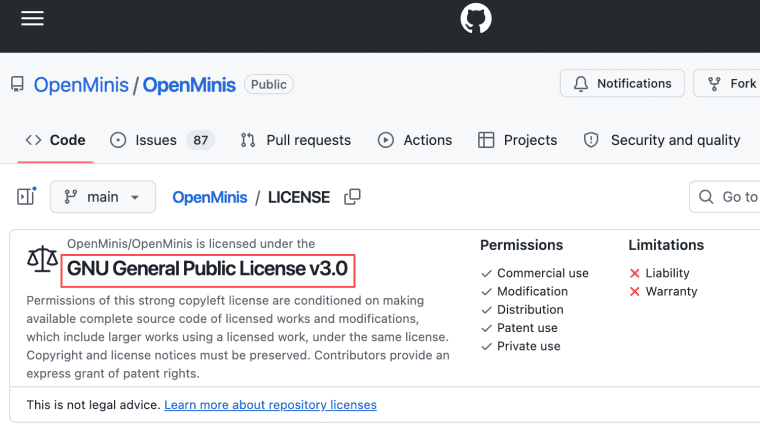
A strong personal AI app is not just an agent loop with a nicer prompt. It is a controlled product system: clear job, visible plan, scoped permissions, honest on-device AI language, editable memory, and release discipline. Open Minis is licensed under GNU GPL v3.0, so founders studying it should also treat license, source, and contribution boundaries as product facts, not footnotes.
Explore More Topics:
FAQ
Who owns routines created by a personal AI app user?
Treat routines as user-owned content unless your terms clearly say otherwise. The app may provide templates, but the user's saved prompts, schedules, rules, and outputs should be exportable and deletable.
Can households share one personal agent account safely?
Shared accounts are risky when memory, calendars, files, and messages mix. A safer design uses separate profiles, clear switching, permission walls, and no shared memory unless each person opts in.
What happens to scheduled tasks after a subscription ends?
Stop paid automation cleanly, not silently. Show which routines will pause, keep a read-only history, allow export, and give users a grace path for urgent reminders or compliance records.
How should an agent move to a replacement device?
Device migration should be explicit. Let users choose whether to transfer memory, routines, credentials, and local files, then require fresh permission checks on the new phone or computer.


