
I'm Elin. A Grok 4.6 AI app should not start with "What can the model do?" It should start with "What job is painful enough that a user will return?" Grok 4.6 creates new product space because xAI frames it around long-running agents, interactive work, visual projects, coding, research, and multi-step knowledge work. The product challenge is turning that capability into a narrow workflow users can trust.
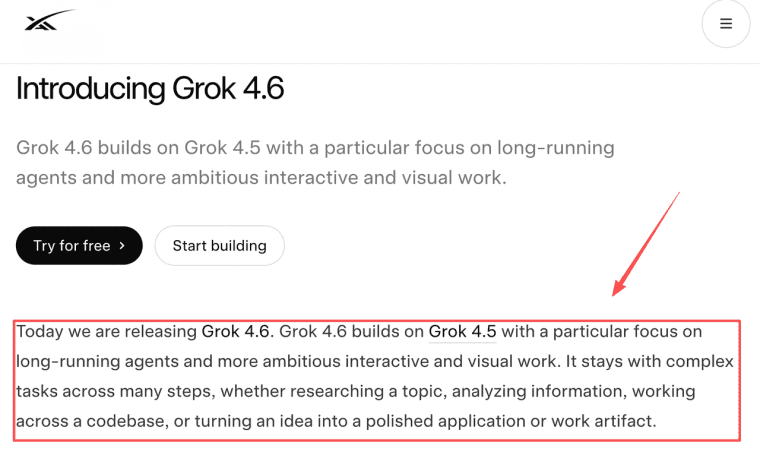
What Grok 4.6 Adds to the App-Idea Landscape
Long-running agents, visual work, and multimodal inputs
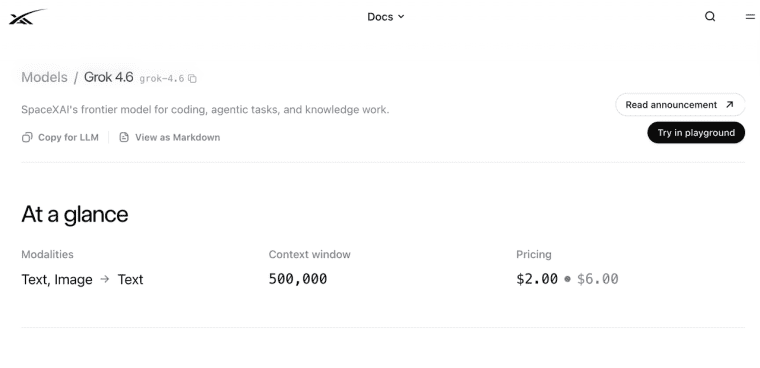
The useful shift is persistence. Grok 4.6 is positioned for tasks that continue across several steps, not only one-response chat. Its developer materials list text and image input, a 500,000-token context window, function calling, structured outputs, reasoning, and API pricing details for grok-4.6. Those model-level inputs, context, tool, and pricing boundaries matter because app ideas need cost, latency, and review planning from day one.
Five Grok 4.6 AI App Ideas Worth Testing
A visual project brief assistant
User: agencies, designers, or e-commerce teams. Input: screenshots, product photos, brand notes, and campaign goals. Visible result: a structured creative brief with risks, missing assets, and next steps. Error cost: wrong brand interpretation or missing legal claims. Human review should approve the final brief before client delivery.
A multi-step research workspace
Aimed at consultants, founders, and analysts. Inputs include files, links, notes, and competitor references. The output is a saved research board with source notes, explicit assumptions, and draft recommendations. Because the model can generate confident-sounding but outdated synthesis, the review step should clearly separate verified facts from model-generated conclusions.
A product feedback synthesis tool
Built for SaaS founders and product managers. It takes support tickets, interview notes, app reviews, and sales feedback, then groups themes by severity, pulls representative quotes, and suggests roadmap labels. The biggest error risk is overweighting noisy or outlier feedback, so prioritization should stay under human control before any roadmap decisions are made.
An interactive prototype copilot
Useful for non-technical founders and product builders. Users describe the app idea, screen notes, reference examples, and intended user flow. The result is a prototype brief or an early interactive version of the core flow. The critical risk is optimizing the wrong workflow, so review should focus on whether the user task is solved correctly rather than on visual polish.
An operations review assistant
Targeted at operators and small teams. Inputs are process documents, logs, checklists, and screenshots. The app surfaces exceptions, bottlenecks, and suggested fixes. Because bad operational advice can affect customers, money, or access, any recommended action should be confirmed by a human before it is acted on.
Choose an Idea With a Real User Job
Frequency, evidence, error cost, and buyer urgency
The best Grok 4.6 app ideas have repeated demand. A weekly research brief, monthly client report, daily feedback triage, or recurring ops review is stronger than a one-time novelty. Ask four questions: how often does the user need it, what evidence proves the output, what happens if it is wrong, and who has authority to pay?
Buyer urgency matters. "Nice to explore" rarely becomes a product. "This saves review time before every client call" has a clearer path.
Turn Model Capability Into a Product Workflow
Intake, progress, review, correction, and saved outcomes
A Grok 4.6 product idea becomes usable when the app has intake, progress, review, correction, and saved outcomes. The user should know what to submit, what the app is doing, what needs review, how to fix bad output, and where the final result lives.
This is where many AI app product ideas fail. They expose the model, but not the workflow. A strong app shows status, stores versions, logs errors, and makes human review part of the product instead of a hidden rescue step.
When HappySeeds May Fit the First Product Version
A customer-facing workflow can sit around an external model
HappySeeds should not be described as a native Grok 4.6 integration unless that is verified in the current product. A safer fit is the outer product layer: forms, customer screens, saved results, payments, domains, and feedback loops around an external model workflow.
For founders testing multimodal AI apps, HappySeeds' app-building workflow for customer-facing products may help prototype the visible experience while model access, routing, and provider setup remain separate technical decisions.

Limits and Trade-Offs
Provider dependence, cost, latency, privacy, and human review
Provider dependence is the first trade-off. If your app depends on Grok 4.6 behavior, you need a fallback plan for price changes, latency, rate limits, context limits, or policy changes. Cost also grows with long context, retries, tool calls, and large outputs.
Privacy needs careful handling when users upload images, customer notes, or internal files. Human review is still required for high-impact outputs. Cross-customer prompt asset reuse and model disclosure are contract and policy questions, not universal rules. This article is general information, not legal or contract advice. Actual handling should follow customer agreements, asset licenses, confidentiality duties, official policies, and qualified professional review.
Build the Workflow Before Naming the Idea
Grok 4.6 may inspire strong product ideas, but the model is not the product. Start with one repeated user job, design the reviewable workflow, test real inputs, and only then decide whether the idea deserves a customer-facing app.
Fact-check date: August 13, 2026. Model access, pricing, context, tools, regional availability, and policies should be checked again before publication or launch.
Explore More Topics:
FAQ
Can one Grok 4.6 app support separate customer workspaces?
Yes, if the product layer is designed for separation. Each workspace should have its own users, files, outputs, billing state, logs, and permissions. Do not rely on prompt instructions alone to separate customer data.
What should teams log when users report incorrect outputs?
Log the user, workspace, input type, model route, timestamp, output version, correction, review status, and whether the issue affected delivery. Avoid storing unnecessary sensitive content in support notes.
Can agencies reuse prompt assets across client projects?
Sometimes, but only if contracts, confidentiality duties, and asset licenses allow it. Reusable prompt patterns should be separated from client-specific examples, private files, and proprietary instructions.
How should founders handle requests beyond the model context window?
The app should not silently drop context. It should split the job, ask for prioritization, use retrieval, or move the request into human review. The user should understand what was included.
Should founders disclose which model powers a customer-facing app?
For low-risk tools, broad disclosure may be enough. For enterprise, regulated, or sensitive workflows, customers may request model names, data handling, fallback rules, and review policies before approval.


