
Hi everyone, I'm Elin. The dangerous part of kimi api is how quickly it can make a half-built AI app feel convincing.
A model answers. A screen moves. The demo feels alive. Then a real user opens it, and the boring problems show up: What do I click? Why should I trust this? Where does payment happen? What breaks when I come back tomorrow? That is the gap between model access and a product.
What the Kimi API Gives AI App Builders
The Kimi API is the developer entry point for using Kimi models from Moonshot AI inside your own software. The official Kimi API quickstart says the API is compatible with the OpenAI API format, which matters because many existing tools, SDKs, and app platforms already know how to work with that structure.
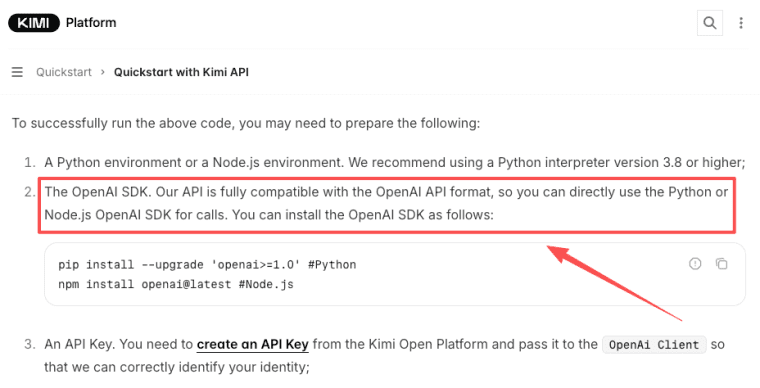
In plain builder language, this means you can use a kimi model inside an app without designing the whole model layer yourself. You can send user input, files, images, or workflow instructions to the model, then show the result inside your own product experience.
That opens the door to apps like:
| AI app idea | Where Kimi can help | What you still need |
| Consultant assessment tool | Read intake answers and produce recommendations | Forms, login, payment, saved reports |
| Research companion | Work through long source material | Uploads, citations, review flow |
| Creator content tool | Turn audience input into custom outputs | Public pages, user accounts, sharing |
| Ops assistant | Analyze recurring internal workflows | Permissions, data boundaries, logs |
| Agent workflow app | Use tools and multi-step actions | Guardrails, retries, approvals |
That last column is the part people skip when they are excited. I've done this too. You get one impressive model response, and suddenly your brain starts designing the launch tweet. Then you remember there is no login page.
What Kimi K2.6 Changes for Builders
Kimi K2.6 matters because it is not only a chat model story. Kimi's official K2.6 documentation describes it as a multimodal model that supports text, image, and video input, with dialogue and agent tasks. The same docs list a 256K context window for K2.6 and related Kimi models.
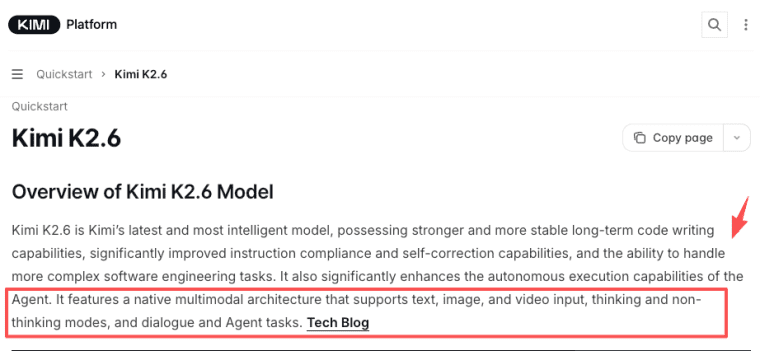
For builders, long context is useful when the product needs to work with more than a short prompt. Think client documents, long transcripts, product specs, research files, codebases, policies, or multi-step work history.
But long context is not magic storage. You still need to decide what belongs in the prompt, what belongs in your database, and what should never be sent to the model at all.
Kimi's official K2.6 tech blog also frames the release around open-source coding, long-horizon execution, and agent workflows. That makes it more interesting for app builders who want AI to do structured work, not just produce a paragraph of text.
Long context, thinking and instant modes, agent workflows
The useful way to think about Kimi K2.6 is this: different user jobs need different model behavior.
A quick rewrite, summary, or classification task should feel instant. A complex planning task can take longer if the user understands why. A workflow that calls tools needs much tighter controls, because the model is no longer only answering. It is choosing actions.
Kimi's thinking model guide is relevant here. For a founder, the practical takeaway is not "turn thinking on everywhere." It is to reserve deeper reasoning for moments where the user expects judgment: comparing options, diagnosing a workflow, planning a launch, reviewing complex files, or breaking a problem into steps.
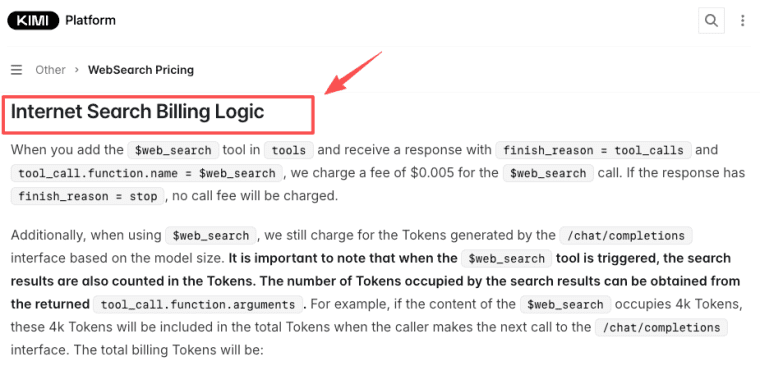
The agent API angle is where things get exciting, and also where things can get messy. Tool calls, web search, JSON output, and long context can support agent-style workflows. The Kimi docs note that K2.6 supports ToolCalls, JSON Mode, Partial Mode, automatic context caching, and internet search functionality. Kimi also documents separate WebSearch billing logic, which is a good reminder that tools can affect both cost and product behavior.
So yes, you can build agent-like AI apps. Just do not let the agent roam around your product without rules. Give it a narrow job, visible steps, failure handling, and a human-friendly way to recover.
API Access Is Not the Same as a Product
This is the part that feels annoying until it saves you. An API key gives your app model access. It does not give you a business. A real AI app has onboarding, user data, permissions, payments, support, analytics, SEO pages, pricing logic, usage limits, and a reason for someone to return. The kimi api can power part of that experience, but it will not decide your product shape for you.
A small paid AI app needs answers to very unglamorous questions:
| Product question | Why it matters |
| Who is the exact user? | "Everyone who needs AI" is not a market |
| What do they finish in one session? | A clear job beats a vague assistant |
| What data do they provide? | Data shape affects trust and cost |
| What result do they pay for? | Payment should match the user's value moment |
| What happens when the model is wrong? | Users need review, retry, or correction paths |
| How do you learn from usage? | Feedback is your version two |
That is why API-first projects often stall. The model works. The product does not yet have a spine.
Data, login, payments, SEO, and user workflows
For non-technical founders, this is where an ai app builder can be more useful than a blank coding environment. Not because it makes strategy disappear. It just moves the hard work to the right level.
Instead of starting with infrastructure, you can map the product:
- What pages does the user need?
- What should be public for SEO?
- What should sit behind login?
- What data should be saved?
- Where does payment happen?
- What output is valuable enough to charge for?
- What feedback should be collected after each result?
A good builder should help you answer those questions before you spend days polishing one model response. Because the painful part is rarely "Can the model reply?" The painful part is everything around that reply.
When Kimi May Fit an AI App Idea
Kimi may fit your AI app idea when the product depends on long inputs, multimodal understanding, reasoning, or tool-based workflows.
Good candidates include document-heavy apps, research assistants, code or technical workflow helpers, visual review tools, client intake products, and agent-style internal tools. If the product needs to read a long file, compare details across sources, inspect screenshots, or reason through a multi-step task, Kimi is worth testing.
It may be less necessary for simple apps where the AI only rewrites short text, generates basic captions, or answers a small FAQ. In those cases, your product risk is probably not the model. It is distribution, pricing, onboarding, and whether anyone wants the result.
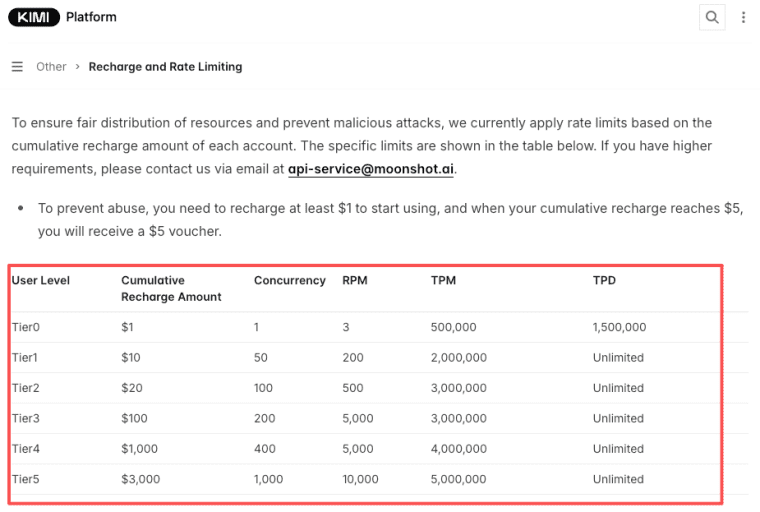
Before launch, verify the current model list, pricing, rate limits, commercial terms, data handling, and regional availability in official Kimi sources. The Kimi pricing and rate limit docs explain that limits can depend on account recharge level and may change under cluster load. Please use the latest official documentation as the source of truth before promising customers anything about price, uptime, limits, or availability.
One more practical test: run your app idea with three messy real examples, not one clean demo prompt. If the output still helps, you may have something. If it only works when the input is perfect, you have a demo, not a product.
The bottom line: kimi api access can be a strong ingredient for AI app creation, especially when your idea needs long context, multimodal input, or agent workflows. Just make sure the model is serving a product people can actually use. That is the part that turns the idea from "interesting" into "maybe this can sell."
Explore More Topics:
FAQ
What is the Kimi API?
The Kimi API lets builders connect Moonshot AI's Kimi models to their own apps. In product terms, it is the model access layer. It can generate, reason, analyze, call tools, and process supported inputs, depending on the model and settings you choose.
How can builders use Kimi K2.6 in AI apps?
Builders can use Kimi K2.6 for long-context workflows, multimodal input, reasoning-heavy tasks, coding-related flows, and agent-style actions. The best use case is not "add Kimi AI chat." It is a specific user job where the model helps produce a result the user can act on.
What should founders verify before using Kimi API?
Verify pricing, limits, commercial rights, supported regions, data policy, model availability, tool billing, and any launch-sensitive terms. This is especially important for paid products. Please use the latest official documentation as the final source before publishing pricing or policy claims.
Is Kimi API enough to launch a paid AI app?
No. It can power the AI layer, but a paid app also needs user flows, data handling, login, payment, support, SEO, usage controls, and validation. The API can help create value. It does not package that value into a business by itself.
When should founders use an AI app builder instead?
Use an AI app builder when you want to launch and test a real workflow without assembling every product layer from scratch. If your main problem is "How do I turn this idea into something users can try and pay for?" then a builder may get you closer than working only at the API level.


