A client portal sounds tidy until a real client uses it. They forget the file name, reply inside an old email thread, ask who approved the last version, or want the invoice resent to a different contact. That is why the best client portal software is not simply the tool with the prettiest login screen. It is the system that keeps client work clear when files, messages, approvals, billing, and responsibility all start moving at once.
Elin here. Reviewed on August 27, 2026, this comparison treats product claims, pricing, storage, branding, payments, and data handling as live details to verify before purchase.
Quick Picks by Client Portal Use Case
For an all-in-one service-business portal, SuiteDash is a strong candidate because it combines CRM, onboarding, files, proposals, billing, project tasks, secure messaging, support tickets, and white-label portal features in one product. Its fit is best when a small team wants one operating hub rather than separate tools stitched together.
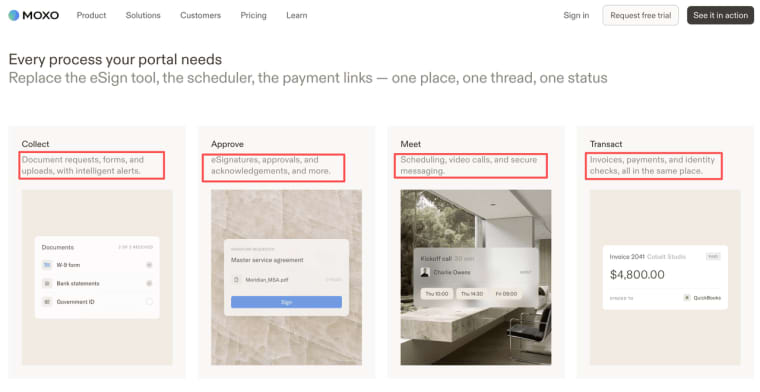
For high-touch client processes, Moxo is worth evaluating. Its portal model centers on client journeys: secure links, document collection, approvals, eSignatures, scheduling, payments, messages, and workflow steps. That makes it more interesting for firms where every client engagement has milestones and follow-up work.
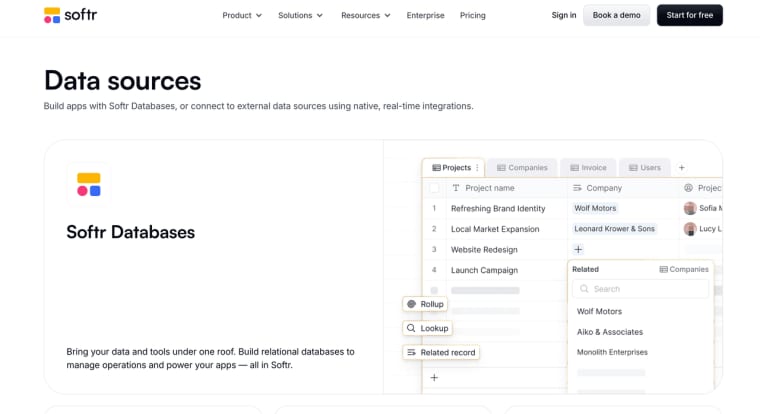
For flexible custom portals without a full custom build, Softr fits teams that want to shape a client-facing interface around existing data. Its client portal examples are useful for teams moving from spreadsheets, Airtable, Google Sheets, HubSpot, or other data sources into a cleaner external experience.
For highly specific workflows, a custom-built client portal may be the better path. This is where a team needs unusual permissions, a niche intake process, custom reporting, or a productized service that standard client portal software for small business cannot model cleanly.
How We Evaluated Client Portal Software
A Shared Service-Business Scenario
The comparison uses one service-business scenario: a consulting team sells monthly client work. Each client needs onboarding, a private workspace, file exchange, status updates, comments, approvals, invoices, and a simple way to request help. Internally, the team needs client records, staff roles, delivery history, and a record of what was approved.
That scenario is boring on purpose. Boring workflows reveal the truth. A portal that looks impressive in a demo but cannot handle a late invoice, a replaced client sponsor, or a corrected file name will create more work than it saves.
Client Experience, Delivery, and Administration Criteria
The evaluation focuses on client experience, delivery control, and administration. Client experience means login or secure access, clear navigation, branded presentation, mobile usability, and fewer "where is this?" messages. Delivery control means files, requests, approvals, messages, tasks, and service history. Administration means permissions, billing, integrations, pricing, data export, privacy, and ongoing maintenance.
No product is treated as universally best. The right choice depends on the type of client work, how often clients return, how sensitive the files are, and how much internal process the team is ready to maintain.
Dedicated Client Portal Platforms
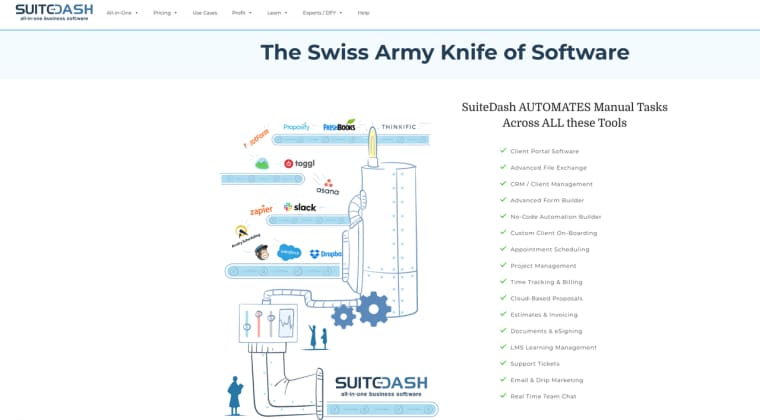
SuiteDash is the broadest dedicated option in this set. Its all-in-one client portal model includes CRM, onboarding, project work, invoicing, file exchange, secure messaging, support tickets, white-label branding, and subscriptions. That breadth is useful for agencies, consultants, coaches, accountants, and service businesses that want one place for the full customer journey. The trade-off is setup discipline. A tool with many modules can become messy if the team does not define which features clients should actually see.
Moxo is more workflow-led. Its client journey experience combines document requests, forms, uploads, approvals, eSignatures, scheduling, secure messaging, payments, and AI-assisted follow-up. It is a better fit when the client portal is not just a file cabinet but the front door to a guided process. The trade-off is cost and fit: teams should confirm pricing, AI credit assumptions, portal features, and security needs before committing.
Softr is different because it is closer to a no-code custom app builder for portals. Its custom portal flow supports logins, data sources, client communication, document management, project views, billing, dashboards, and role-based access. It can work well when a team already has structured data and wants to expose the right slices to clients. The trade-off is that the team must understand its own data model. Softr gives flexibility, but flexibility still needs decisions.
Custom-Built Client Portals
A custom-built portal makes sense when the workflow is the product. Think of a grant-writing firm with a scoring method, a legal operations consultant with unusual intake stages, or a creative studio that packages approvals, comments, file versions, and payments in a distinctive way. In those cases, standard portal software may be too broad in the wrong places and too rigid in the exact places that matter.
Custom portals are not automatically better. They need design, authentication, database structure, permissions, hosting, file storage, security review, billing logic, support, and maintenance ownership. They also need someone to answer ordinary client questions after launch. The upside is fit. The downside is responsibility.
Compare the Options on the Same Dimensions
| Option | Best fit | Watch carefully |
| SuiteDash | Small teams wanting CRM, portal, files, billing, support, and white-label tools in one suite | Feature sprawl, setup time, module governance, storage needs |
| Moxo | Firms with guided client journeys, approvals, documents, payments, and frequent follow-up | Price level, portal access model, AI credits, workflow complexity |
| Softr | Teams building a custom portal interface on top of structured business data | Data design, permissions, external-user pricing, integration maintenance |
| Custom-built portal | Unique workflow, productized service, special permissions, or niche client experience | Build cost, maintenance owner, support process, data portability |
Onboarding, Authentication, and Client Records
A good portal should make the first client action obvious. SuiteDash can support onboarding and CRM-style client management. Moxo reduces login friction with secure-link portal access, which may help with clients who resist creating another account. Softr is strong when the team needs custom forms and data views. A custom build gives the most control, but it also makes the team responsible for every account state: invited, active, suspended, archived, and deleted.
Secure Documents, Messages, and Service Requests
For document-heavy services, the portal must show who requested a file, who uploaded it, whether it was accepted, and what happens next. SuiteDash leans into file exchange, secure messaging, support tickets, proposals, and e-signing. Moxo is compelling for document collection and approval steps inside a guided flow. Softr can expose document or request data through a custom interface, but secure handling depends on how the underlying data and integrations are configured.
Branding, Domain, Payments, and Integrations
Branding matters more than teams expect. A client who pays a premium fee should not feel dropped into a generic back office. SuiteDash lists custom URL, branded login, white-label email, mobile app branding, invoicing, subscriptions, and file storage in its current materials. Its pricing structure starts with unlimited staff, clients, and portals, with plan differences around storage and higher-tier tools, but teams should recheck plan details before buying.
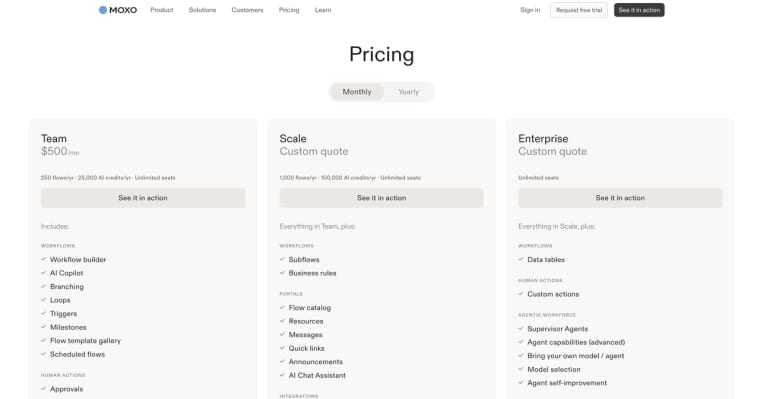
Moxo positions portal branding, payments, and workflow actions together. Its pricing currently separates flow volume, AI credits, portal features, custom domain, audit log, SAML SSO, APIs, and enterprise controls by plan, so it needs a careful budget check. Softr pricing should be checked for external users, data sources, custom domains, and app limits before it is treated as a long-term portal base.
Pricing, Portability, and Ongoing Maintenance
A client portal budget is not only the monthly plan. Add setup time, staff training, client onboarding, storage, failed-payment handling, migration risk, and support load. Portability also matters. If the team leaves a portal platform later, what can be exported: client records, files, messages, approvals, invoices, comments, or only raw data? If this is unclear, ask before importing sensitive client work.
When a Project Management Client View Is Enough
Sometimes the team does not need dedicated client portal software. If clients only need task visibility, occasional comments, shared files, and simple approvals, a project management tool with guest or client access may be enough. That path is especially sensible when internal delivery already lives in a PM system and the client only needs a limited view.
The line changes when the client portal becomes part of the service promise. If clients need branded onboarding, private records, invoices, contracts, support requests, repeat orders, or long-term account history, a simple PM guest view can start to feel thin. For that route, compare the separate project-management option in /project-management-software-with-client-portal/.
Which Portal Path Fits Your Team?
Choose SuiteDash if you want one business operating system around the client lifecycle and are willing to configure the modules carefully. Choose Moxo if the value is a guided client journey with requests, approvals, signatures, payments, and follow-up. Choose Softr if your real advantage is a custom interface over structured data. Choose a custom-built portal when the workflow is too specific to fit a general platform.
The honest test is this: can a new client complete the first useful action without asking your team where to click? If not, the portal is not reducing work yet. It is just moving confusion into a new room.
When HappySeeds May Be Worth Considering
HappySeeds belongs in the custom-built path, not the dedicated portal-platform bucket. It may be worth considering when a team wants to test a narrow client workflow before committing to a larger build: intake, saved records, basic dashboards, next-action tracking, payments, or a small private workspace.
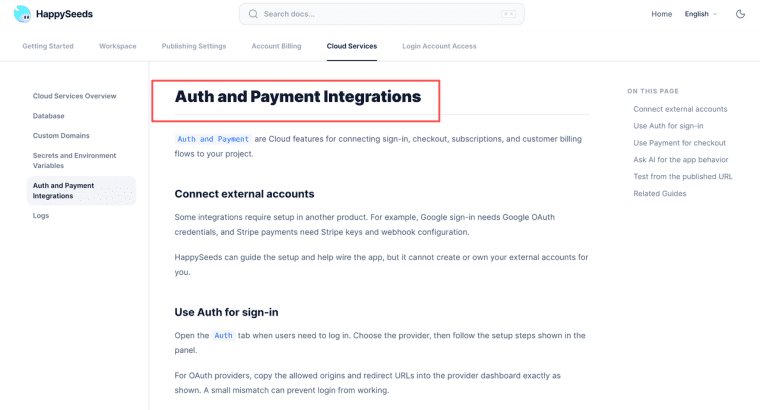
For example, a consultant might test whether clients will actually use a structured intake and status view before buying a heavier portal suite. At that stage, the relevant layer is not a generic homepage claim but the ability to create database-backed app records for saved client information and combine that with auth and payment flows for sign-in, checkout, subscriptions, and customer states. It is a validation path, not a claim that HappySeeds replaces mature client portal suites out of the box.
Limits and Trade-Offs
Client portals concentrate trust. They hold client files, messages, requests, payments, approvals, and sometimes sensitive business records. Before launch, verify privacy terms, access controls, retention policies, export options, backup expectations, support response paths, and any industry-specific obligations.
Terms of use, accessibility testing, records management, and service-level commitments require local review. This article is general product guidance, not legal, compliance, procurement, or audit advice. For regulated industries or contractual service promises, confirm the portal setup with qualified professionals before using it with clients.
Choose the Portal That Clients Will Actually Use
The best client portal is the one that reduces follow-up without hiding responsibility. Pick the path that matches your real service rhythm: dedicated suite, workflow-led portal, custom no-code interface, or a narrow custom build. Then test it with one client, one file request, one approval, one payment state, and one support question before rolling it out to everyone.
Explore More Topics:
FAQ
Does a client portal need separate terms of use?
Often, yes. A client portal can create behaviors that a standard service agreement does not cover, such as file uploads, account access, message records, payment actions, user responsibilities, and acceptable use. The exact wording depends on the business model, jurisdiction, and client contract.
Can a portal be sold as a paid service add-on?
It can, if the portal creates a clear extra benefit: faster turnaround, organized files, premium reporting, self-service access, or better visibility. The offer should explain what clients receive and what remains part of the core service.
Who is responsible for client-portal accessibility testing?
The business offering the portal should assume responsibility for verifying accessibility before relying on it for client delivery. Vendors may provide product information, but the actual client experience includes configuration, content, files, colors, forms, and workflows.
Can the files and messages in a client portal be used as formal work records?
Not by default. A portal keeps useful history of files, comments, and approvals, but formal records usually need clear retention rules, legal holds, controlled deletion, and reliable export. Use the portal as a working record, then check whether it meets your actual compliance needs.
Should the portal show response times or delivery commitments?
Only if you can reliably keep them. Showing reply windows or turnaround times creates client expectations. If those promises already appear in the contract and your team can monitor them, displaying them can help. If not, leave them out to avoid unnecessary pressure.