An avatar can deliver a clean hook while holding a bottle that quietly changes size between shots. That is the awkward bit hidden by polished demos: presenter realism is only half the buying decision. The rest is whether the tool can preserve the product, claims, voice, and approval trail long enough to make an ad you can run.
This guide is about choosing the generator, not making an ad from scratch. It compares inputs, reveals failure tests, and the cost of reaching an approved output.
What Does an AI UGC Video Generator Actually Produce?
An AI UGC video generator creates ads in the visual language of creator-made content: direct-to-camera delivery, casual framing, demonstrations, captions, and a call to action. The presenter may be fictional, licensed from a stock library, or based on a consenting real person.
That is not genuine user-generated content. A synthetic presenter has not bought the product or formed an opinion. Presenting the result as a real customer review would turn a format choice into a misleading claim. In the United States, current FTC guidance treats testimonials as messages that appear to reflect someone's real experience. Other markets may apply different rules.
Tool menus are not especially tidy. AI video ad generation may sit beside labels such as Gen UGC, product avatar, or creator ad. Ignore the label. What matters is whether the system accepts your source material and returns scenes you can inspect, edit, and license. A glossy sample is not evidence that your awkward packaging, approved script, or regional offer will survive the same workflow.
Choose the Starting Input That Fits Your Workflow
Product URL or Store Listing
URL-first tools remove the blank page by pulling product details into a draft. This route fits an accurate catalog with repeatable offers.
The risk is silent invention. A listing may contain old pricing, customer-review language, unavailable colors, or qualified benefits. Before buying credits, try one awkward SKU: a bundle, a multi-variant product, or an item with precise instructions. Check which facts were imported and which were improvised.
URL-first suits fast intake more than fine scene control. It will not rescue a messy listing. It will simply make the mess speak on camera.
Script or Creative Brief
Script-first tools provide more control over claims, sequence, and tone. They suit precise wording, a specific promotion, or pre-approved copy.
Ask what the system changes after upload. Can a reviewer lock a sentence? Can one hook change without regenerating the demonstration? An AI tool to make UGC-style product videos should not require a full rebuild because somebody replaced six words in the CTA.
Product Image, Existing Footage, or Reference Ad
Image-first workflows fit products without filmed demonstrations. Existing footage is safer when physical use is hard to synthesize. A reference ad may guide pacing, but it does not grant permission to reproduce another creator's identity or execution.
For UGC video ads, AI works best when it fills a defined gap. Generate the presenter or voice, but preserve verified footage when product accuracy matters more than novelty.
Evaluate the Presenter and Product Presentation
Stock Presenters, Custom Avatars, and Faceless Formats
Stock presenters are quick to audition, but permitted uses vary. Custom avatars add continuity plus consent and offboarding questions. Faceless formats avoid likeness management and suit screen recordings, packaging close-ups, or hands-only demos.
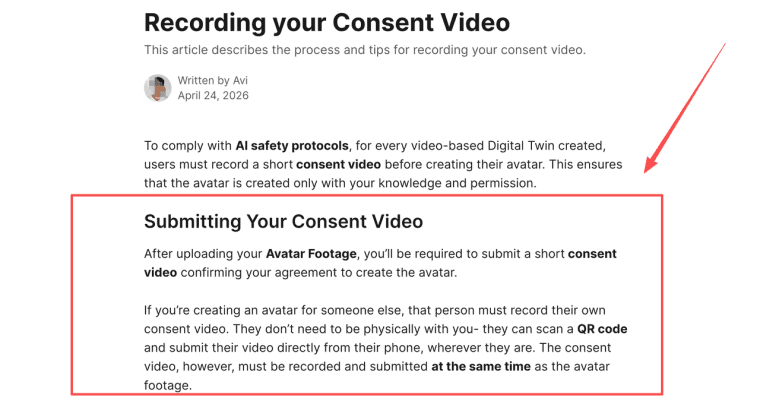
Do not treat a presenter library as permanent. Ask what happens if an avatar is withdrawn or a campaign needs revision later. For a real-person avatar, consent matters too. HeyGen requires a separate consent recording for each video-based Digital Twin, including when someone else is represented.
Product-in-Hand, Demonstration, and Interface Accuracy
Product-in-hand is where attractive previews become expensive. A tool may accept a product image, presenter, voice, and script, yet still lose the label, dimensions, or usage sequence once the product begins moving. The buyer's question is not whether the feature appears in a demo. It is whether the output survives inspection.
Use a five-frame check:
| Frame | What to inspect |
| First clear view | Correct packaging, color, logo, and variant |
| First hand contact | Plausible grip, scale, fingers, and shadows |
| Demonstration | Correct opening, application, or interface behavior |
| Claim moment | Visual evidence does not contradict the spoken line |
| Final shot | Product, price, offer, and CTA remain consistent |
A skincare tube should not become a pump bottle halfway through. Tiny errors stop being tiny when they become product evidence.
Build and Review Useful Ad Variants
Hooks, Scripts, Claims, and Calls to Action
Useful variation changes one decision at a time. Keep the demonstration and offer fixed, then compare three openings. Change everything together and the result teaches you almost nothing.
Give each variant an export-safe name, such as hook-problem_v2_offer-a. It is boring. So is explaining why the wrong file went live.
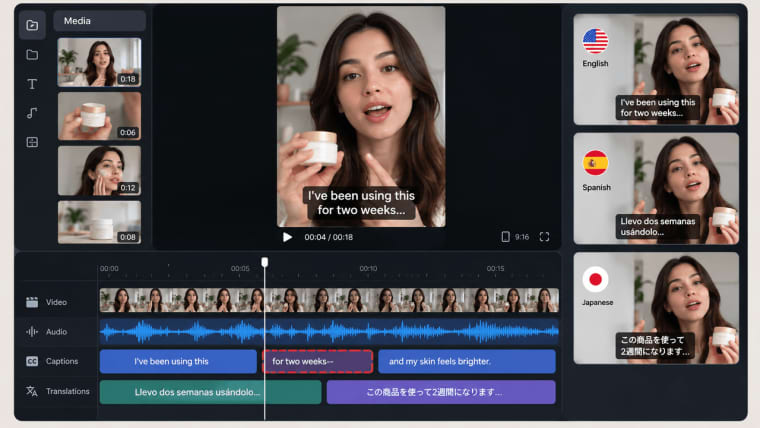
Voice, Accent, Lip-Sync, Captions, and Localization
Listen before watching. Mispronounced names, strange pauses, and drifting accents are easier to catch without visuals. Then watch silently for lip-sync, captions, line breaks, and safe-area problems.
Localization needs a native reviewer, not only translated captions. The words may be correct while the claim, tone, or CTA still feels wrong. AI UGC video ads can scale versions; approval still belongs to someone who understands the audience.
Scene Control, Review, and Regeneration
Before choosing a tool, deliberately break one scene. Change the price, replace a product shot, and shorten the hook. Check what regenerates, what stays locked, and whether prior approvals survive.
That is the line between a fun generator and a production tool. Without version history, fixing one scene can erase yesterday's approved detail elsewhere.
Check Output Quality and Ad-Platform Fit
Download a sample before judging quality. Inspect resolution, watermark, aspect ratio, captions, audio loudness, file format, and whether the export is editable or flattened. Test the platform crop too; a good-looking 9:16 caption may sit under interface controls after publication.
Too much polish can also hurt when every pause and gesture feels mechanical. The goal is not fake imperfection. It is a believable rhythm that keeps the product clear and does not misrepresent a person.
Verify Likeness Rights, Disclosure, and Commercial Use
Commercial use is not one checkbox. It may depend on the plan, presenter, voice, source image, territory, and paid-media status. Synthesia currently prohibits paid promotion with its stock and synthetic avatars while treating custom avatars under the agreement with the represented person.
Disclosure rules vary by channel. TikTok requires labels for certain realistic AI-generated media, while Meta applies AI information labels to qualifying ads created or significantly edited with generative AI. Check the destination platform and generator terms before launch.
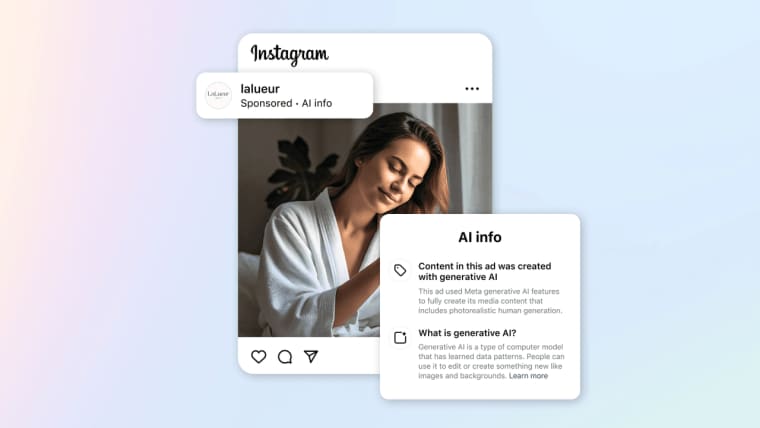
Keep presenter authorization, source rights, approved scripts, exports, disclosure decisions, and the terms used at publication. This is operational evidence, not legal certainty; review material questions against current contracts, platform policies, and qualified advice.
Compare Pricing and Cost per Usable Ad
Monthly price is a weak comparison because credits disappear at different points. Tools may charge for previews, duration, premium presenters, voice cloning, regeneration, or higher-resolution exports. Calculate:
Cost per usable ad = subscription and credit spend/outputs approved for use
If a plan funds 20 generations but only five pass review, the practical output is five ads, not 20. Add reviewer time and outside editing separately. Test one typical and one difficult product before committing annually.
Choose Between URL-First, Script-First, and Avatar-First Tools
| Route | Best fit | Main buying test | Likely weak point |
| URL-first | Large catalogs and fast offer drafts | Import an awkward SKU and audit every extracted fact | Old or invented product claims |
| Script-first | Approved messaging and controlled campaigns | Change one line without rebuilding the ad | Limited visual spontaneity |
| Avatar-first | Recurring presenter-led campaigns | Check consent, replacement, voice, and paid-use rights | Presenter dependency |
A UGC AI video generator is worth keeping when it matches the team's source material and review habits. A polished avatar cannot compensate for expensive corrections.
Where HappySeeds Fits a Reference-Led UGC Workflow
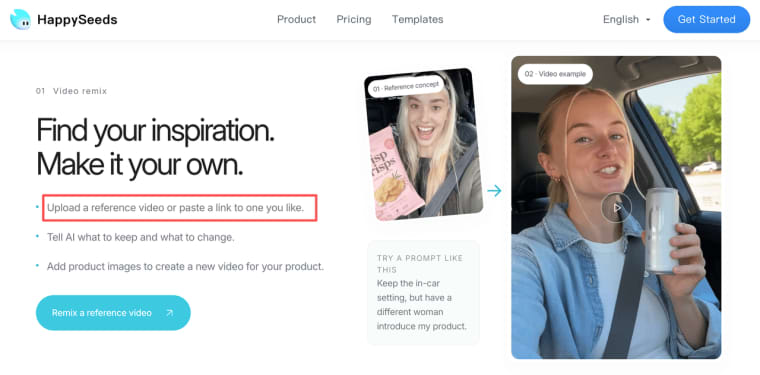
HappySeeds is most relevant to this comparison when a brand already has a UGC-style reference and wants to reinterpret it around its own product. That is different from an avatar-first generator, where the main decision is choosing or training a presenter.
A team can upload a reference video or paste a link, identify the parts worth keeping, and describe what should change. That might mean retaining the opening hook and quick shot rhythm while replacing the setting, speaker, script, and featured product. Product images can then be added so the new version is built around the brand's own assets rather than simply copying the original creative.
The reference-to-video workflow inside HappySeeds is a practical fit for synthetic product reviews, creator-style demonstrations, and social ads inspired by an existing format. After generation, the team can revise scenes, voiceover, captions, music, brand colors, aspect ratio, and basic timing. Voiceover and captions should still be reviewed separately, and complex editing may require another tool.
There is an important boundary here. A synthetic presenter is not a real customer, and a generated product review should never be framed as genuine buyer testimony. Hands, packaging, product interaction, spoken claims, lip-sync, and likeness rights all need human review. Current HappySeeds materials also do not establish it as a dedicated custom-avatar platform, so buyers who need precise avatar control or long presenter continuity should verify those requirements separately.
In short, HappySeeds may fit a reference-led UGC workflow. It should not automatically be treated as interchangeable with every avatar-first AI UGC video generator.
Choose the Workflow That Produces Reviewable Ads
The best generator is not the one with the most convincing demo presenter. It starts from material your team controls, keeps the product accurate, and makes corrections affordable. Run the same difficult product through your shortlist and count only the ads you would genuinely publish. That number is more honest than the credit balance.
Explore More Topics:
FAQ
How should a team respond when a live presenter is removed?
Pause new production, list every active ad using that presenter, and check whether existing publication rights continue. Preserve approvals and the license version, then replace creative where required. Approve a backup presenter before a high-volume campaign begins.
Can a brand preserve approval comments after changing its product name?
Yes, but keep old comments attached to the reviewed version. Create a revision for the renamed product and record changed copy, packaging, domains, and legal references. Do not overwrite the earlier approval trail.
What happens to viewer comments when an AI UGC ad is replaced?
Comments usually remain with the original post or ad object, not the replacement file. Choose whether to edit, duplicate, pause, or relaunch within the platform's controls. Archive material feedback first, especially reports about misleading scenes or claims.
Can an agency transfer the editable project to its client?
Only if the tool supports transfer and the contract covers source assets, avatars, voices, licenses, and remaining credits. Confirm this before production; a downloadable MP4 is not an editable project.
What should a brand retain if a platform challenges the ad?
Keep the submitted ad, source assets, approved script, claim evidence, presenter consent, licensing terms, disclosure record, export date, and revision history. Retention duties depend on the platform, contract, and applicable rules.