
GPT-5.6 pricing is not just an API line item. For an AI app founder, it becomes task cost, credit design, margin, usage limits, support policy, and sometimes the difference between a profitable workflow and a very shiny loss machine.
Elin here. I checked OpenAI's live pricing page on July 10, 2026. OpenAI currently lists GPT-5.6 Sol, Terra, and Luna with separate rates for input, cached input, cache writes, output, short-context and long-context usage, plus Standard, Batch, Flex, and Priority processing where available.
Treat every number in this article as current only as of July 10, 2026. Before launch, verify the live page where OpenAI lists current model rates by processing mode.
Read the Official GPT-5.6 Pricing Structure
Do not start by asking which model is "best." Start by reading the price shape. For standard short-context pricing, OpenAI currently lists GPT-5.6 Sol at $5 input and $30 output per 1M tokens, Terra at $2.50 input and $15 output, and Luna at $1 input and $6 output. Builders sometimes chain Gumloop and Codex for agent steps. Cached input is lower, cache writes have their own cost, and long context, Batch, Flex, and Priority processing can change the math quickly.
That is the part founders miss. The model price is not one number. It is a pricing system.
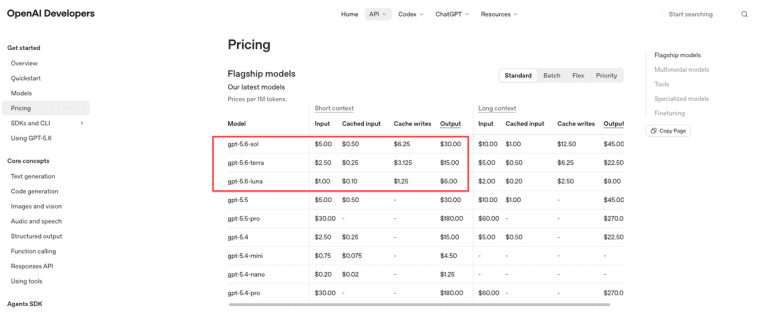
Separate model tiers, input, cached input, output, and available processing modes
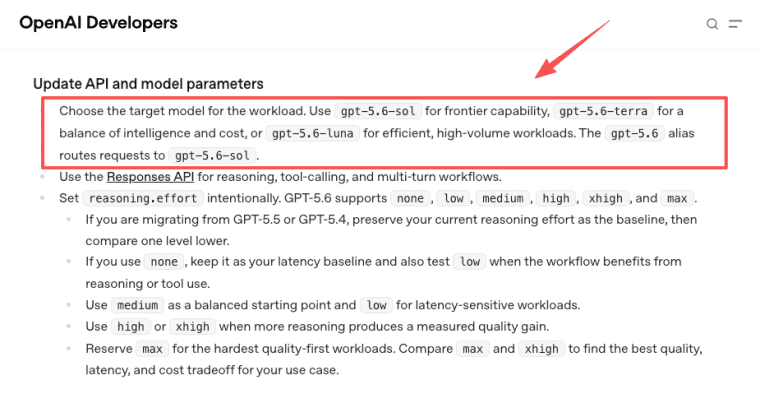
Sol, Terra, and Luna should map to different jobs. Sol may belong in expensive review, coding, or high-value reasoning tasks. Terra may fit default workflows. Luna may fit lightweight routing, drafts, and high-volume checks.
The founder's mistake is using one tier everywhere. A GPT-5.6 API app should route by task value, not by model excitement. A $0.20 customer task and a $20 customer task should not automatically use the same model path.
Translate Token Rates into Task-Level Cost
Token rates are raw materials. They do not tell you whether a feature makes money. A useful cost model starts with representative tasks. Pick real prompts, real user files, real output lengths, and real retry behavior. Then estimate cost per completed job, not the cost per single call.
Representative prompts, reasoning, tool calls, long context, retries, and output size
A task-level estimate should include input tokens, cached prompt share, cache-write cost, output size, tool calls, reasoning depth, long-context usage, retries, and failed generations. If the app uses web search, file search, code execution, or hosted tools, it includes those costs too. OpenAI's pricing page notes that tokens used with built-in tools are billed at the chosen model's token rates, while some tools and containers can also have separate pricing.
Build three scenarios: normal, heavy, and messy. The messy case matters. Users paste long files, ask follow-ups, hit errors, and regenerate. That is where model cost surprises founders.
Convert Internal Cost into Customer Credits
Credits are translations. They turn variable model cost into something customers can understand. Do not expose raw tokens unless your audience is technical and expects them. Most users understand "1 report," "5 reviews," "20 generations," or "100 credits" better than input and output tokens.
Cost units, customer-facing credits, margin buffers, and measurable task boundaries
Start with an internal unit, such as cost per completed report, analysis, agent run, or generated workflow. Then convert that into AI app credits with a margin buffer.
For example, if a task normally costs $0.18 but messy cases reach $0.45, do not price credits as if every task costs $0.18. Add room for retries, support, refunds, failed runs, cache misses, and model routing changes.
The task boundary must be measurable. A "chat" is vague. A "contract summary up to 20 pages" is easier to meter. A "campaign review with 3 outputs" is easier to price. Clear boundaries make AI app pricing feel fair.
Set Cost Controls Before Launch
Cost controls should exist before the first paid user arrives. A founder does not need enterprise billing on day one, but the app should know when a job is getting expensive, when a user is retrying too often, and when a workspace is burning credits faster than expected.
Usage caps, job previews, retry limits, routing rules, and per-workspace monitoring
Use job previews when possible. Tell users a task may consume more credits if it uses long files, deep reasoning, high-output mode, or Priority processing.
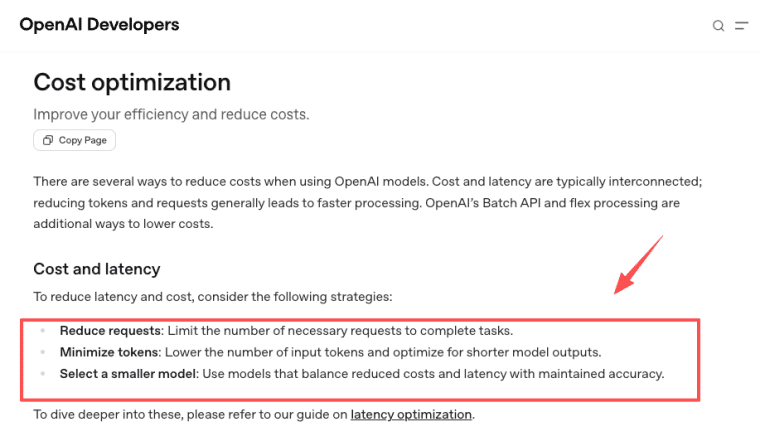
Set retry limits. Hidden retries can destroy margins. Add routing rules so lightweight tasks use Luna, default work uses Terra, and high-value tasks use Sol only when needed. OpenAI's cost optimization is useful here because reducing requests, minimizing tokens, selecting smaller models, Batch API, and Flex processing can all affect spend.
Caching also deserves its own line in the spreadsheet. OpenAI's prompt caching guide explains that cache hits depend on reusable prompt prefixes, and GPT-5.6 models introduce cache-write pricing. In plain founder English: do not assume every input gets the cached rate.
Per-workspace monitoring matters for teams. One heavy user should not quietly drain the whole account unless that is the plan. Clear usage limits protect both the customer and the founder.
Choose a Paid Plan Structure
A good paid plan makes cost feel predictable without hiding usage reality. The simplest structure is credits plus plan limits. The plan buys access, saved work, seats, support, and included credits. Extra usage can be sold as bundles.
Credit bundles, subscriptions, team allowances, and separately priced high-cost jobs
Credit bundles work well for variable tasks. Subscriptions work well when users return monthly. Team allowances work when multiple users share a workspace. High-cost jobs should be priced separately if they use long context, Sol, Priority processing, or heavy tool calls.
Avoid unlimited plans unless you have strong controls. Unlimited sounds friendly. It often becomes a margin problem.
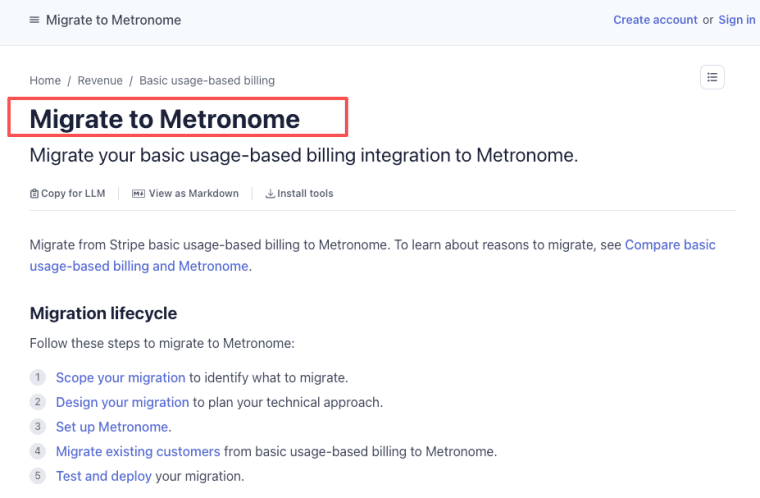
For metered SaaS billing, Stripe's usage-based billing and related Metronome migration documentation are useful references for metered usage, prepaid credits, credit balances, usage visibility, and invoicing workflows. Stripe Tax documentation can also help founders understand tax calculation workflows, but invoice language, VAT, GST, currency, and recordkeeping should still be checked with a qualified professional.
Risks and Trade-Offs
Pricing can look clean in a spreadsheet and still fail in production. The danger is variance. Two users may buy the same task and create very different costs because one uses short clean input and the other uploads a long messy file.
Caching assumptions, task variance, hidden retries, output quality changes, and support burden
Caching helps only when prompts and context repeat in a cache-friendly way. Do not assume every input gets the cached rate.
Task variance is normal. Long context changes cost. Output length changes cost. Hidden retries change cost. Tool calls change cost. Model quality changes can also change support burden. If a model update makes outputs longer, slower, safer, or more cautious, your credit model may need adjustment.
Support time belongs in margin too. A refund dispute, failed job, confusing invoice, or angry customer email is not "free." It is part of the cost of selling the workflow.
Price the Workflow, Not the Model
GPT-5.6 API pricing only becomes useful when you translate it into real app behavior: tasks completed, credits consumed, retries handled, and margins protected. Start with representative workflows, add buffers for messy usage, and make customer credits easy to understand. The goal is not to expose every token cost. The goal is to build an AI app pricing model that users can trust and that your business can survive.
Explore More Topics:
FAQ
Can one legal entity receive invoices for multiple workspaces?
Yes, but the billing model should separate legal payer, workspace owner, and end users. One company may want a single invoice while departments use separate workspaces. The app should support workspace-level usage reports so finance can allocate spend interna
Should invoices separate model charges from platform service fees?
For business customers, separating model usage from platform service fees can improve trust. It can also create confusion if customers expect pass-through pricing. A practical structure is to show plan fee, included credits, overage credits, and premium jobs separately, while explaining that credits include infrastructure, support, monitoring, and model routing.
How should international invoices display taxes and currency conversion?
Tax, VAT, GST, currency conversion, and invoice fields vary by jurisdiction, customer type, and transaction structure. This article is not tax or legal advice. Before selling internationally, have a qualified professional verify invoice language, tax collection, currency display, and recordkeeping rules.
What billing records do enterprise procurement teams usually request?
Procurement teams often ask for invoices, usage reports, contract terms, tax records, workspace-level activity, purchase orders, and sometimes data-processing documents. If enterprise customers are likely, design exports early instead of reconstructing billing history later.
When should customer terms reflect a renamed model tier?
Update customer terms when a model rename changes pricing, capabilities, availability, support expectations, or customer-facing plan promises. If "Sol," "Terra," or "Luna" appears in plan terms, invoices, or service descriptions, keep a versioned note explaining what changed and when.


