Replit describes Replit Free Mode as a new Agent mode for everyday no-credit Agent work inside eligible paid plans. The important distinction is simple: Free Mode is not the same thing as Replit's free Starter plan. It is a mode available to Core and Pro subscribers, while Starter has separate daily Agent credits and a lighter build path.
Replit announced Free Mode in its August 2026 Agent pricing update. The practical value for non-technical builders is lower-friction exploration, not unlimited production work.
What Replit Free Mode Is
A Replit Agent mode for eligible paid plans, not the Starter plan
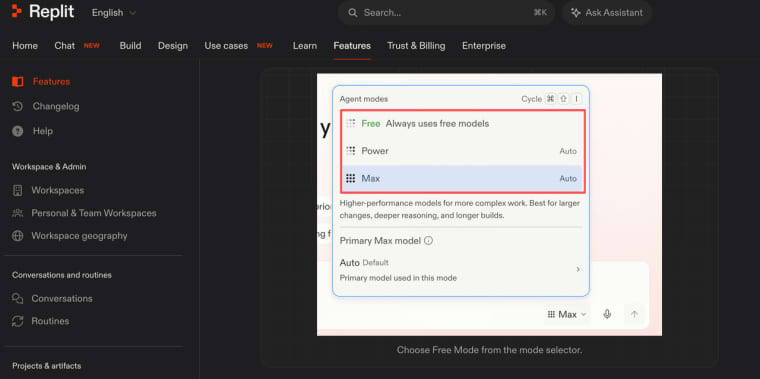
Replit Free Mode is part of the Replit Agent modes system, alongside Power Mode and Max Mode. The current mode materials define Free Mode, Power Mode, Max Mode, model routing, shared-project settings, and usage checks.
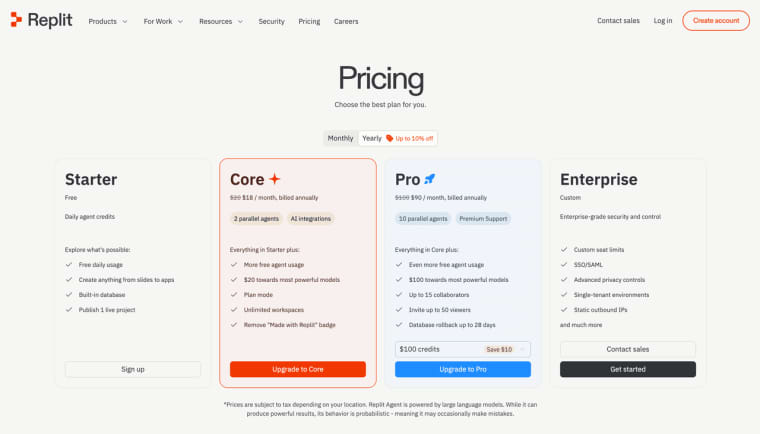
For Replit Core and Pro users, Free Mode is designed for starting work without spending credits on everyday Agent activity within the allowance. For Starter users, the pricing table still describes daily Agent credits, not Free Mode access. That difference matters because a founder comparing Replit Free Mode limits should not assume "free plan" and "Free Mode" mean the same thing.
How No-Cost Everyday Agent Work Functions
Allowances, reset timing, Auto model routing, and paid-action confirmation
Free Mode always uses Auto routing. That means the user does not manually pick a model inside Free Mode; manual model selection belongs to Power Mode or Max Mode where available. The allowance is plan-based, and Replit shows the remaining Free Mode usage and reset timing in Settings.
Replit's launch announcement describes Core and Pro access, usage limits that reset every 5 hours, and the official "30X more" claim for Core users. Treat that as Replit's own positioning, not a personal budget guarantee.
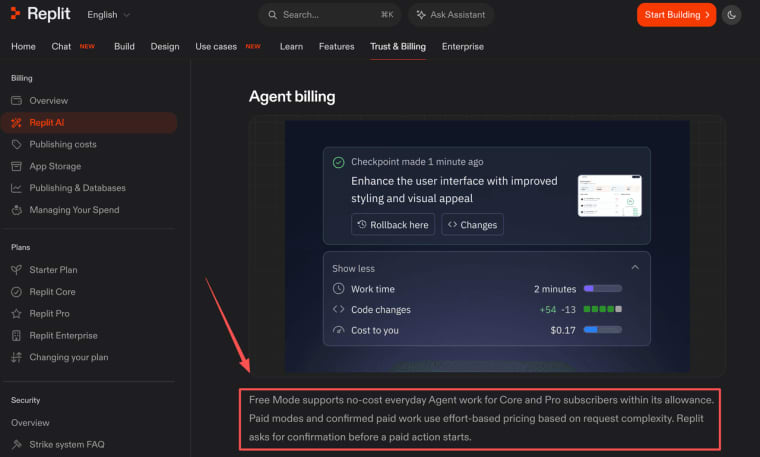
The billing boundary is also important. Replit's AI billing materials explain that Free Mode supports no-cost everyday Agent work within allowance, while paid modes and confirmed paid work use effort-based pricing. Replit also states that paid actions require confirmation before they start. That paid-action confirmation and effort-based pricing boundary is the part builders should understand before moving from exploration to serious app work.
What Free Mode Is Designed to Handle
Exploring ideas, learning Replit, starting projects, and everyday tasks
Free Mode is best understood as an exploration and everyday-work mode. It can help a founder explore ideas, learn Replit, start a project, ask questions, and shape early app direction without watching every prompt as a credit event.
That is useful for early product thinking. A non-technical founder can test whether an idea deserves more work, sketch a feature, revise a page, or understand a codebase. It is not a promise that every feature, integration, or production-grade change will stay at no cost.
When Replit May Suggest Power or Max Mode
More complex, higher-value, or production-grade work
As the task becomes more complex, Replit may suggest Power Mode or Max Mode. Power Mode is positioned for cost-conscious everyday builds. Max Mode is positioned for more capable work, larger codebases, complex features, and production-grade projects.
That means Replit Agent Free Mode is not a substitute for budgeting. If the project moves from "explore this app idea" to "build a full payment flow, database, authentication, and launch-ready product," the work may belong in a paid mode. Plan details, included credits, and current prices should be checked against Starter, Core, Pro, and Enterprise plan information before purchase.
What Free Mode Changes for Non-Technical Builders
Lower-friction exploration does not remove product validation or launch decisions
Free Mode may make it easier to start. It does not validate demand, choose pricing, handle customer support, or decide whether an app should launch. Builders still need to define the user, input, output, payment model, data rules, and maintenance plan.
This is where Replit and HappySeeds represent different product paths rather than equivalent tools. Replit Free Mode may reduce friction inside a coding-oriented Agent workspace. HappySeeds is closer to a planning-first route for non-technical builders who want to shape the app flow before owning the code path; its guide on how teams can build and ship an app with a reviewed agent workflow gives a useful contrast. The choice depends on the workflow, not the hype around no-credit Agent work.
Use Free Mode as a Starting Lane
Replit Free Mode can make everyday Agent exploration feel less constrained for Core and Pro users, but it should be treated as a starting lane, not a full launch budget. Use it to learn, shape, and begin. When the work becomes complex, customer-facing, or production-grade, confirm the mode, cost, plan limits, and product responsibilities before going further.
Explore More Topics:
FAQ
Can workspace admins see which Agent mode a collaborator used?
Mode settings are user-specific in shared projects. Teams should verify current admin visibility inside their workspace before relying on mode history for billing review or governance.
Does Replit keep a mode record with each project change?
The public materials reviewed here do not establish a universal mode-level audit record for every project change. Teams should document important Agent runs, checkpoints, reviewers, and cost-sensitive actions separately.
Can agencies separate Free Mode activity across client workspaces?
Agencies should not assume Free Mode allowance automatically creates clean client separation. Use separate workspaces, billing records, project notes, and permissions where client boundaries matter.
What data-handling terms apply to Free Mode conversations?
Free Mode conversations still occur inside Replit's product environment, so teams should review Replit's current privacy, commercial, and workspace terms before entering client data, regulated data, or confidential material.
What should a team document before a Free Mode allowance resets?
Record the project, goal, prompts that changed scope, accepted outputs, unresolved issues, and any point where the work should move to Power or Max Mode. That makes the next session easier to review.