
How to Start Using Codex in 3 Steps
Install one supported surface first: the ChatGPT desktop app, Codex CLI, or the Codex IDE extension. Then:
- Open Codex and sign in. Use the ChatGPT account flow shown by the surface you installed.
- Open one project. Select the repository root so Codex can read the right instructions, files, and test commands.
- Give it a reviewable task. Start with one file or one visible behavior, then request the changed files and test result.
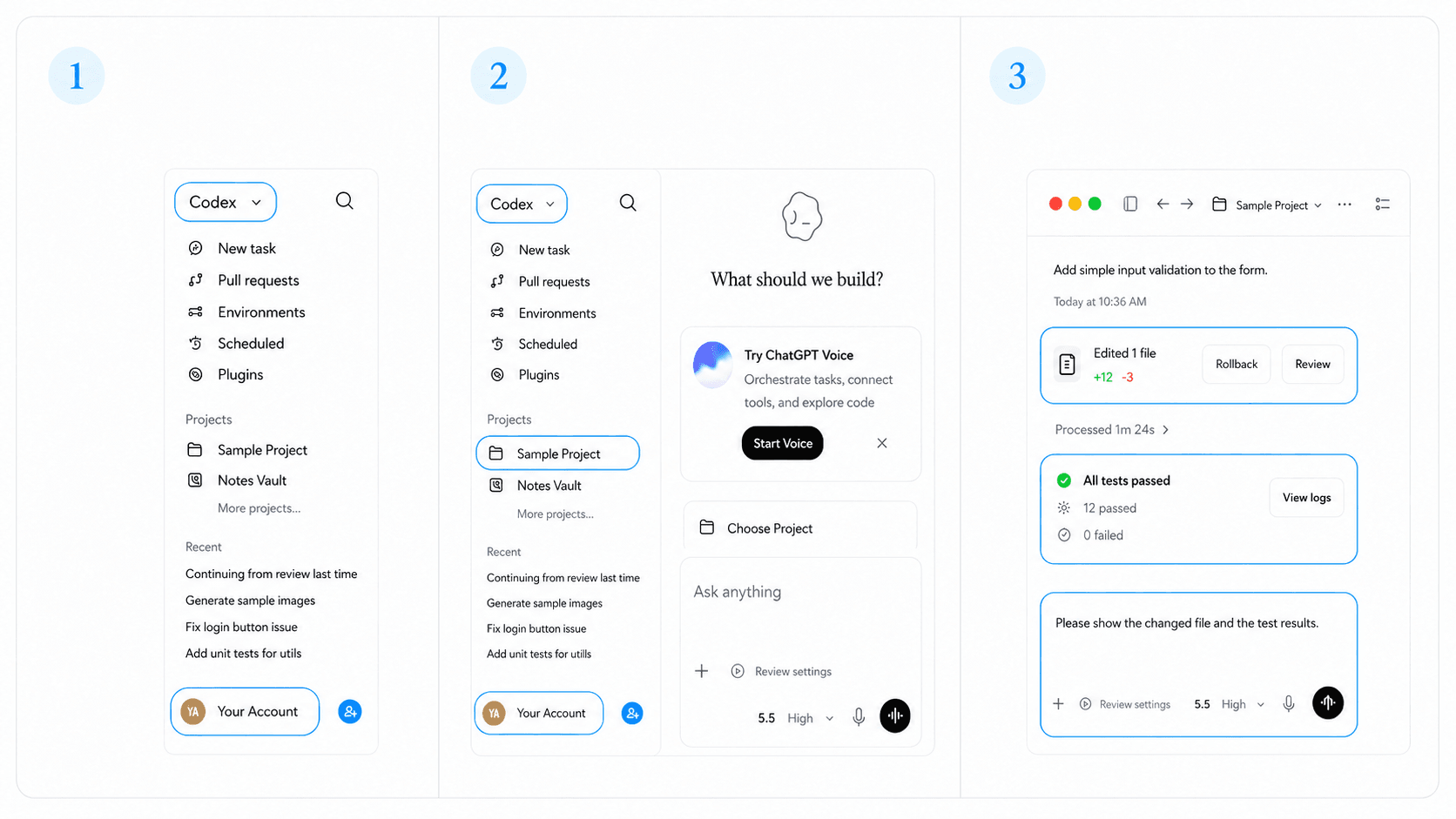
For example:
Add polite status feedback to the verification button.
Keep the existing button behavior.
Add one focused test and return the changed files, command, result, and skipped checks.
Verified first-task result: In the local HappySeeds evidence project, Codex changed index.html, added html.test.js, and returned 2 passing tests, 0 failures, and 0 skipped checks on macOS 14.8.7 with Codex CLI 0.146.0-alpha.3.1.
Choose the Right Codex Surface
Choose the surface that matches the work: the ChatGPT desktop app for projects and long-running work, the Codex CLI for terminal workflows, the Codex IDE extension beside your editor, or Codex cloud for delegated work in an isolated environment.
| Surface | Use it when | Context to provide |
|---|---|---|
| ChatGPT desktop app | Coordinate longer tasks, review changes, or use worktrees | Project, goal, constraints, and checks |
| Codex CLI | Work with commands, logs, and file paths in one terminal loop | Exact paths and commands |
| Codex IDE extension | Keep Codex close to the files you are editing | Open files and selected code |
| Codex cloud | Delegate a bounded repository task remotely | Repository, setup, deliverables, and tests |
Open a Project and Add AGENTS.md
Open the repository at its root, then add AGENTS.md for durable rules. Add more specific instructions in nested directories when a subfolder needs different rules.
AGENTS.md
Project rules:
- Use TypeScript for new application code.
- Keep existing API response fields backward compatible.
- Run `npm test` and `npm run lint` before handing off.
- For UI changes, verify the affected route on desktop and mobile.
Keep stable rules here. Put the task outcome, files, and acceptance criteria in the prompt.
Give Codex Its First Reviewable Task
Give Codex one outcome with a clear definition of "finished":
- Define one user-visible result.
- Point to the files, routes, or reproduction steps in scope.
- Preserve contracts that must not change.
- Request the smallest relevant tests and visual checks.
- Review the diff and results before starting the next task.
For example: “Add a regression test for the saved-settings bug in settings.ts. Run the relevant test suite and return the changed files and result.”
Review Changes, Run Tests, and Verify the App
Review the diff before accepting the task. Run the smallest relevant test, then open the changed route and reproduce the expected behavior.
Confirm the diff matches the requested scope, run the relevant checks, reproduce the acceptance scenario, inspect affected interface states, and record anything skipped.
Use Codex Integrations
Use this page as the hub for the rest of the cluster. Choose the guide that matches the layer you need to control:
| Goal | Guide |
|---|---|
| Evaluate the OpenCodex community fork | OpenCodex |
| Work inside an editor | Cursor, VS Code, or Windsurf |
| Coordinate coding agents | Codex with Claude Code |
| Retrieve current documentation | Context7 |
| Test a browser journey | Browserbase |
| Work with data or automation | PlanetScale or Gumloop |
| Add authentication | WorkOS or Kinde |
| Maintain product documentation | Mintlify |
| Build retrieval and RAG | Milvus or R2R |
| Prepare a self-hosted deployment | Dokploy |
Codex vs HappySeeds: Which Workflow Fits?
Codex and HappySeeds serve different builders. Codex fits repository-level work where someone can review code, commands, and tests. HappySeeds gives non-technical commercial builders a planning-first route from an app idea to a publishable project where supported.
| Stage | Action |
|---|---|
| Define | State the target user, main action, data, and acceptance criteria. |
| Plan | Use the HappySeeds quick start or an app template to define the flow. |
| Execute | Convert each criterion into a bounded Codex task when code must change. |
| Verify | Review diffs, run tests, and inspect the live route. |
| Launch | Follow an idea-to-launch workflow for publishing, feedback, and iteration. |
Choose Codex for repository-level control. Use the Codex and app-builder comparison when the goal is a commercial app without managing the engineering stack, or open HappySeeds when the product flow should come first.
Tested setup: HappySeeds Editorial Team; last reviewed July 30, 2026; macOS 14.8.7; Codex CLI 0.146.0-alpha.3.1; VS Code extension 26.721.41059; Cursor extension 26.721.30844.
FAQ
Codex accepts plain-language tasks, but someone still needs to review the code and behavior. Start with small outcomes.
Use the Codex IDE extension for open-file context, Codex CLI for a terminal loop, the ChatGPT desktop app for longer coordinated work, and Codex cloud for bounded remote work.
No. Use it when repository rules repeat. Keep one-off instructions in the task prompt.
Yes. Use Codex for repository-level code changes and HappySeeds for app planning and publishing. Review the Codex and AI app builder comparison before choosing the main build path.
Launch with HappySeeds
Built the app but not the business? Start with HappySeeds to launch a live, monetizable AI app, or browse AI app templates to see what you can sell.