
Why Auth Code Is a Risky Thing to Hand-Write
Authentication crosses browser redirects, server sessions, identity claims, logout, and authorization. A page that appears to sign in can still mishandle a callback or grant the wrong organization access. Use the provider's supported SDK and treat generated code as a draft for review.
How WorkOS Handles the Hard Parts
WorkOS AuthKit provides hosted authentication components and SDK guidance. The CLI installer can help configure supported projects. These tools reduce boilerplate, but application authorization still belongs in your code.
For another framework-led identity path, compare the Kinde integration guide. When authentication data affects the database, review the PlanetScale permission workflow.
Scaffolding Auth Flows With Codex
For a concrete Next.js App Router example, start from the official AuthKit Next.js SDK or run the documented installer:
The WorkOS installer requires Node.js 20 or later. Confirm the repository runtime before running the command.
npx workos@latest installReview the generated diff. A successful Next.js installation should add the AuthKit package, a callback route, the provider or proxy layer required by the detected version, environment-variable names, and a successful build check. If framework detection fails, use npx workos@latest install --integration nextjs; use git diff before accepting the generated files.
For the Next.js AuthKit SDK, use the documented variable names in .env.local:
WORKOS_CLIENT_ID="client_..."
WORKOS_API_KEY="sk_test_..."
WORKOS_COOKIE_PASSWORD="REPLACE_WITH_AT_LEAST_32_CHARACTERS"
NEXT_PUBLIC_WORKOS_REDIRECT_URI="http://localhost:3000/callback"
WORKOS_CLIENT_ID identifies the WorkOS application. WORKOS_API_KEY authorizes server-side WorkOS API calls and must not enter the browser bundle. WORKOS_COOKIE_PASSWORD encrypts the AuthKit session cookie, must remain server-side, and must contain at least 32 characters. NEXT_PUBLIC_WORKOS_REDIRECT_URI is callback configuration rather than a secret, and it must match the redirect URI configured in the WorkOS dashboard.
Then:
- Confirm the repository uses Next.js App Router, or choose the official guide for its actual framework.
- Configure development callback and logout URLs.
- Keep
WORKOS_API_KEYandWORKOS_COOKIE_PASSWORDon the server. - Ask Codex to scaffold the documented flow.
- Test login, logout, expiry, and denied access.
Start with: "Read the current auth routes and compare them with the WorkOS AuthKit guide for this framework. Return the plan before editing files."
Then: "Scaffold AuthKit using server-side environment variables. Keep the existing user table unchanged and show the diff."
For a testable handoff: "Return: callback route, logout route, required environment variable names, tests run, and authorization decisions still owned by the app."
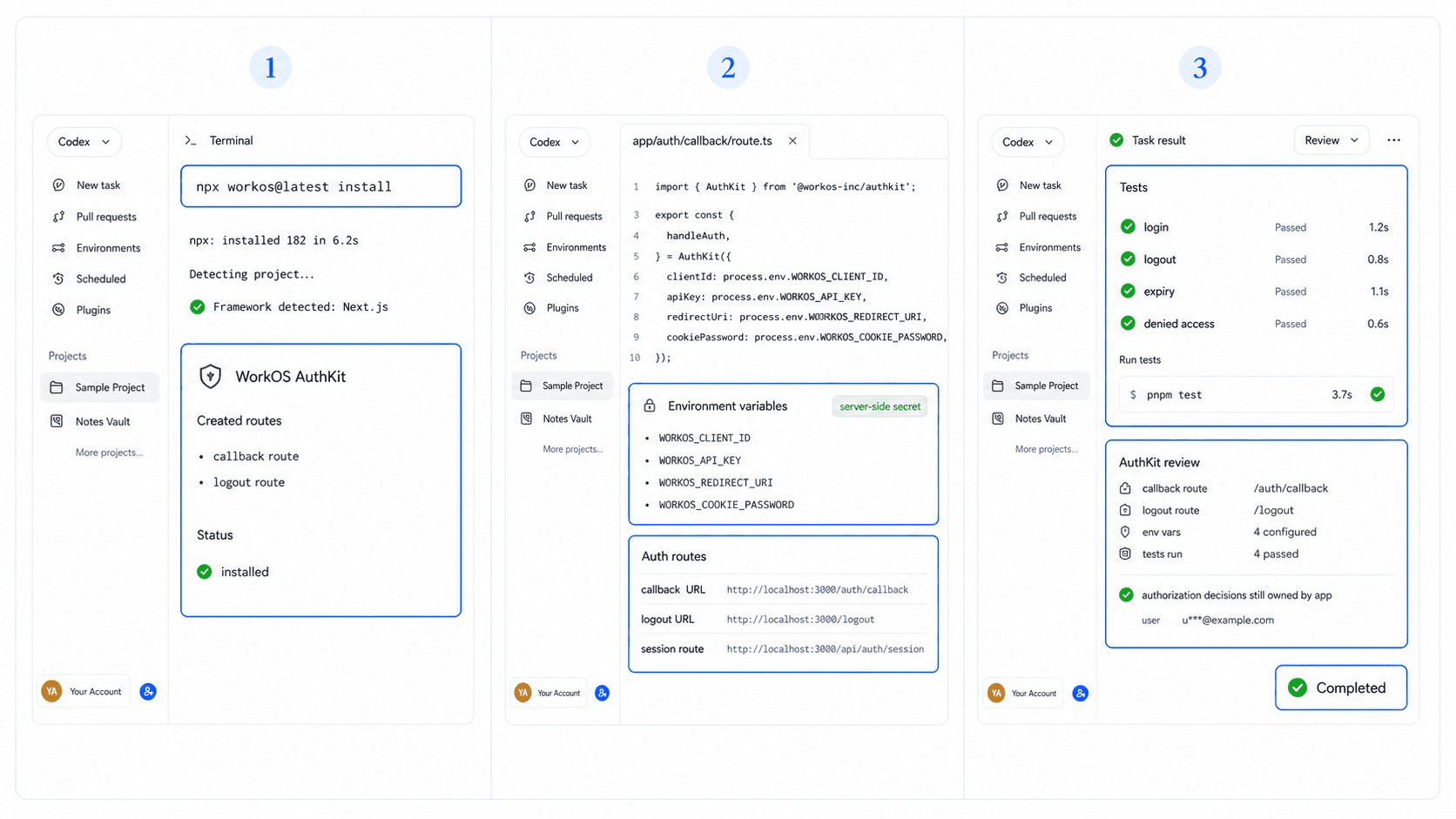
What to Double-Check Before Shipping
Verify exact callback and logout URLs for every environment. Confirm that secrets stay out of browser bundles and logs. Test expired sessions, canceled login, duplicate accounts, organization switching, and a user who lacks permission.
Authentication answers who the user is. Authorization answers what that user may do. Use a successful WorkOS login for identity and server rules for tenant and record access.
Map the Onboarding Flow Before Adding AuthKit
Authentication implementation should follow an agreed onboarding journey. HappySeeds helps non-technical builders map signup, access, recovery, and account states before an SDK is introduced.
Use the HappySeeds quick start for onboarding planning, then give Codex a smaller WorkOS task for each approved state.
FAQ
It can scaffold supported files and commands, but you must review settings, secrets, redirects, and access rules.
Keep WORKOS_API_KEY and WORKOS_COOKIE_PASSWORD in a server-side environment or secret manager and outside browser code.
No. SSO authenticates identity. Your application must still enforce roles and resource access.
Test success, cancellation, invalid callback, expired session, logout, and denied access.
They serve different stages. Review the coding-agent and app-builder comparison before selecting the product path.
Define Access Before Scaffolding Auth
List each user type, protected action, and denied state before generating routes. Start with a HappySeeds onboarding template if those decisions are still open.
Launch with HappySeeds
Built the app but not the business? Start with HappySeeds to launch a live, monetizable AI app, or browse AI app templates to see what you can sell.