
Should Codex Have Direct Database Access?
Start with development access. Review metadata first, then bounded queries, followed by a development migration when the change is approved. Production writes remain an explicit human decision.
This workflow applies to a PlanetScale database reached through PlanetScale MCP. Other databases may use different authentication, branching, deployment, and recovery procedures, so adapt those steps instead of treating every database workflow as interchangeable.
PlanetScale's MCP integration supports configurable access scopes, which makes least-privilege setup practical.
Database access usually sits beside identity and authorization. Compare the WorkOS authentication workflow and the Kinde SDK workflow when the data model contains users or organizations.
Connecting Codex to PlanetScale
Add the current PlanetScale MCP endpoint:
codex mcp add planetscale --url https://mcp.pscale.dev/mcp/planetscaleThen:
- Complete the browser-based OAuth login.
- Run
/mcpin Codex and confirmplanetscaleis enabled. - Select a scope that allows metadata or bounded reads first.
- Point the task to a development branch or database.
- Inspect the generated query before execution.
Expected success: /mcp lists planetscale as enabled after OAuth. If authentication stalls or the server remains disabled, remove the incomplete entry, confirm the PlanetScale account can access the intended organization, and repeat the command.
Ask: "List the tables and columns used by the billing page. Omit row values and schema changes."
Next: "Write a bounded query that counts unsuccessful test orders by day. Return the SQL for review before execution."
For a migration plan: "Propose the schema change for adding trial_ends_at. Return the migration SQL, affected queries, tests, and a rollback/recovery plan. State whether recovery requires a follow-up migration, a deploy-request revert, or a restore procedure. Do not assume one inverse SQL statement can safely recover every change. Stop at the proposal."
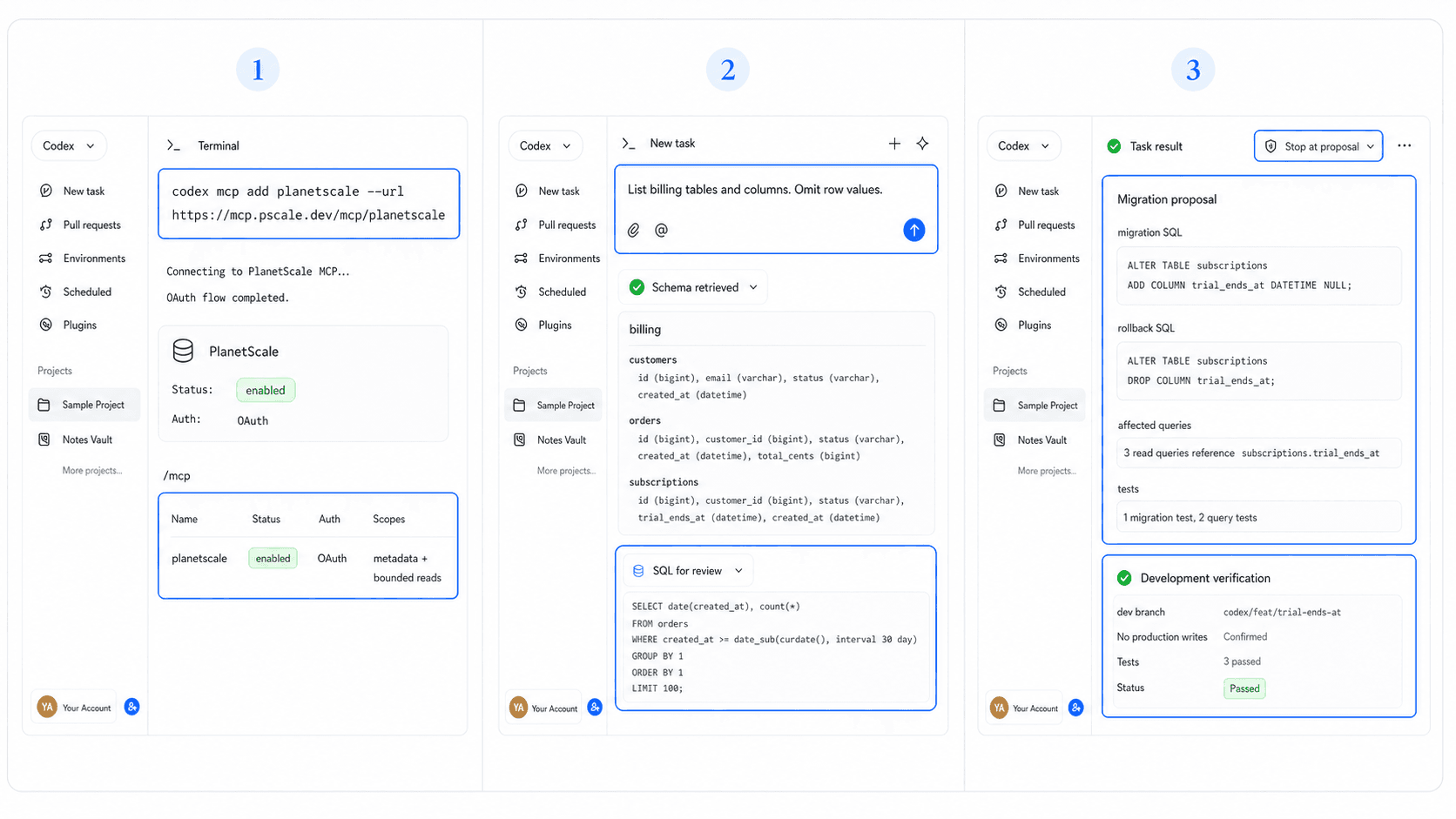
What Queries and Migrations Look Like in Practice
Keep exploration and mutation separate. First inspect schema metadata. Then draft a parameterized query. For schema work, create a migration in a development environment, test application compatibility, and review the deployment path.
A useful review table is:
| Check | Evidence |
|---|---|
| Scope | Named database and branch |
| Access | Bounded reads or reviewed write |
| SQL | Parameterized and bounded |
| Recovery | Follow-up migration, deploy-request revert, or restore procedure |
| Verification | Query result and app test |
Guardrails Worth Setting Up First
Use the narrowest MCP scope, short-lived credentials, and separate development data. Keep personal data out of prompts and logs. Require confirmation for DDL and any UPDATE or DELETE. Validate mutation boundaries and generated SQL before execution.
Define Data and Permissions Before Database Access
A data model should begin with business objects and user permissions rather than database commands. HappySeeds helps non-technical builders describe those records and flows before an engineering team chooses the storage layer.
Start from an app template with a defined workflow, then use PlanetScale when the coded path requires database control.
FAQ
Start with a development environment and bounded read access.
Yes. Its documented integration includes configurable access scopes.
It may be able to request database tools under the permissions you grant. Keep migration execution behind explicit review.
Use scoped access and test data, keep rows out of prompts, and audit database activity.
Model Permissions Before Writing SQL
Write down who may read or change each record before granting database tools. Use the HappySeeds quick start when the product's data flow still needs clarification.
Launch with HappySeeds
Built the app but not the business? Start with HappySeeds to launch a live, monetizable AI app, or browse AI app templates to see what you can sell.