
What Building RAG From Scratch Actually Involves
A RAG system needs document ingestion, parsing, chunking, embeddings, storage, retrieval, context assembly, generation, citations, permissions, and evaluation. Building every layer yourself adds decisions outside many products' core value.
How R2R Shortcuts the Process
R2R provides REST and SDK surfaces for ingestion, search, and RAG workflows. That gives Codex a defined service boundary to integrate instead of inventing a pipeline from unrelated components.
The flow is:
Approved documents -> R2R ingestion -> retrieval -> application context -> generated answer -> source review
For lower-level vector storage, compare the Milvus workflow. When the integration depends on current package APIs, bring in the Context7 documentation path.
Wiring R2R Into a Codex Session
Start from the current repository quick start:
pip install r2r
python -m r2r.serve
Connect a Python client to the local service:
from r2r import R2RClient

client = R2RClient(base_url="http://localhost:7272")

client.documents.create(file_path="/path/to/approved-sample.pdf")
documents = client.documents.list()
For the local quick start, OPENAI_API_KEY is the model-provider credential used by the R2R service. Do not describe it as an R2R user API key. If your hosted deployment also requires R2R authentication, follow that deployment's current access workflow and keep the credential server-side.
Then:
- Keep any development credential in a server-side environment.
- Ask Codex to create a typed client for the chosen SDK or REST endpoint.
- Ingest a small approved sample.
- List the created documents and run saved retrieval questions.
- Record the returned source IDs and citations.
Expected success: the local service answers on port 7272, the client can create or list a document, and retrieval returns the expected sample source. If the client cannot connect, confirm that python -m r2r.serve is still running and that base_url uses the same host and port.
Start with: "Inspect the R2R API and propose a typed client boundary for ingestion and search. Return the plan before editing files."
Then: "Create the server-side R2R client. Read the base URL and API key from environment variables and add timeout handling."
For evaluation: "Run the saved question set and return: question, retrieved source IDs, top rank, answer citation, and issue note."
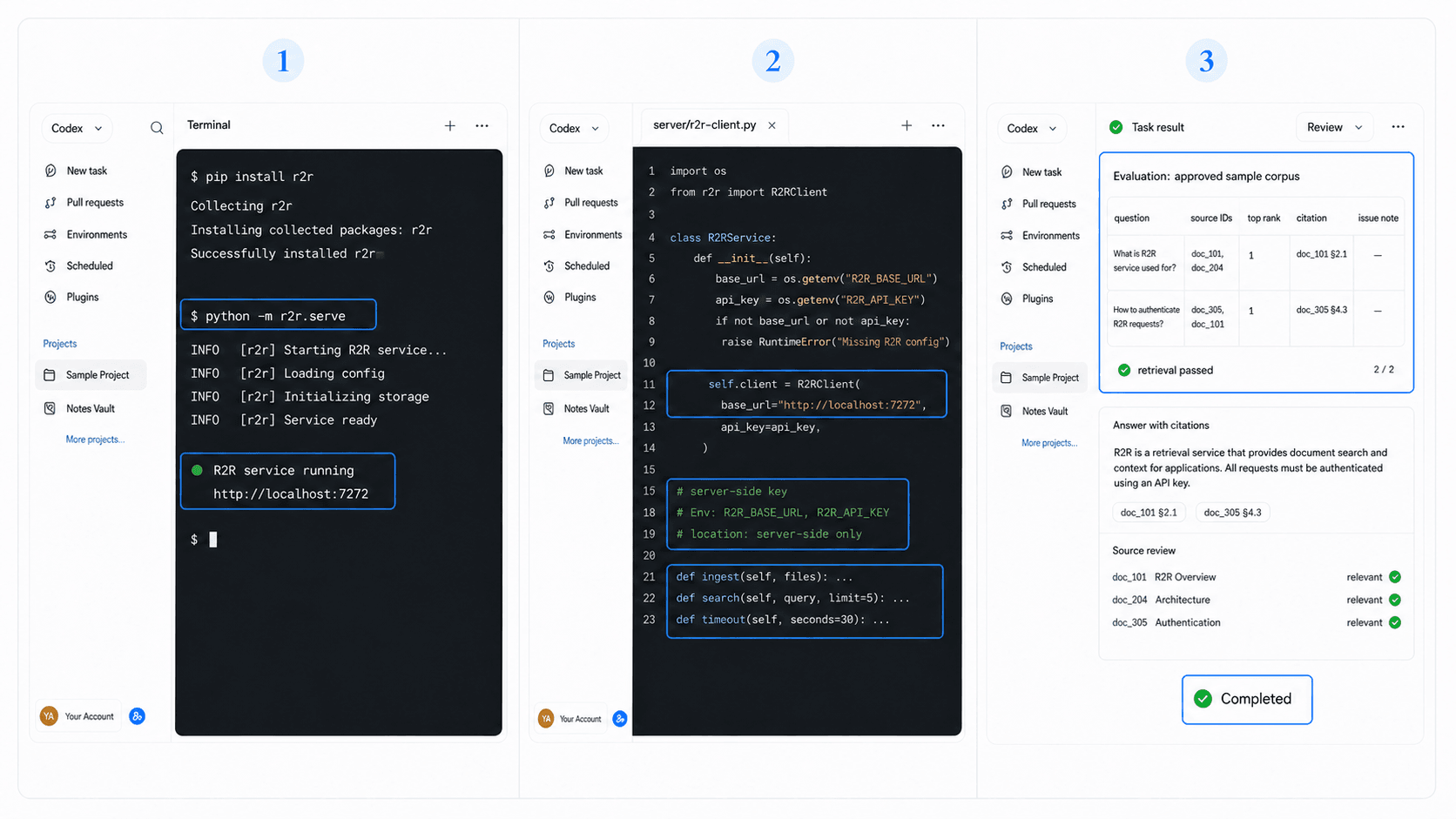
R2R vs Building Your Own Pipeline
Choose R2R when a maintained ingestion and retrieval service lets you test the product sooner. Build your own pipeline when infrastructure behavior is the product, strict deployment constraints require it, or the required control sits outside R2R.
In either case, define access filters before ingesting private content. Enforce tenant boundaries and keep full sensitive documents out of logs.
Prototype the Retrieval Experience Before RAG Plumbing
A RAG stack should begin with the experience users need: what they ask, which sources are acceptable, and how citations appear. HappySeeds helps prototype those states before a non-technical team commits to retrieval infrastructure.
Use HappySeeds to shape the cited-answer flow, then choose R2R when the coded backend needs a defined retrieval service.
FAQ
No. It provides retrieval and RAG infrastructure around models and your application.
This page uses R2R's documented REST or SDK surface rather than an MCP integration.
Use a small, approved, representative corpus with known evaluation questions.
Track expected sources, observed ranks, citation coverage, and unsuccessful cases on a repeatable test set.
Evaluate Sources Before Answers
Track expected sources, observed ranks, and citation coverage on a saved test set. Start a HappySeeds build when the interaction needs validation before backend expansion.
Launch with HappySeeds
Built the app but not the business? Start with HappySeeds to launch a live, monetizable AI app, or browse AI app templates to see what you can sell.