
The Problem: Codex and Outdated Documentation
Packages rename functions, change configuration, and remove old examples. A plausible answer can still target the wrong version. The fix is to bring current documentation into the task and make the expected version explicit.
Do not assume retrieved documentation makes generated code correct. Run the project's real type checks and tests.
How Context7 Solves It
Context7 provides MCP tools that resolve a library identifier and query its documentation. Codex supports MCP server configuration, so the documentation lookup can happen within the agent workflow.
The flow is:
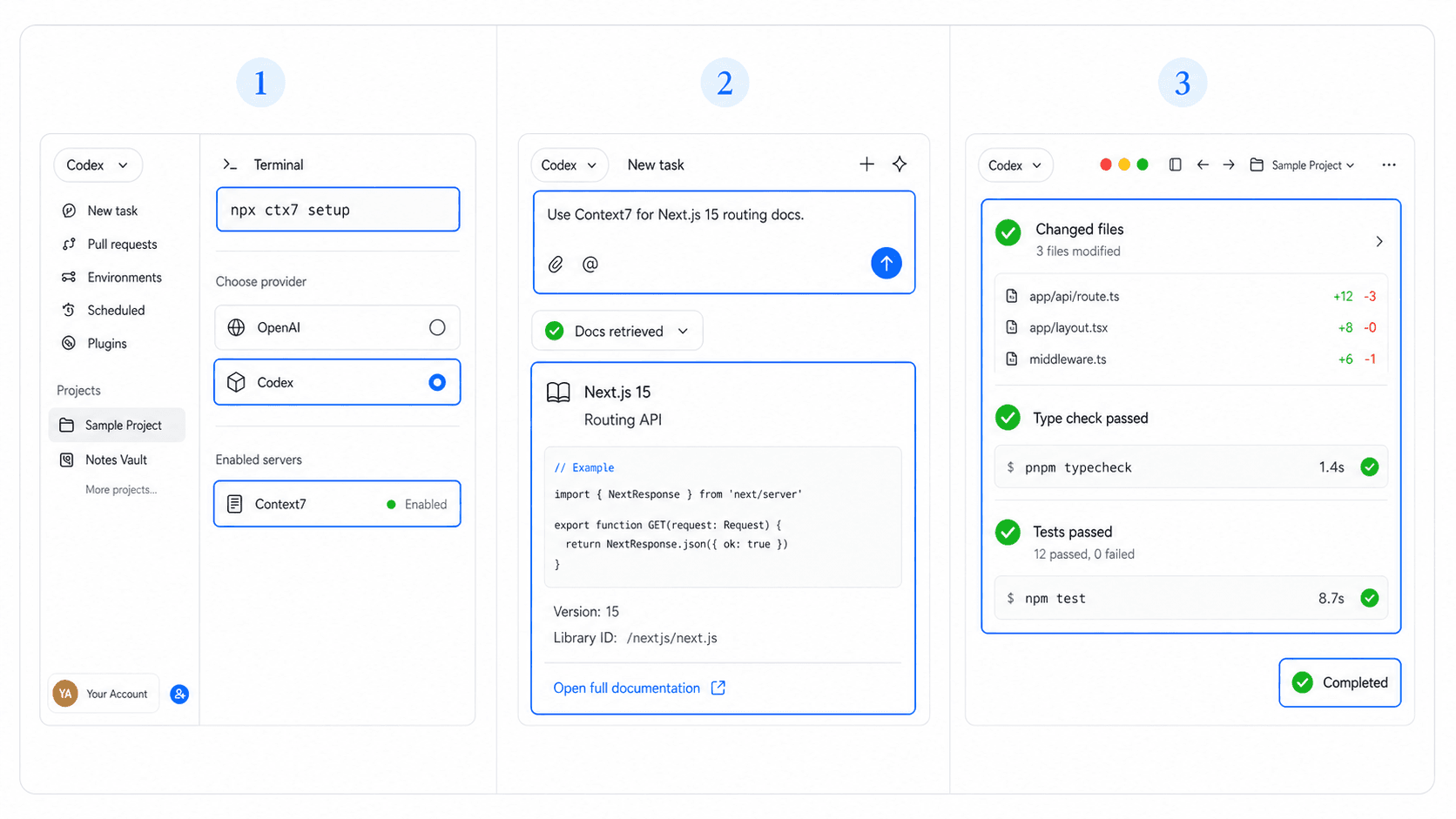
Task -> library and version -> Context7 docs -> Codex patch -> local verification
Documentation retrieval supports implementation, but it serves a different role from maintaining product docs with Mintlify. For retrieval-backed apps, compare the R2R integration workflow.
Wiring Context7 Into Your Codex Session
Run the current setup helper from the repository root:
npx ctx7 setupChoose Codex when prompted, then:
- Store the Context7 API key outside the repository if your setup requests one.
- Restart or reload the Codex surface.
- Confirm the Context7 tools appear in the MCP list.
- Request docs for one named package and version.
- Implement only after the returned API shape is clear.
Expected success: the setup helper writes or updates the Codex MCP configuration and Context7 appears as an enabled server. A common setup error is npx: command not found; install a current Node.js runtime with npm, reopen the terminal, and rerun the command.
Try: "Use Context7 to find the routing API for Next.js 15. Return the relevant functions and constraints. Do not edit files."
Then: "Using those docs, update app/account/page.tsx. Preserve the existing loading state and run the type check."
For a reviewable handoff: "Return: documentation version, changed files, verification command, result, and any API detail that remains unclear."
When This Setup Matters Most
Use Context7 for fast-moving frameworks, version upgrades, unfamiliar SDKs, and errors caused by copied legacy examples. It adds less value for stable project code that already has tests and local documentation.
Treat retrieved content as external input. Avoid sending private source code or secrets to a documentation service. Keep MCP credentials in environment configuration and limit the server to the tools required.
Set Product Requirements Before Fetching Library Docs
Library choices should follow the product requirement, not lead it. HappySeeds helps non-technical builders describe the user action and expected result before a framework or SDK is selected.
Use an app template to clarify the experience, then bring Context7 into the coded path when current library documentation matters.
FAQ
No. It supplies documentation context. Codex still proposes the change, and you still test it.
Name the library, version, feature, and output you need. Check that the returned material matches that version before implementation.
Yes. Put the library and version in the prompt and check that the retrieved material matches.
Review what leaves your environment. Do not send secrets or unnecessary proprietary code to an external service.
Ask for the Exact Documentation Context
Name the package, version, and feature before requesting code. If the product interaction is still unclear, start a HappySeeds project and define that flow first.
Launch with HappySeeds
Built the app but not the business? Start with HappySeeds to launch a live, monetizable AI app, or browse AI app templates to see what you can sell.