
Why Documentation Falls Out of Date So Fast
Code, configuration, UI labels, and examples change in different commits. Documentation becomes unreliable when no task explicitly owns the matching update. Make documentation part of the feature definition and require the same review evidence as code.
When a page depends on changing library APIs, use Context7 for version-specific documentation. When the docs describe a retrieval feature, check the R2R integration guide against the same product contract.
Linking Codex to Your Mintlify Docs
- Open the repository containing the Mintlify docs.
- Identify the navigation configuration and relevant MDX pages.
- Ask Codex to compare the docs with the current code or API contract.
- Preview locally with the documented Mintlify CLI.
- Review links, examples, and rendered components before merge.
The flow is:
Code change -> affected docs -> Codex draft -> mint dev preview -> technical review
Letting Codex Draft and Update Pages
Start with: "List the documentation pages affected by the new export endpoint. Do not edit files."
Then: "Update the export guide to match the current request and response types. Preserve the existing front matter and navigation."
Ask for a structured review: "Return: changed MDX files, new links, code examples checked, preview command, result, and claims needing a maintainer."
Follow Mintlify's Git workflow guidance so documentation changes can be reviewed like other repository work.
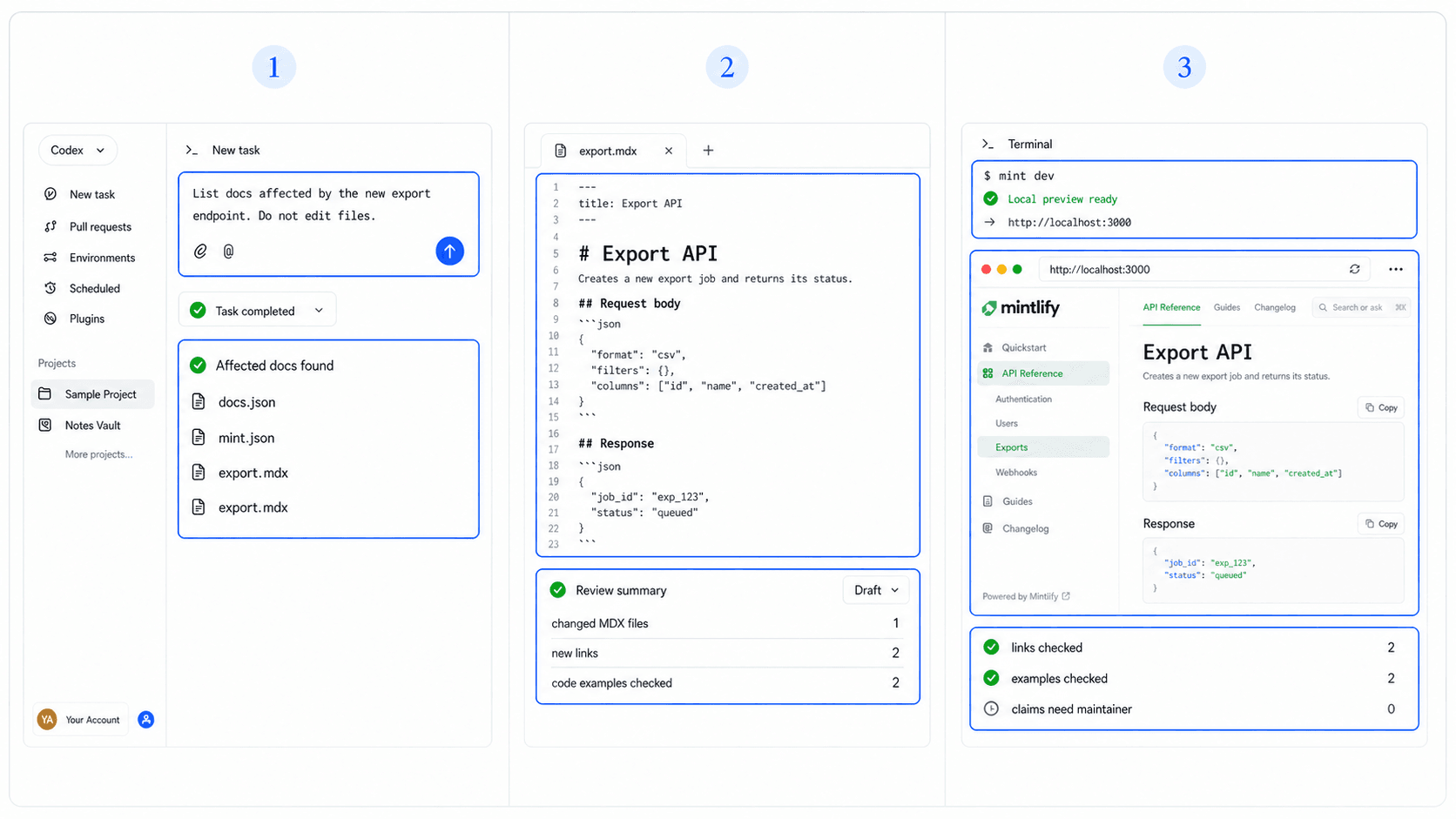
Keeping AI-Written Docs Accurate
Check every command against the current product and every response example against real types or a test environment. Remove invented defaults, limits, prices, and future capabilities. Confirm that internal links resolve and that external links go to primary documentation.
Preview visual components, tabs, callouts, and long code blocks. A valid MDX file can still render poorly or hide essential information on mobile.
Separate Product Publishing From Documentation Publishing
Documentation should describe a stable user journey rather than compensate for an unclear product. HappySeeds can help a builder define and publish that experience where supported before a separate Mintlify site explains it.
Use HappySeeds templates to settle the core flow, then maintain the technical guide through Codex and Mintlify.
FAQ
The safer workflow is to edit the docs repository, preview locally, review the change, and merge through your normal publishing path.
Yes, but preview them. Component syntax and visual behavior need render checks.
Commands, API examples, configuration names, internal links, and statements about current product behavior.
Add a documentation check to feature acceptance criteria and update both in the same review cycle.
Preview the Documentation as a User
Check the exact command, rendered component, and next link before merge. Open a HappySeeds project when the product itself still needs iteration.
Launch with HappySeeds
Built the app but not the business? Start with HappySeeds to launch a live, monetizable AI app, or browse AI app templates to see what you can sell.