
Why Run Two Coding Agents at Once
Two agents can investigate different parts of a project at the same time. One might trace a backend error while the other prepares a UI test. The benefit comes from parallel discovery and independent review rather than simultaneous edits to one feature.
Codex CLI and the Claude Code CLI can each work from a terminal. Treat their outputs as proposed changes that still require human review.
Start with the main Codex workflow, then choose an editor surface such as the VS Code setup for reviewing each patch.
Setting Both Up in the Same Repo
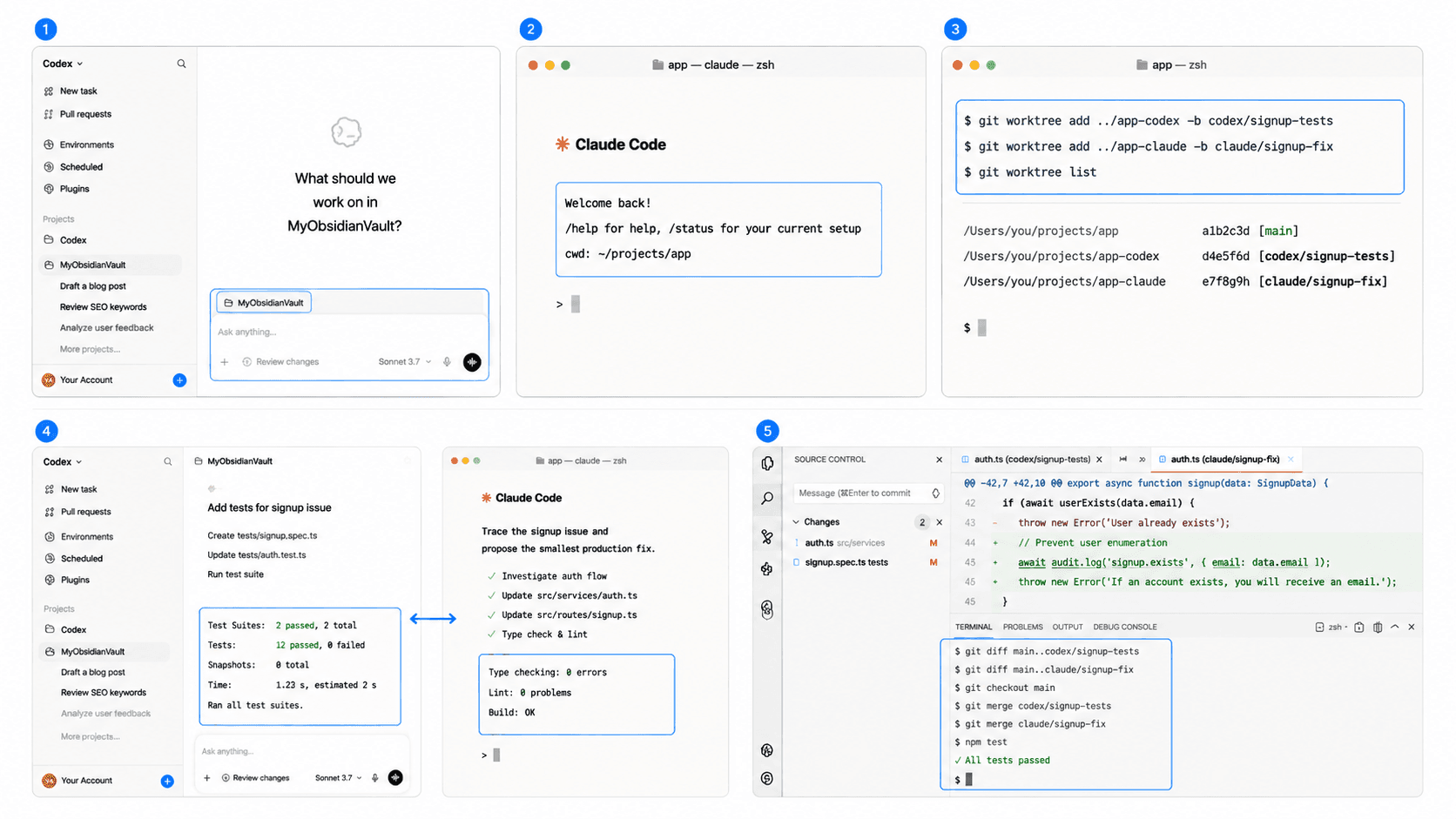
- Create a clean branch or worktree for each agent. For example:
 git worktree add ../app-codex -b codex/signup-tests
git worktree add ../app-claude -b claude/signup-fix- Give both the same repository rules and acceptance criteria.
- Assign non-overlapping files or deliverables.
- Run tests inside each isolated workspace.
- Review and combine one change at a time.
Prompt Codex: "In your branch, add regression tests for the signup issue. Limit the change to test files. Return the test command and result."
Prompt Claude Code: "In a separate worktree, trace the signup issue and propose the smallest production fix. Limit the change to production files."
Handoff prompt: "Review this patch against the acceptance criteria. Return: blocking issue, affected file, evidence, and recommended next action."
Which Tasks Go to Which Agent
Assign by task shape. Use one agent for a focused implementation and the other for investigation, test design, or review. When a task needs the same files, run it sequentially.
Example division:
| Track | Deliverable | Boundary |
|---|---|---|
| Codex | Regression tests | Test-file scope |
| Claude Code | Root-cause note and patch | Production-file scope |
| Human review | Final merge decision | Acceptance criteria |
Avoiding Conflicts Between the Two
Give each agent its own branch and commit window. Record the base commit, keep working trees clean, and re-run tests after combining patches. Keep secrets out of prompts and logs. If either agent proposes a schema migration, deployment, or destructive command, require explicit review before execution.
Define the Product Contract Before Splitting Agent Work
Parallel coding agents amplify an existing plan. Product clarity still comes from defining the user, main action, data, and acceptance criteria before work is split. HappySeeds can help a non-technical founder create that shared brief.
Use the planning-first quick start to create the shared brief that both coding tracks follow.
FAQ
Yes. Use separate branches or worktrees with explicit file ownership.
Choose based on the task. A useful pattern is one agent implementing while the other reviews or writes tests.
Assign explicit files, merge sequentially, and run the full relevant checks after integration.
HappySeeds handles planning and publishing, while the coding agents run in their own repository workflows.
Launch with HappySeeds
Built the app but not the business? Start with HappySeeds to launch a live, monetizable AI app, or browse AI app templates to see what you can sell.