
What Gumloop Handles That Code Doesn't Need To
Gumloop provides visual workflows, integrations, triggers, and run outputs. That can keep routine orchestration outside your application code. Your code still needs to validate user input, protect credentials, handle errors, and show the run state.
If the automation drives a browser journey, pair it with the Browserbase QA workflow. If the automation needs identity context, review the WorkOS setup before passing user data.
Connecting Codex to Your Gumloop Workflows
- Build and manually test the Gumloop workflow.
- Enable its documented API or webhook trigger.
- Store the API key in a server-side secret.
- Give Codex the expected request and response shape.
- Test with non-sensitive sample data.
The connection is:
App event -> server endpoint -> Gumloop API -> workflow run -> status or output
The Gumloop API guide documents the start endpoint and run identifier. Its authentication guide supports a Bearer token that keeps the secret out of the URL.
Start a saved flow from a server-side route. Replace the IDs with values from your own Gumloop account; no real project identifiers or credentials are included here.
curl -X POST 'https://api.gumloop.com/api/v1/start_pipeline' \
  -H "Authorization: Bearer $GUMLOOP_API_KEY" \
  -H 'Content-Type: application/json' \
  -d '{
    "user_id": "YOUR_USER_ID",
    "saved_item_id": "YOUR_SAVED_ITEM_ID"
  }'
A successful start response includes a run_id. Store that identifier with the application job record, then use it to retrieve the run state and outputs:
curl 'https://api.gumloop.com/api/v1/get_pl_run?run_id=YOUR_RUN_ID&user_id=YOUR_USER_ID' \
-H "Authorization: Bearer $GUMLOOP_API_KEY"| Gumloop state | Application state | Handling |
|---|---|---|
STARTED or RUNNING | Pending | Keep the job pending and poll again with a bounded delay. |
FAILED or TERMINATED | Failed | Stop polling, retain the run_id, and return a reviewable error without exposing secrets or the full sensitive payload. |
DONE | Completed | Read named values from outputs and persist only the fields the product needs. |
Triggering an Automation From a Codex Session
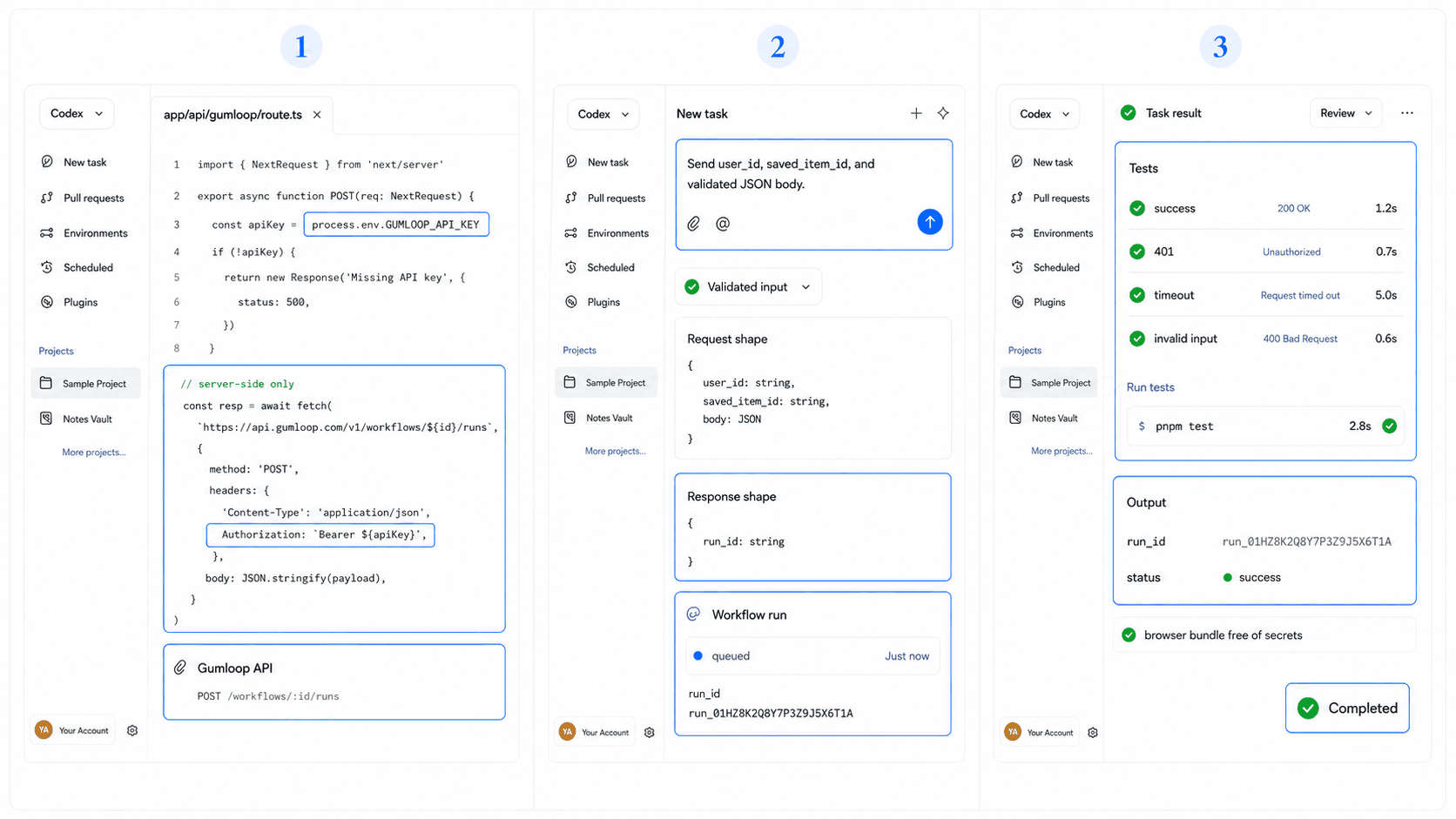
Ask Codex to build the integration while keeping the credential server-side.
Try: "Create a server-side Gumloop client that reads GUMLOOP_API_KEY from the environment. Keep the browser bundle free of secrets."
Then: "Add a function that sends user_id, saved_item_id, and a validated JSON body. Return the typed response containing run_id, then query the run until it maps to pending, failed, or completed."
For failure handling: "Stop polling on FAILED or TERMINATED, preserve the run_id for review, and return a safe error message. Bound retries for timeouts and repeated RUNNING responses."
A Few Practical Starting Points
Begin with a reversible workflow such as summarizing an approved document, formatting a lead record, or notifying an internal channel. Delay payments, deletions, and customer messages until permissions, approvals, idempotency, and error recovery are designed.
Log a run ID rather than the secret or full sensitive payload. Poll or retrieve results through the documented response path, and show clear pending and unsuccessful states in the app.
Turn an Automation Into One Product Action
The useful product question is what the user submits, sees, and does next. HappySeeds helps a commercial builder design that interface before a coded integration is added.
Use the planning checklist to define inputs, results, pending states, and recovery.
FAQ
No. Codex can build a client that calls Gumloop's documented API or webhook.
Store it server-side in an environment variable or secret manager.
Keep the private API key in a protected server endpoint.
Use the run ID and the documented Gumloop result flow. Design pending, unsuccessful, and completed states.
Turn One Workflow Into a Product Action
Choose one approved automation, one input contract, and one visible result. Create the surrounding app in HappySeeds when the interface matters more than custom integration code.
Launch with HappySeeds
Built the app but not the business? Start with HappySeeds to launch a live, monetizable AI app, or browse AI app templates to see what you can sell.