
Can Codex Be Trusted to Trigger Deployments?
Only within a narrow, reviewed workflow. A deploy can change customer-facing behavior even when the code diff is small. Begin with preview or staging, require passing checks, and keep the production trigger behind explicit confirmation.
After staging deploys, use the Browserbase guide for a controlled user-path check. If the release includes data changes, apply the PlanetScale guardrails before promotion.
Connecting Codex to Your Dokploy Server
- Prepare a Dokploy Application or Docker Compose service in a non-production environment. Dokploy auto deploy applies only to these two service types.
- Configure the source, build settings, health checks, and secrets.
- Enable auto deploy and obtain the webhook URL generated by Dokploy, following its auto-deploy guide. This is a Dokploy-issued URL for the configured deployment target, not an endpoint to invent manually.
- For Git-based sources, confirm that the branch configured in Dokploy matches the branch being pushed. For DockerHub, use an Application and match the configured image tag.
- Store the webhook URL as a secret and let Codex reference only the environment variable name.
- Let Codex prepare the request and verify the deployment result.
The release path is:
Reviewed commit -> checks -> Dokploy webhook -> build -> health check -> promotion or rollback
| Method | Use it for | Required configuration |
|---|---|---|
| Webhook | Triggering a known Application or Docker Compose deployment from a source event or bounded script. | The Dokploy-generated webhook URL stored as a secret, plus the matching branch or Docker tag. |
| Dokploy API | Programmatic deployment control from CI/CD or another trusted automation service. | The documented API endpoint, target application ID, and an authentication secret held outside the page and logs. |
Do not substitute the webhook URL for a Dokploy API endpoint. A webhook identifies a prepared deployment trigger; the API is an authenticated control surface and should be used only when the workflow needs that broader control.
What a Typical Deploy Command Looks Like
Load the Dokploy-issued webhook from a secret environment variable rather than placing its value in source code, prompts, or this page:
curl -X POST "$DOKPLOY_DEPLOY_WEBHOOK"Ask Codex: "Create a deployment script that requires DOKPLOY_DEPLOY_WEBHOOK, refuses an empty value, and never prints the secret."
Then: "Add a predeploy command that runs lint and the relevant test suite. Stop on the first failure."
For a complete report: "Run the staging deploy workflow and return: commit, checks, deployment status, health-check result, and rollback reference."
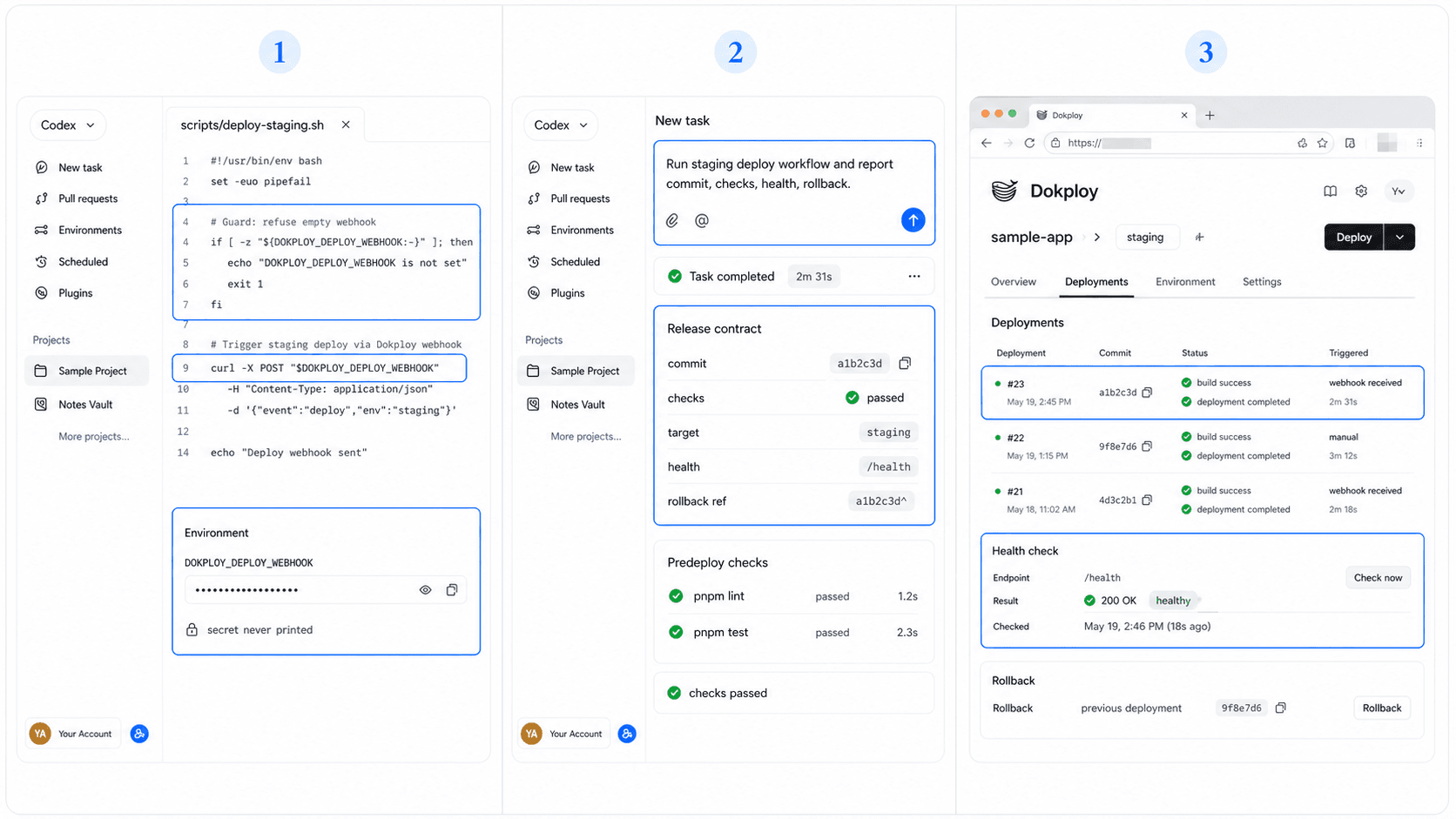
Rollback Steps If Something Breaks
Define rollback before the first automated deployment. Dokploy documents application rollback; choose the recovery method that matches how the image or release was built.
If health checks fail:
- Stop further promotion.
- Capture logs and the failing release identifier.
- Restore the last approved deployment.
- Verify the health endpoint and one critical user path.
- Open a separate fix task from the captured evidence.
Do not paste VPS credentials, registry tokens, or webhook URLs into prompts or logs.
Choose the Launch Path Before Self-Hosting
Self-hosted deployment is useful when infrastructure control is a requirement. HappySeeds offers a separate publishing path for builders who want to move from plan to a live app without managing a VPS.
Read the Codex and app-builder comparison before adding deployment operations to the project.
FAQ
Start with staging or preview. Keep production promotion behind explicit human approval.
Use the webhook URL generated by Dokploy for the configured Application or Docker Compose service. Keep the URL in a secret and never include it in prompts or logs.
Keep them in server-side secrets and grant the minimum permissions required.
Check deployment status, health endpoints, logs, and at least one critical user path.
Use Dokploy's documented rollback path and restore the last approved release.
Prepare the Rollback Before the Deploy
Record the last approved release and health check before triggering staging. If infrastructure ownership is not central, explore a HappySeeds publishing workflow.
Launch with HappySeeds
Built the app but not the business? Start with HappySeeds to launch a live, monetizable AI app, or browse AI app templates to see what you can sell.