
Hi, Elin here. I get why founders search for deepseek api and immediately think, "Okay, maybe this is the shortcut." The API is useful. The tricky part is that an API key is not a product. It is one piece of the product.
If you're a non-technical founder, indie builder, consultant, or a tiny team trying to launch an AI app, the real question is not "Can I get the model to answer?" It's this: can someone open your app, understand what to do, get something useful, trust the result enough to pay, come back later, and maybe even tell you where it felt confusing?
That is the gap this guide covers.
What the DeepSeek API Gives App Builders
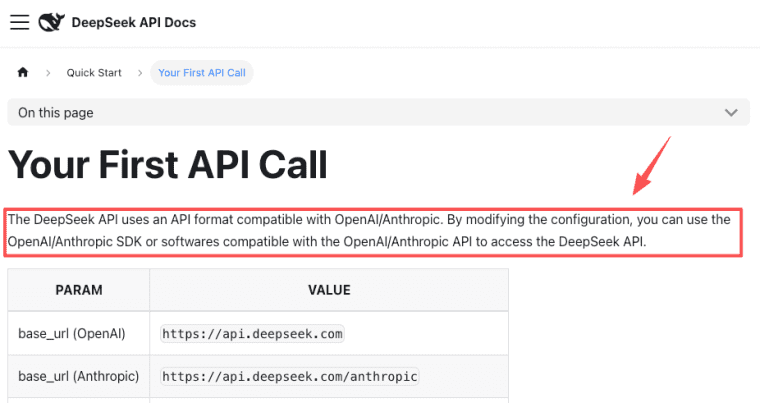
The DeepSeek API gives builders access to DeepSeek models through API formats compatible with OpenAI and Anthropic-style integrations, according to the official DeepSeek API quick start. That matters because many tools, wrappers, and agent systems already understand those request patterns.
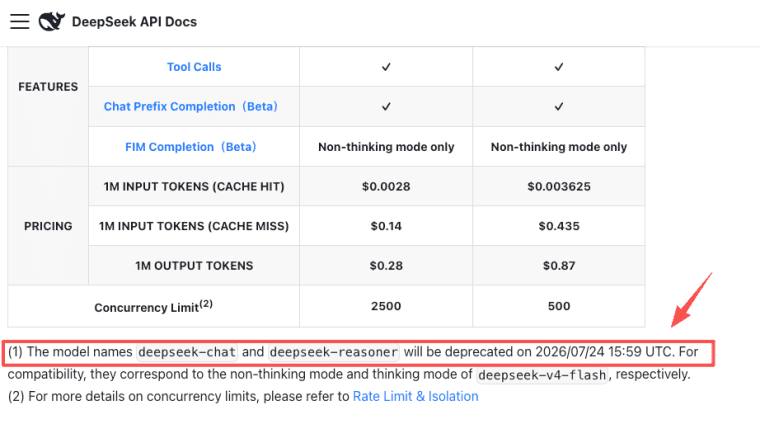
As of June 30, 2026, DeepSeek's official docs list deepseek-v4-flash and deepseek-v4-pro as the current model names, while deepseek-chat and deepseek-reasoner are marked for deprecation on July 24, 2026. Please check the official Models & Pricing page before launch, because model names, prices, discounts, and billing rules can change.
For product builders, the useful capabilities are not only "chat." The docs mention thinking mode, JSON output, tool calls, context caching, and OpenAI/Anthropic-compatible access. In normal founder language, that means you can build apps that draft, classify, analyze, reason through steps, return structured fields, or connect model output to business actions.
A few examples:
| App idea | What the model can help with | What the product still needs |
| AI assessment tool | Score answers and generate recommendations | User accounts, result pages, payment, emails |
| Consultant workflow app | Turn client input into a structured plan | Data intake, version history, admin review |
| Creator companion app | Answer based on course or content context | Content uploads, access control, analytics |
| Internal ops assistant | Summarize data and suggest next actions | Permissions, audit trail, human approval |
That last column is where most "API projects" quietly get stuck.
API Access Is Not the Same as a Product
This is where I see people overestimate the shortcut. They get an API response working and feel like the app is 70% done. Usually, it is much less done than it feels.
The API call proves that the model can respond. It does not prove that the product can handle real users, messy prompts, failed payments, repeated usage, refunds, abuse, support requests, or cost spikes.
A product has edges. Login. Empty states. Loading states. "Try again" states. Billing rules. Limits. User data. Admin tools. SEO pages. Feedback loops. None of that magically appears because the model returned a nice answer.
Model calls, user experience, and business workflow
Think of an AI app as three layers.
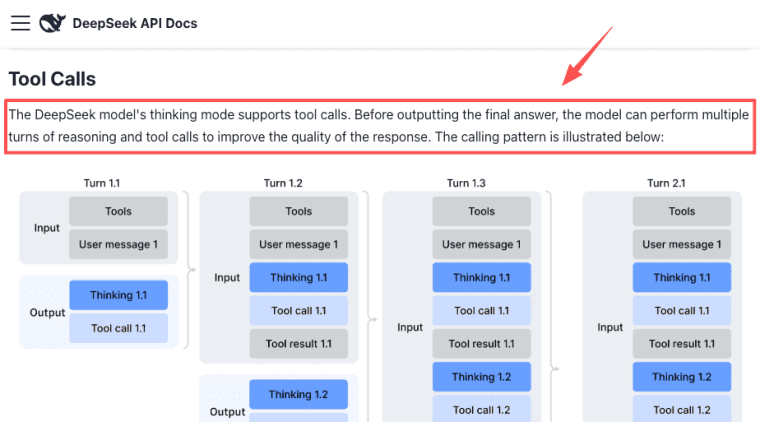
First, the model layer. This is where the DeepSeek API sits. You choose the model, decide whether thinking mode is enabled, pass prompts, receive outputs, and handle errors. The official Thinking Mode guide is worth reading if your app depends on multi-step reasoning.
Second, the user experience layer. This is what the customer touches. A founder does not pay for "tokens." They pay because your app helps them write a proposal, audit a landing page, generate a meal plan, review a contract draft, or understand their customer data.
Third, the business workflow layer. This is the boring part that makes money possible. Who can access the app? Is it free, paid, or gated by plan? What happens after a user hits their quota? Can you see usage by customer? Can you improve the prompt without breaking old results?
A clean ai app api setup connects these layers. The model call should serve the workflow, not sit in the middle like a mysterious black box.
How to Productize DeepSeek API Into an AI App
Start with the smallest paid or validated workflow, not the biggest technical idea.
A good first version might be: "A paid AI intake tool for wedding photographers that turns client answers into a shoot brief." That is much easier to productize than "an AI assistant for photographers." Specific beats impressive. Every time.
Here is the practical path I would use.
- Define the user action. What should the user finish inside the app? Upload a file, answer a form, generate a report, compare options, receive a recommendation, or share an output?
- Map the data flow. What data enters the system? What goes to the model? What is stored? What is shown back to the user? What should never be sent to an external model?
- Choose the model behavior. Use faster, cheaper paths for simple drafting or classification. Reserve deeper reasoning for tasks where the user expects judgment, planning, or multi-step analysis. Do not enable expensive behavior just because it sounds smarter.
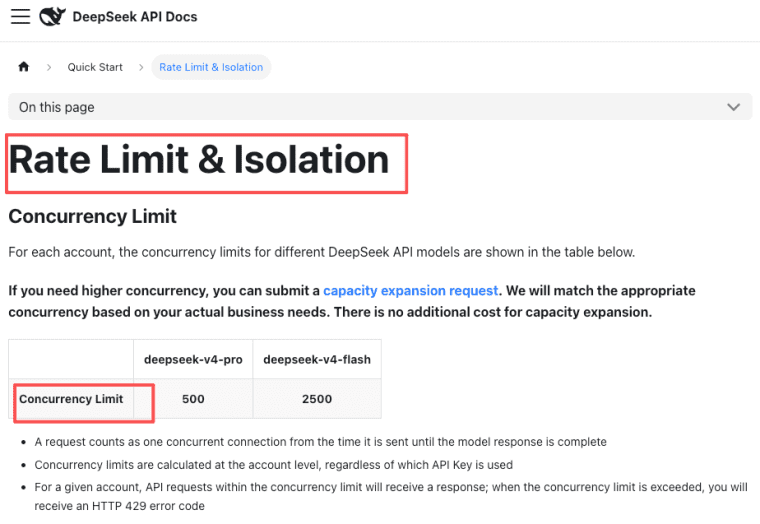
- Add usage controls. Set per-user limits, retry rules, abuse checks, and admin visibility. DeepSeek documents account-level concurrency for users with increased concurrency quotas, plus per-user_id limits and isolation in its Rate Limit & Isolation guide, which is relevant when real customers start using the same app.
- Build the payment path. Decide whether users pay per report, per month, per workspace, or per seat. The model cost is only one input. You also need hosting, support, refunds, failed payments, and your own margin.
- Validate with a narrow audience. Give the app to 5-10 people who match your buyer. Watch where they hesitate. The useful feedback is not "cool idea." It is "I would pay if it handled this one missing part."
Data, payments, usage controls, SEO, and feedback
This is exactly where an ai app builder can help, especially for non-technical teams. If the platform already handles publishing, data, payments, custom domains, SEO basics, and iteration, you can spend more time shaping the product workflow.
That does not mean an AI app builder removes all decisions. It just moves the work to a better level. Instead of wiring every backend piece yourself, you decide:
- What user data the app needs
- What model output is valuable enough to save
- Which actions should be paid
- Which pages should be indexable for SEO
- Which prompts need human review
- Which metrics prove the product is improving
For SEO, do not publish only a login screen. Create helpful public pages around the problem your app solves: examples, templates, use cases, FAQs, and comparison pages. The app is the product, but the public content is often how early users find it.
For feedback, add one lightweight loop from day one. A thumbs-up/down is fine. A "what should this result improve?" field is better. The founder mistake is waiting until the app is "done" before collecting feedback. It won't be done. That is kind of the point.
What Founders Should Verify Before Launch
Before you launch anything paid, do a boring checklist. I say boring with affection. Boring saves weekends.
Check the official DeepSeek docs for current model names, pricing, discounts, deprecations, token billing, and rate limits. The DeepSeek changelog is useful because API behavior changes over time.
Then verify your own product risks:
| Area | What to check |
| Cost | What does one normal user session cost under realistic usage? |
| Limits | What happens when requests fail, time out, or hit concurrency limits? |
| Data | What user data is sent to the model, stored, deleted, or exported? |
| Quality | What examples prove the output is good enough for your niche? |
| Payments | Can users pay, cancel, upgrade, and get support without messaging you manually? |
| Trust | Do you explain AI limitations, privacy boundaries, and refund rules clearly? |
| Iteration | Can you change prompts, flows, and pages after launch? |
DeepSeek's official docs list Reasonix under Agent Integrations, but not as a DeepSeek API model. I would present deepseek reasonix as an Agent integration/tool, not as a model name, unless you verify a specific official source that positions it otherwise.
Before you wire another API call, it may help to map the full product first. For non-technical founders, the HappySeeds OPC Launchpad is a useful starting point because it focuses on the parts that turn an AI idea into a real app: user flows, payments, feedback loops, and iteration. The walkthrough is a quick way to see how a rough idea becomes a product map before the build begins.
The launch question is simple: if 30 real users arrived tomorrow, would the app teach you something useful without creating chaos? If yes, ship the rough version. If no, fix the missing workflow before adding more AI.
The bottom line: deepseek api access can be a strong ingredient, but the sellable thing is the workflow around it. Build the smallest version where a real user can arrive, get value, pay, and help you make the next version less fragile.
Explore More Topics:
FAQ
What is the DeepSeek API?
It is an API service that lets developers or app platforms call DeepSeek models from software products. For current model names, billing rules, deprecation notices, and supported features, use the official DeepSeek documentation as the source of truth.
How can founders use DeepSeek API in AI apps?
Founders can use it for drafting, reasoning, classification, structured outputs, analysis, and assistant-style workflows. The best use case is not "add chat." It is a specific workflow where AI output helps a user finish a valuable job faster.
What API cost risks should app builders check?
Check input tokens, output tokens, retries, long conversations, thinking mode, failed requests, free users, abuse, and concurrency. Do not price your app from one perfect test prompt. Test messy real sessions and keep checking official pricing before making public promises.
When should founders use an AI app builder instead of only an API?
Use an app builder when you need the full product wrapper: pages, data, payments, users, SEO, domains, and fast iteration. Use only the API when you already have the technical team and infrastructure to build those pieces yourself.


