
Elin here. Google AI Studio App Builder can help a founder move from a focused prompt to a working Gemini app, but the prototype is only the first layer. A product still needs ownership, billing, secrets, customer data rules, usage controls, and a deployment route that someone can maintain after launch.
What Google AI Studio Build Mode Creates
Google AI Studio Build mode is useful when you want to test a Gemini-powered workflow before hiring an engineering team or committing to a full stack. You can start from a prompt, remix an app gallery example, or import from GitHub, then iterate with chat, code edits, or UI annotations. That makes it a practical way to build an app with Google AI Studio when the idea is still being shaped.
Current web and Android outputs, runtimes, preview, and deployment options
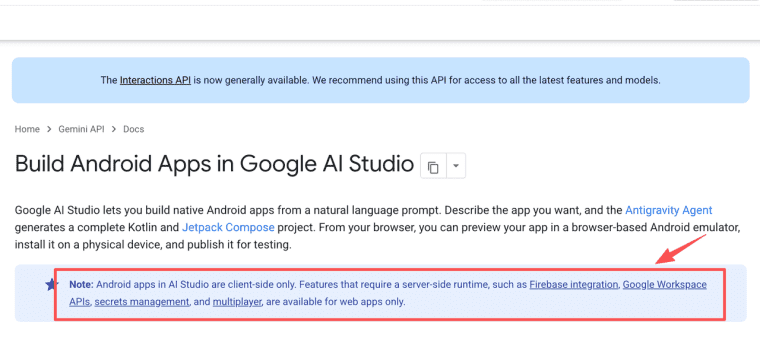
For web apps, AI Studio currently creates a full-stack environment with a React frontend by default and a Node.js server-side runtime for secure API calls, database connections, and npm packages. That server-side layer matters because Gemini API calls and secrets should not sit in browser code. AI Studio can also create native Android apps with Kotlin and Jetpack Compose, preview them in a browser-based emulator, install APKs on a physical device, and publish to the Play Store internal testing track. However, Android apps in AI Studio are client-side only, so features that need server runtime, secrets management, multiplayer, Firebase, or Google Workspace APIs belong on the web app route. Treat preview as a design review, not as acceptance testing. A browser preview can show the workflow, but it does not prove account recovery, billing alerts, data migration, or mobile edge cases.
Choose a Focused Prototype Idea
The best first prototype is narrow enough that a buyer can judge it in one session. A broad "Gemini app builder" idea usually turns into a scattered demo: one screen for chat, one screen for files, one screen for dashboards, and no clear reason to pay. Start with a painful repeatable job instead.
One user, one repeated job, one Gemini capability, and one measurable result
Use this filter before you prompt: one user, one repeated job, one Gemini capability, and one measurable result. A sales founder might test "turn messy discovery notes into a qualified lead summary." A course creator might test "convert uploaded lesson notes into a quiz and feedback plan." A consultant might test "read a client intake form and draft a scoped proposal." Each idea uses one Gemini capability, such as structured extraction, summarization, multimodal review, or generation, and each has a result the user can inspect.
The fastest way to weaken a prototype is to make Gemini responsible for every step at once. Keep retrieval, reasoning, formatting, and action separate in your own notes before asking Build mode to create the app. If the app reviews PDFs, define whether Gemini should extract facts, compare them to a checklist, or draft a recommendation. Those are different promises, and each needs different testing.
A more believable founder story often starts smaller. Someone has a messy spreadsheet, a few saved client calls, and one repeat task they keep doing late at night. They do not need a full platform yet; they need a prototype that proves one client would trust the output enough to ask for it again. That is the emotional line between a clever demo and a product idea.
Prompt and Test the Core Workflow
Prompting is product design when you use AI Studio Build mode. The prompt should describe not only the interface, but the user's path, the data shape, the expected output, and what should happen when the model is unsure. This is where a quick prototype either becomes a believable workflow or stays a nice screen.
Inputs, expected outputs, edge cases, errors, and acceptance criteria
Give the builder a compact spec. Name the input fields, allowed file types, required output sections, empty states, error states, and acceptance criteria. For a Gemini API app that drafts customer replies, acceptance criteria might include: it asks for missing customer context, refuses to invent policy terms, marks uncertain details, and produces a final response under a set length. Test weak inputs as early as good ones: blank forms, long documents, contradictory instructions, unsupported file types, and users who paste sensitive information by mistake. Add a small "known limits" note inside the app while testing, so early users know which inputs are unsupported. Keep a lightweight test log with prompt version, input type, expected result, actual result, and the next fix. Do not paste real API keys, private customer files, or live contracts into prompts just to see if the demo works.
Add Usage and Data Controls
A shared prototype can create real cost and privacy exposure. AI Studio's sharing model lets other people use your app, and Gemini API calls can count toward your usage limits when the app uses your key. Founders should therefore design cost controls before sending a demo link to a client, investor, or community.
Server-side secrets, quotas, per-user limits, cost visibility, and abuse prevention
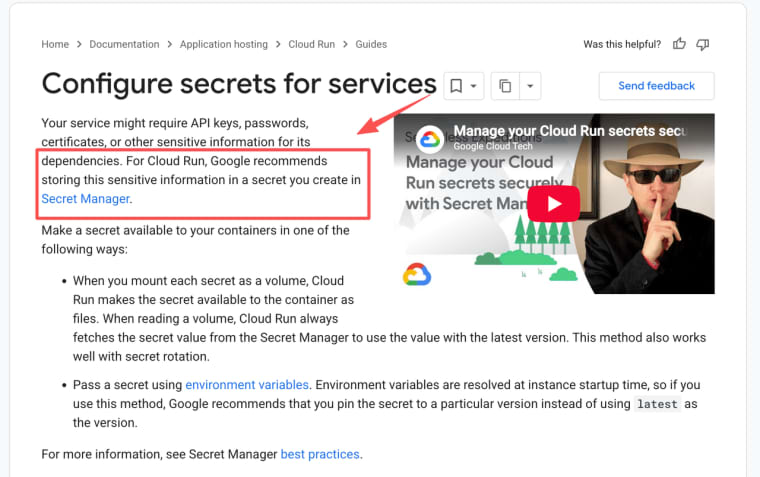
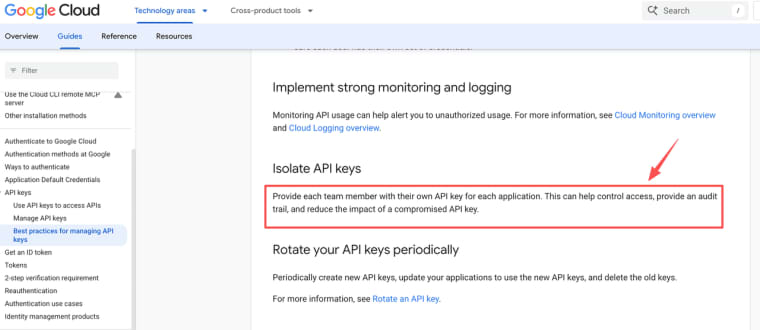
For new Gemini API apps, AI Studio automatically configures GEMINI_API_KEY as a server-side secret, and the key is not included in client-side code. If you deploy outside AI Studio, the hosting environment still needs a server-side GEMINI_API_KEY. For Cloud Run, Secret Manager integration is the safer default for API keys, passwords, and certificates, while ordinary environment variables fit non-sensitive configuration. Add rate limits, daily usage caps, user-level quotas, prompt length limits, and abuse checks in your own app layer; Gemini API rate limits vary by project, model, and tier, so they are not a substitute for product-level controls. Also restrict keys where possible, rotate keys after public tests, and delete unused keys; API key restrictions reduce the blast radius if a key leaks. Show users when a request is expensive, long-running, or likely to fail.
Move From a Shared Prototype to a Product
A shared prototype proves interaction. A product proves continuity. The difference is what happens after the first good demo: users return, their data persists, payments work, support exists, and the founder can explain who owns the stack.
Authentication, persistent data, payments, domain, privacy, and support
Before launch, add authentication, persistent storage, billing logic, a domain, privacy language, and support routing. AI Studio web apps can work with Firebase Authentication and Firestore through its full-stack capabilities, but that does not remove the need to design account states, data deletion, export, retention, and admin access. If you add payments, separate the payment provider's customer ID from app data, and avoid storing card details yourself. Add an admin view for failed runs, refunds, account deletion requests, and support tickets before inviting paying users. If you want to vibe code a website that looks like a SaaS marketing site, keep the promise smaller than the prototype: "request access," "join beta," or "test this workflow" is more honest than claiming a public product before monitoring, backups, and customer support exist.
One practical founder habit is to write a one-page operating note before the first paid user enters. It should say where user data lives, who can access admin screens, how refunds are handled, what happens when Gemini returns a weak answer, and who owns the Google Cloud project if the app is sold or handed to a client.
Decide Whether to Stay, Deploy, or Export
The right route depends on who must operate the app after validation. Staying in AI Studio is useful for rapid iteration, sharing, and visual edits. Deploying is useful when the prototype needs a stable URL and cloud runtime. Exporting is useful when the app needs normal engineering review, tests, CI, or custom hosting.
Compare the operational responsibility attached to each route
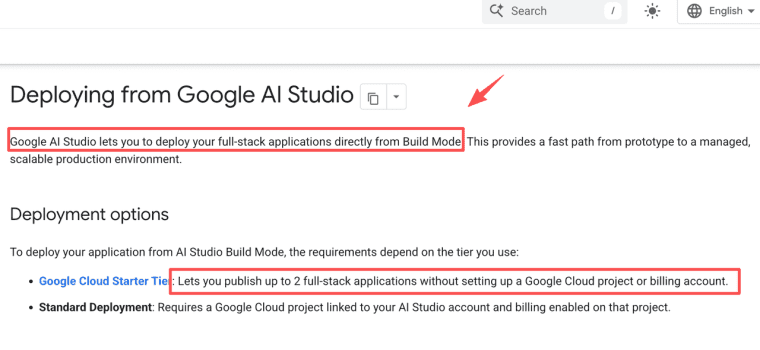
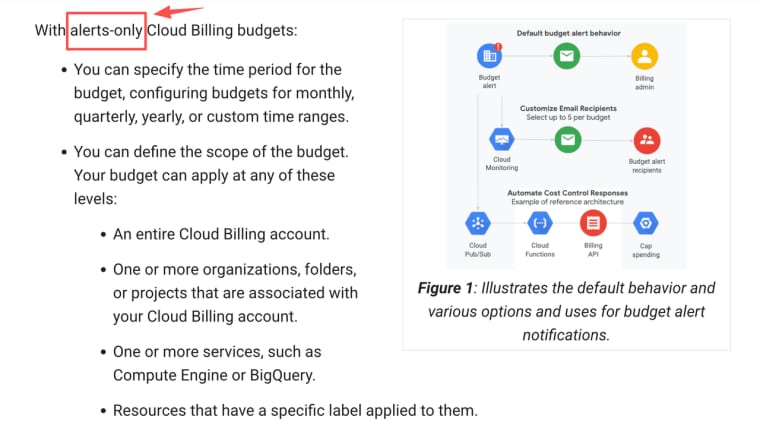
Staying in AI Studio keeps the work close to prompt-based iteration, but you still need to watch sharing settings, usage, and app behavior. Deploying from Google AI Studio can publish a full-stack app to Cloud Run; Starter Tier can publish up to two services without setting up a full Google Cloud project or billing account, while standard deployment requires a linked Google Cloud project with billing enabled. Exporting to GitHub or downloading code moves responsibility to your own workflow: secrets, branches, reviews, deployments, observability, and rollbacks. Cloud Run can scale as a managed service, but Cloud Billing budgets are alerts, not automatic hard caps. For a client project, avoid a launch route that only the original founder can access, pay for, or debug. Treat each route as an operations decision, not a design preference.
Make Prototype Transferable
The Google AI Studio app builder is strongest when you treat it as a fast validation path, not a shortcut around product work. Use Build mode to find the workflow, then decide who owns the project, where secrets live, how usage is limited, how customer data moves, and which deployment route can survive handoff. Keep a short audit trail for these decisions, because buyers and collaborators need to see how the prototype became operable. A founder who answers those questions early can turn a Gemini prototype into a product someone else can trust, buy, and operate.
Last updated: August 2026. This article is for informational purposes only and does not constitute professional, technical, legal, or financial advice. Features, policies, and pricing of Google AI Studio and related services may change at any time. Always verify the latest official documentation before use. The author assumes no responsibility for any decisions or outcomes based on this content.
Explore More Topics:
FAQ
Is Google AI Studio App Builder suitable for production apps?
Google AI Studio App Builder is best used to validate a focused Gemini workflow quickly. A production app still needs authentication, persistent data, usage controls, monitoring, billing, privacy rules, and a deployment setup that can be maintained after launch.
How should development, staging, and production projects be separated?
Use separate projects for development, staging, and production when customer data, paid usage, or client handoff is involved. Dev, staging, and production should have different access rules, billing visibility, and secrets, so a test change does not quietly affect paying users.
Who should own the Google Cloud project after a client handoff?
The client should normally own the production Google Cloud project, billing relationship, and organization-level access. The founder or developer can remain as a limited collaborator, but the app should not depend on their personal Google account.
How can a buyer identify services tied to the founder's Google account?
Audit the Google Cloud project, AI Studio app ownership, billing account, API keys, OAuth apps, GitHub repository, domain registrar, Firebase project, Cloud Run service identity, and support inbox. The buyer should also check whether any recovery email, domain login, billing contact, or repository admin still points to the founder personally.


