Spreadsheet to App: Build on the Data You Already Have

Upload a CSV or Excel file, describe the forms, records, and rules you need, and get a custom web app your team or customers can use.

What you get

What kind of app can you make from a spreadsheet?

what you getFrom a CSV or Excel file, you can make a custom web app with forms, record views, user logins, and a database.

who it’s forHappySeeds is built for small businesses that want that app shaped around how their team or customers work.

you bringYou bring the file and a plain-language description of who will use the app and what they need to do; people open the result in a phone or computer browser.

what it costsAs of October 2026, you can publish it for real users on the free plan, which starts with 30 free credits, and paid plans start at $12.90 a month.

A web app built from your spreadsheet gives people a way to work with your records: find an item, open its details, add an entry, or update a status. Tell HappySeeds which actions your users need so it can build the forms and record views around those tasks.

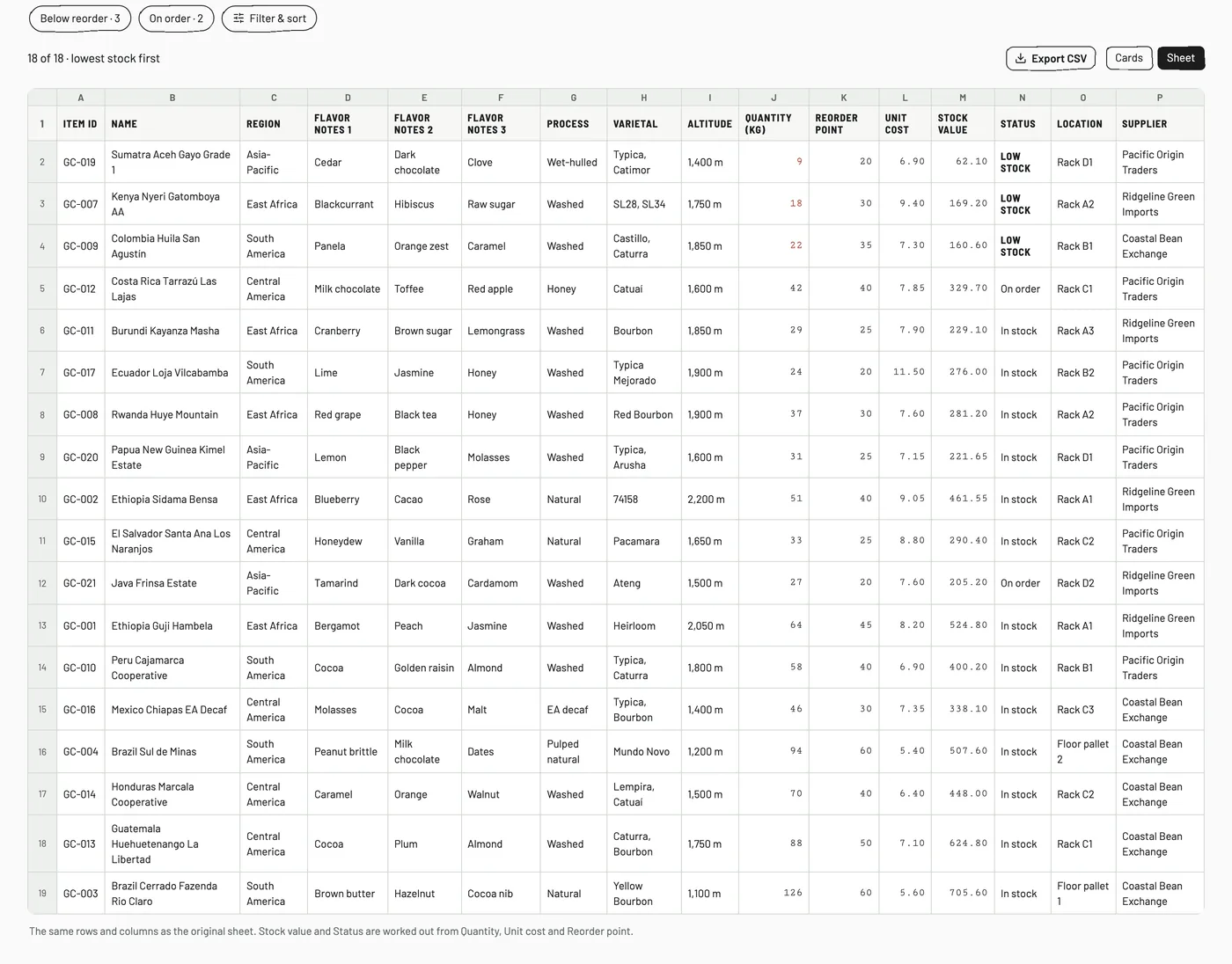
Sheet view in the Fallow Roasters sample app: one row per green coffee lot with Item ID, name, region, flavor notes, process, varietal and altitude columns
The sample app’s Sheet view: one row per lot, as in the original spreadsheet

A row can become a detail page. Column headings can become form fields. A list that someone once scrolled through can become a searchable view with the information they need for the next action.

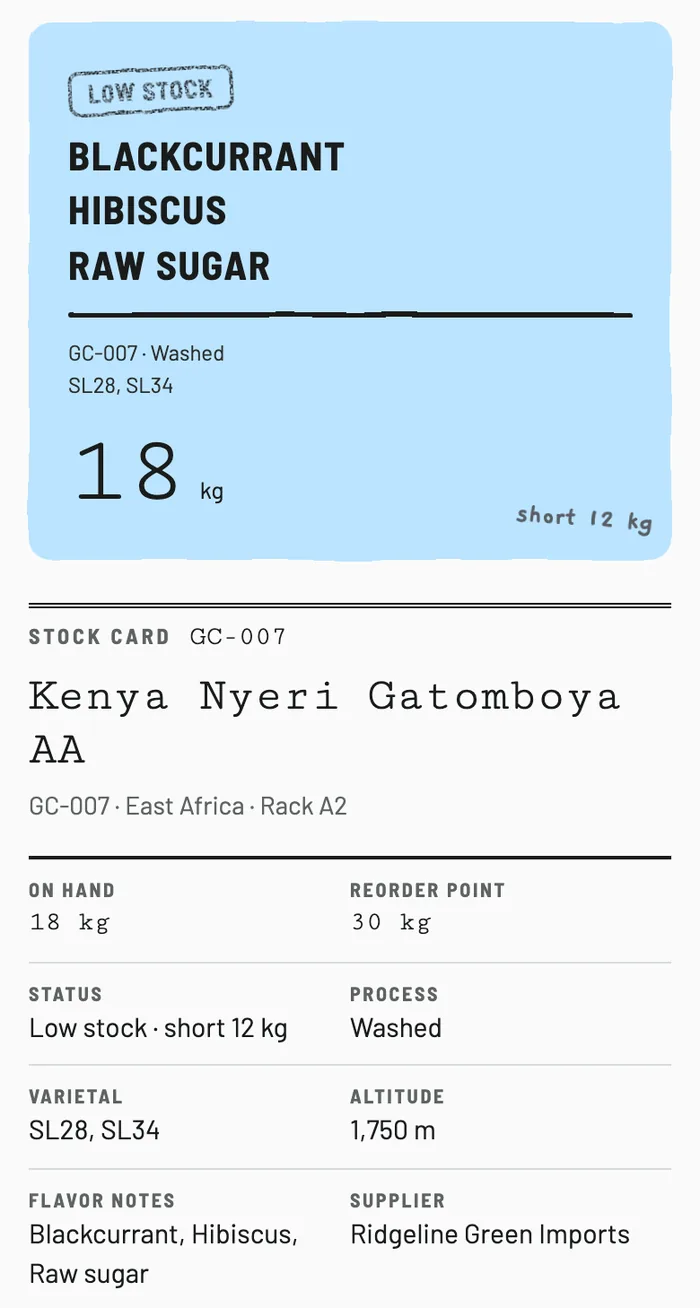
Stock card for lot GC-007 Kenya Nyeri Gatomboya AA on a phone: 18 kg on hand, reorder point 30 kg, status Low stock, short 12 kg
Row GC-007 as its own stock card
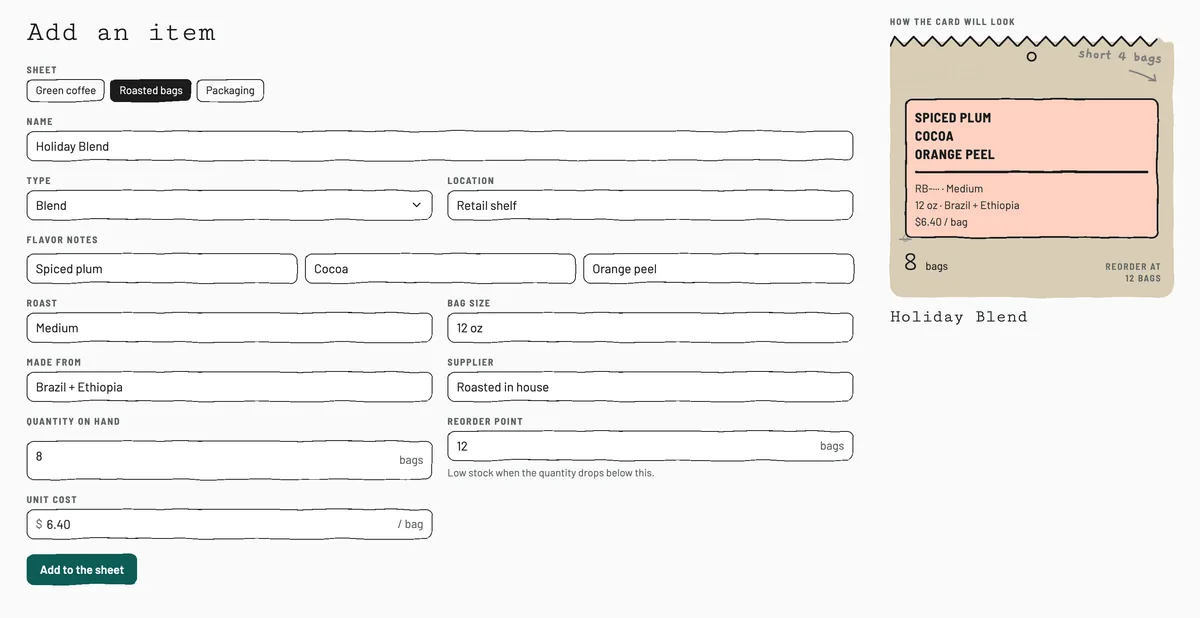
Add an item form in the sample app: sheet, name, type, location, flavor notes, roast, bag size, quantity on hand, reorder point and unit cost, with a preview of the new card
The column headings as an Add an item form
Hand-drawn coffee-origin map in the sample app: Central America, South America, East Africa and Asia-Pacific with lot counts, pencil rings on countries with a lot below its reorder point, and region filter buttons
The same lots, filtered by region on a map

When is it worth turning a shared spreadsheet into an app?

Consider turning a shared spreadsheet into a web app when people need different record views and actions, or a form for adding records without working in the file. HappySeeds can build those forms, record views, and role actions from your file and instructions.

  • Staff and customers need different records or different actions on those records.
  • Someone needs to submit a new record through a form, without opening the workbook.
  • People need to find and update records in a phone browser while doing their work.

Use the app to make those tasks clear for each role. Keep the original sheet if it remains useful, and decide where future changes need to be saved.
How can people use your spreadsheet app on an Android phone or iPhone?

They open it in the phone's browser: HappySeeds builds web apps that work on Android phones, iPhones, and computers. Include phone use in your request if staff need to check or update records away from a desk, then try the forms and record views on the devices they will use.

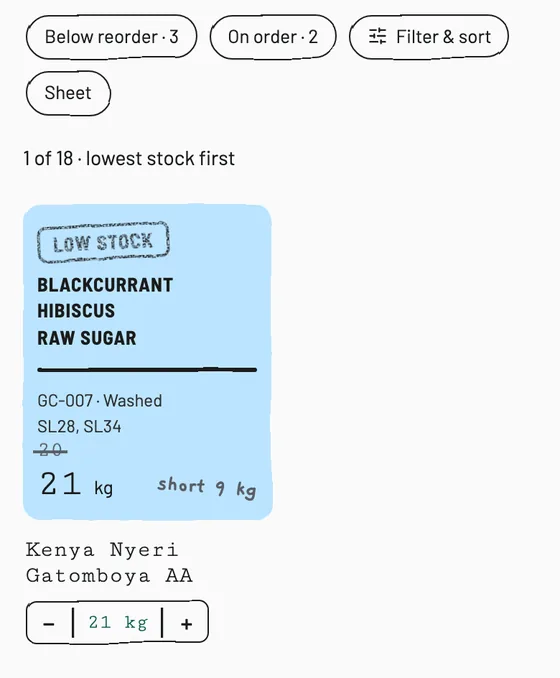
Staff view on a phone: the quantity for Kenya Nyeri Gatomboya AA raised from 20 to 21 kg with the plus button on its card
Tap the count on the shelf
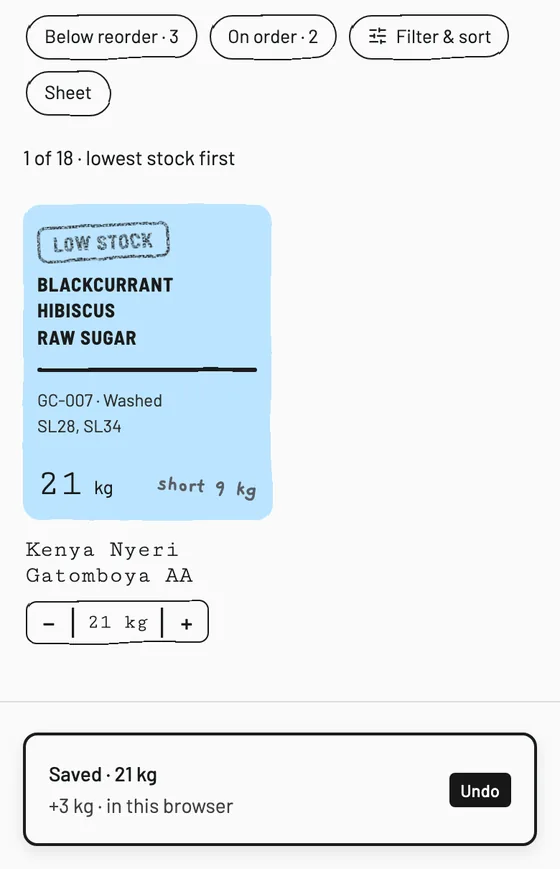
Confirmation on a phone after the change: Saved, 21 kg, plus 3 kg, with an Undo button
The change is saved

Where changes live

Where are changes saved after you upload a spreadsheet?

Changes are saved in your app's database. Your uploaded CSV or Excel file is the starting point: people then add and update records in the app, and the original file stays separate from those changes.

this fits when…This approach fits a team that wants day-to-day record entry and updates to happen in the app, while keeping the original spreadsheet as a reference or backup copy.

compare first when…If another process must keep using live changes in the original sheet, compare the connected-spreadsheet route in the route guide before choosing how to build.

Prepare

How do you build an app from an Excel spreadsheet?

Upload your CSV or Excel file and tell HappySeeds what people need to do with it. A useful request connects the records you already have with the screens, actions, and rules your users need.

Can I convert a Google Sheet into an app?

Yes. Download your Google Sheet as a CSV or Excel file and upload that copy to HappySeeds. For a task that uses several worksheets, download an Excel (.xlsx) copy. Excel files and CSVs can be uploaded directly.

Make the records easy to explain

  • Give columns clear names and keep dates, numbers, and status values consistent.
  • Keep one record on each row. If a color carries meaning, explain it with a field such as Status.
  • Point out the field that identifies a record, such as an item ID or membership number.
  • If several worksheets are related, name the ones your app needs and explain which fields refer to the same item or person.
  • Describe what each group of users should be able to view, add, or change.

You can start with one task. Keep a copy of the original file so you have records and expected values to compare with the app.

Copy this request and add your details

Request template

Build a web app from the attached spreadsheet for [people who will use it]. The main task is [what they need to do]. The records are [what each row represents], identified by [ID field]. Use these worksheets: [names]. They relate through [matching fields, if relevant]. Create [record views, forms, and actions]. [Role] should be able to [view, add, or edit which records]. Apply these calculation or condition rules: [rules in plain language]. Here are sample inputs and expected results: [examples]. I want to maintain new and updated records in the app. Help me review the result before publishing.

The request goes into the box at the top of the page. Replace each part in brackets, then add your file.

Filled example · inventory

Build a web app from this inventory file for our staff. Each row is an item, identified by Item ID. Staff can search items and update Quantity; I can also edit Unit cost and Reorder point. Calculate Stock value as Quantity multiplied by Unit cost. Mark an item Low stock only when Quantity is below Reorder point. Use a few rows from the file to check the calculation and the role actions before publishing.

Calculations

How do you bring spreadsheet calculations and rules into an app?

To build an app around spreadsheet calculations, upload the file, explain what each rule should do, and compare the app's results with a few rows from your original spreadsheet.

Say what to calculate and which values to use

For inventory, you might ask HappySeeds to calculate Stock value as Quantity multiplied by Unit cost, then add those item values to show a total. For a price list, describe which price applies at each quantity and how the total should be calculated.

Include examples with expected answers. They give you a clear way to check whether the app follows the rule you described.

Turn a condition into a clear action

Name the condition and what should happen when it is met. For example: mark an item Low stock when Quantity is below Reorder point. State what happens at the boundary too: an item at the reorder point does not meet a rule that says below.

Try the rule

Quantity
8
Unit cost10
Reorder point5
Stock value

8 × 10 = 80

Low stock?

8 is below 5? No

At 5 the item is not below the reorder point, so it gets no Low stock label.

Check example (illustrative numbers)
QuantityUnit costReorder pointExpected stock valueExpected Low stock label
810580No
210520Yes
510550No
01050Yes

These are illustrative inputs and expected answers for checking your own app.

Roles

What should logged-in users be allowed to see and change?

Decide by each group's job: which records they should open, add, or update. HappySeeds can build employee or customer logins with those record actions for each role.

customer appFor a customer app, ask for each customer to work with their own records.

internal toolFor an internal tool, describe the difference between staff who update a quantity or status and the person who manages item details or prices.

Write the rules for each role

Example roleRecords and actions to request
OwnerOpen the records needed to manage the app and edit the item details or prices.
StaffFind items and update quantities or statuses needed for their work.
Customer or memberOpen and update the records associated with their own account.
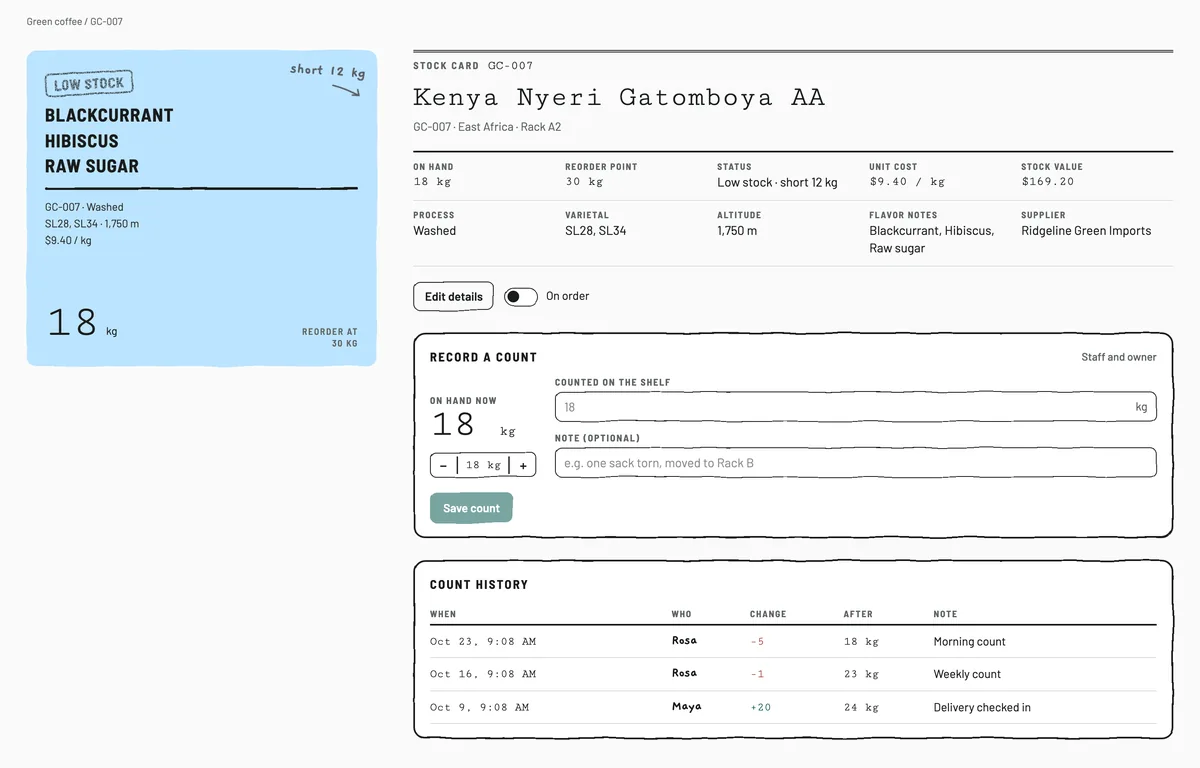
Owner view of stock card GC-007: on hand, reorder point, status, unit cost $9.40 per kg, stock value $169.20 and an Edit details button
Owner: unit cost, stock value and Edit details
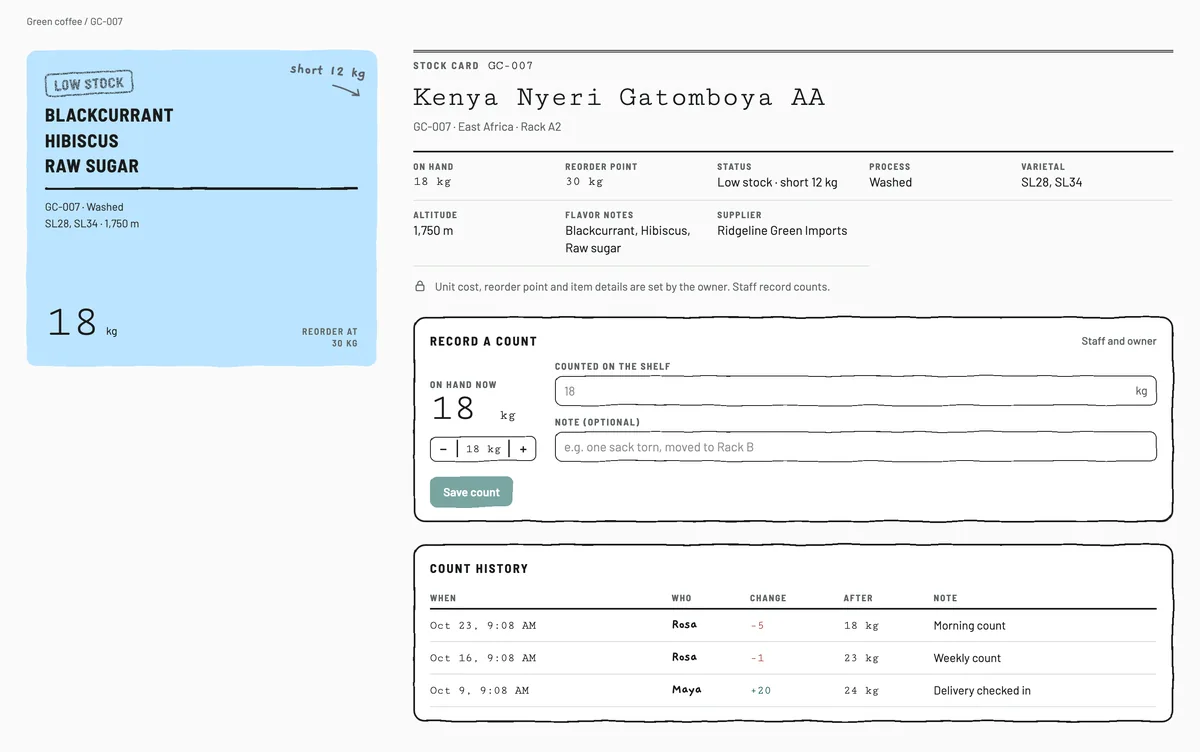
Staff view of the same stock card: no unit cost or stock value, a note that unit cost, reorder point and item details are set by the owner, and Record a count
Staff: the same card without prices; they record counts

Customer or member

This sample app has no customer logins, so there is no screen to show. In your request, say that each customer opens and updates only the records tied to their own account, then check it while signed in as a customer.

Use the roles your app actually needs. Before inviting people, try the main task with each role and check that the available records and actions match your request.

After publishing

What happens to your data after you publish?

Records

After you publish, new submissions and record updates are saved in your app's database, and that data can be exported. Build the forms and edit actions needed for their daily tasks, then check that new and updated records are saved as expected.

The app itself

To change a screen, add an action, or revise a rule, continue the conversation in HappySeeds. After changing the app, return to Deploy and publish again to update the live version.

Exporting records and exporting code serve different needs

Records

Data received by the app can be exported. Before using the export for another task, check that it contains the records and fields you need.

Code Lite and Pro

Code export lets you take the generated app code. Code export and GitHub sync are included in Lite and Pro. See current plans when you want those options.

Choosing a route

Why build an app from your spreadsheet with HappySeeds?

Use your existing records as the starting point, describe the forms and rules you need, and keep adjusting the app through conversation.

If people currently open the same sheet to enter or change values, a custom app can give them forms, record views, and actions matched to their role. See when to turn a shared spreadsheet into an app for the signals to look for. HappySeeds combines app generation, a database, user logins, and hosting. Review the records, calculations, and role actions before everyday use.

  • App generation
  • Database
  • User logins
  • Hosting

Which kind of tool should you use to turn a spreadsheet into an app?

It depends on where ongoing changes must be saved. If another process must keep reading and writing the original spreadsheet, look at a connected-spreadsheet builder. If your team can maintain records in the app, upload the file and build a custom web app with HappySeeds. Calculations can be part of a full app or the main purpose of a smaller tool.

If your main requirement is…

  • An app that reads and writes to a spreadsheet another process must keep using

    Consider this routeA connected-spreadsheet builder

    What to decide before startingWhich sheet remains the live source, and which changes need to flow between the sheet and app.

  • A custom app where people work with records, forms, and rules in the app

    Consider this routeUpload a file and build a custom app with HappySeeds

    What to decide before startingWho uses it, which records and actions they need, and which rules to check.

  • A tool mainly for entering values and getting a calculation

    Consider this routeA spreadsheet-to-calculator converter

    What to decide before startingWhich inputs, formulas, and output values define the calculation people need.

  • Help creating, editing, or analyzing a workbook itself

    Consider this routeAn assistant inside the spreadsheet

    What to decide before startingWhich cells, formulas, or analyses should change while the workbook remains the main output.

A builder can offer more than one route. Use the required result and data flow to choose the mode that fits your task; a need for calculations alone does not mean you must choose a calculator instead of a custom app.

Starting from a process rather than an existing spreadsheet? Describe the work you want a business app to handle, then build around that process.

When another process still depends on the original sheet

Look for dependencies outside the app: another report reads the sheet, people still update the original workbook, or an existing script or automation depends on it. If those changes must keep reaching the original sheet, check a connected-spreadsheet tool's data-source and write-back conditions before choosing that route.

Free plan

Is there a free way to turn a spreadsheet into an app?

Yes. With HappySeeds you can publish the app for real users on the free plan. Hosting and a database are included, so you can share a published web app for people to use.

Lite and Pro add options such as a custom domain, code export, and GitHub sync. See current plans for the available plans and features.

See plans →

By spreadsheet

Build around what your spreadsheet tracks

Different spreadsheets call for different actions. Start with the job people need to do, then choose the records, views, and rules that support it.

Your spreadsheetAn app to ask forA detail worth specifying
Inventory listSearch items, update quantities, and open item details.Define how stock value is calculated and when an item receives a Low stock label.
Customer or member listFind a person, open their record, and update contact details or a status.Say which roles need each record and which fields they can change.
Price listLet people choose an item and quantity, then calculate a total.Explain quantity breaks, which price applies, and example totals to check.

These are starting requests to adapt to your own file. If you mainly need a calculator, use the route guide to compare that option with a broader record-based app.

Before you share

Check the app before inviting people in

Check the generated app against the file and rules you supplied before making it part of daily work. A working page is the start of the review; the records, calculations, and actions need to match the task too.

Use the result of each check to ask HappySeeds for the next change. Start by getting one important task working as intended.

Questions about turning a spreadsheet into an app

Can I turn an Excel file into a web app without coding?

Yes. Upload your Excel file to HappySeeds and describe what people should do with the records. You can build a web app with forms, logins, and a database, then request changes through conversation.

Can I start from Google Sheets?

Yes. Download a copy of your Google Sheet as CSV or Excel and upload that file to HappySeeds. For several worksheets, use an Excel (.xlsx) copy. The uploaded file is the starting point; describe how you want to maintain records in the app.

How do I bring spreadsheet calculations into the app?

Upload the file and explain what each calculation should do, including which values it uses and any conditions that change the answer. Supply sample inputs and expected results, then check the generated app against them.

Can people use the app on Android or iPhone?

HappySeeds builds web apps that people can open in a browser on a phone or computer. Include the intended devices in your request and check the forms and record actions on them before inviting users.

Can people add records after I publish?

Yes. Build the forms and record actions people need, with submissions saved in the app's database. Check a new submission and reload the app to confirm the record is saved as expected.

Can I change the app later without writing code?

Yes. Continue the conversation in HappySeeds to request a new screen, action, or rule. After changing the app, use Deploy to publish again so the live version includes your changes.

Can I export data from the app?

Yes. Data received by the app can be exported. Before using the export elsewhere, check that it contains the records and fields you need. Data export is separate from exporting the generated app code.

Can I publish the web app for free?

Yes. HappySeeds lets you publish for real users on the free plan, with hosting and a database included. Check current plans when you need paid features.

What happens to my original spreadsheet after I upload it?

Your original spreadsheet does not change when people add or update records in the app. Those records are kept in the app's database.

Can I take the generated source code with me?

Code export and GitHub sync are available with Lite and Pro. Use those features when you need the generated app code; business-record data export is a separate task.

What should people be able to do with your spreadsheet?

Bring the file you already use. Tell HappySeeds who the app is for, what they need to do, and which rules it should follow. Start building a web app around that work.

See what else you can build with HappySeeds → Build my app →