
It's Elin. I spent the last few days trying to turn a document parser into something an actual customer could pay for. The parsing part took an afternoon. The other 90% is what nearly broke me. If you want to build an OCR app and not just run a model in a terminal, that gap is the whole story.
So here's what I learned the hard way, using Baidu's Unlimited-OCR as the engine. This isn't a deployment tutorial and it's not model marketing. It's the stuff that sits between "the model read my PDF" and "a stranger trusted my app with their contract."
Quick version for the people skimming: the model is the easy part. Upload flow, corrections, export, accounts, storage, payments, and what-happens-when-it-breaks — that's the product. Pick the model last, not first.
What Unlimited-OCR Changes for Long Documents
One-shot parsing versus page-by-page OCR
Almost every open OCR pipeline I've touched works the same way: chop the file into single pages, run each one through the model, stitch the outputs back together. It works. It's also where reading-order bugs and stitched-together tables come from. Vector search workloads fit the Codex Milvus path.
Unlimited-OCR's bet is different. According to the model's paper on arXiv, it parses dozens of pages in a single forward pass and keeps the KV cache from ballooning as pages add up — they call the mechanism Reference Sliding Window Attention. In plain terms: the model holds context across the whole document instead of resetting its memory at every page. That's the actual reason this thing exists.
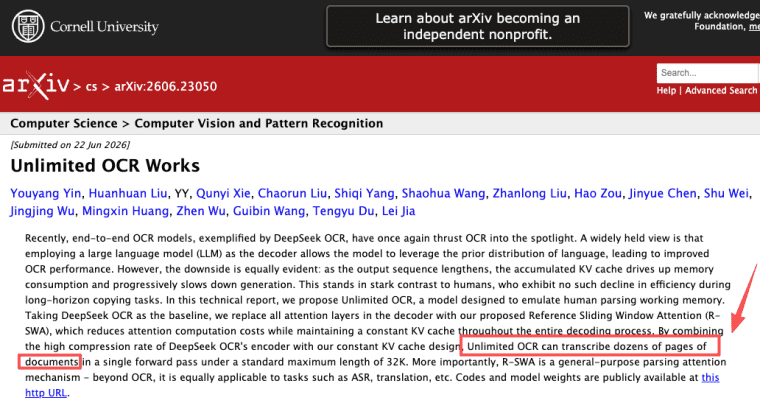
One detail worth knowing if you're choosing it: it's a small model. The paper describes 3B total parameters with 500M activated in the decoder per token, using the MoE architecture inherited from DeepSeek-OCR. Small and fast is great for serving costs. It also means you're not getting some giant general model's world knowledge — it's a specialist.
What the context length and 40+ page tests do not guarantee
Here's the part I almost got wrong in my own notes. The official inference code runs at a max length of 32,768 tokens. The "40+ pages in one pass" number comes from the team's own in-house test set — they picked books and papers and grouped them by page count to measure long-document behavior. That's a self-built evaluation, not a promise that any 40-page file you throw at it will come back clean.
Long, dense, weird-layout PDFs eat tokens fast. So treat "40+ pages" as "this is the kind of thing it was built for," not "this is the hard ceiling for your users' files." I'd test on your actual worst-case documents before you put a page limit on your pricing page.
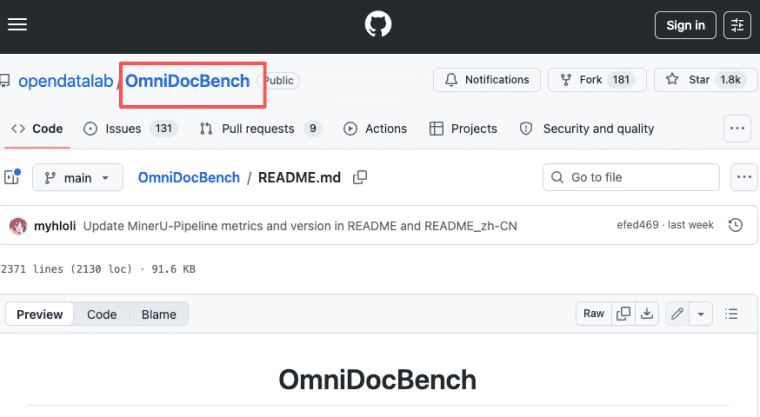
Same caution on the accuracy number. The team reports SOTA results on both OmniDocBench v1.5 and v1.6, with the headline figure being 93.92% on v1.6. I checked the OmniDocBench benchmark itself — it's a real, widely-used document parsing benchmark from Shanghai AI Lab. But those are author-reported results, not independent evals. As of June 2026 I haven't seen a third party reproduce them. Use them as a signal, not as a guarantee you can quote to customers.
Design the OCR Product Before Choosing the Model
Define the user, document type, and required output
This is the step I skipped on my first build, and it cost me a week. I picked the model first, then tried to figure out what to build around it. Backwards.
A document AI app lives or dies on three questions, and you answer them before you write a line of code:
- Who is the user? A solo bookkeeper and a legal ops team want completely different things from the same parsed text.
- What document type? Invoices, contracts, handwritten forms, multilingual reports — each one has different failure modes and different "good enough" bars.
- What's the required output? Clean markdown? Structured JSON with specific fields? A searchable archive? The output format decides half your UI.
Nail these three and the rest of the build gets obvious. Skip them and you'll build a beautiful upload box that produces text nobody can actually use.
Build the Customer Document Workflow
Upload, project status, correction, and export
A PDF OCR app is not "upload → text." It's a loop the user moves through, and every stage needs a real state.
Upload needs to handle big files, angled scans, mixed types. Users need to see what's happening — "processing," "done," "failed on page 7" — not a spinner that lies. I shipped a version where a failed parse looked identical to a slow one. Users left.
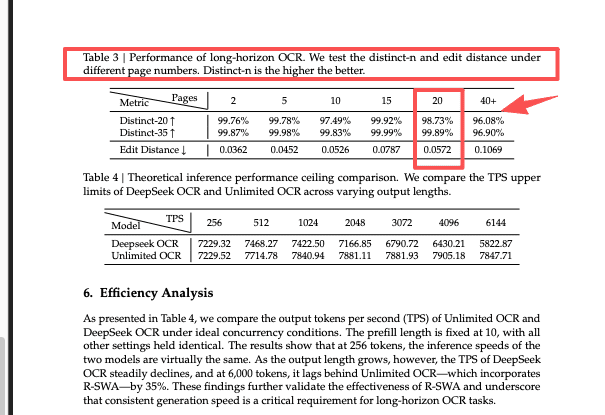
Correction is the part most builders skip and it's the part that earns trust. OCR will get things wrong. Give people a side-by-side view — original page next to extracted text — and let them fix it inline. The paper on Hugging Face reports an edit distance around 0.057 on 20-page documents from the team's own test set, which is genuinely good, but "good" still means errors on a long contract. Plan for the fix, don't pretend it won't happen.
Export is where value lands. Markdown, JSON, plain text, back to PDF — whatever the user does next, the handoff has to be clean.
Accounts, permissions, storage, and payments
None of this is glamorous. All of it is the difference between a demo and a business.
Accounts and permissions matter the second a second person shows up. Who can see which documents? Can a team share a project without sharing everything? Storage is its own decision — where do the original files live, for how long, and who can pull them back.
Payments OCR usage tends to be usage-based. The Stripe Billing docs are the realistic starting point — a customer running 4,000 pages a month is not the same as one running 40.
Make Accuracy and Failure States Visible
This is the hill I'll die on. The worst OCR apps aren't the ones that make mistakes — every OCR app makes mistakes. The worst ones are the ones that hide the mistakes.
Show confidence where you can. Flag the pages the model struggled with. When something fails, say what failed and where, in language a non-technical user understands. "Couldn't read page 12 — it looks like a low-resolution scan" beats a red error icon every time.
I learned this from the other direction: I once trusted an app's clean-looking output, didn't double-check it, and shipped a number that was wrong. Now I build the opposite — apps that make their own uncertainty obvious. It feels less impressive in a demo. It's the reason people come back.
Protect Documents and User Trust
Retention, deletion, and access controls
The moment your app touches someone's contracts, invoices, or ID documents, you're holding sensitive data whether you wanted to or not.
Three things you decide up front, not after a scare:
- Retention — how long do you keep originals and extracted text? Default to less.
- Deletion — can a user actually delete their data, fully, and can you prove it's gone?
- Access controls — who on your side can see uploads? "Nobody, by default" is a good answer.
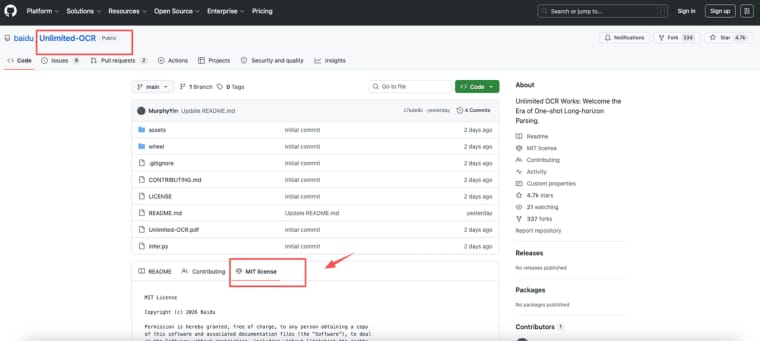
One real advantage of Unlimited-OCR here: it's MIT-licensed and self-hostable, which the model card confirms. That means you can run it on infrastructure you control instead of shipping every customer document to a third-party API. For privacy-sensitive customers, that's not a nice-to-have — it's the thing that closes the deal. I'd still get a lawyer to look at your terms before you make promises about who's liable when OCR misreads something. Treat any policy or liability language as "check the latest official guidance and get real legal advice," not something you copy from a blog.
Decide How to Run Unlimited-OCR
You've basically got two paths, and the right one depends on how much infrastructure you want to own.
Run it yourself: the official repo documents inference through Hugging Face Transformers and SGLang, tested on NVIDIA GPUs. Community write-ups mention vLLM, Docker, Ollama, and llama.cpp paths too, but I'd draw a clear line between "the team officially validated this" (Transformers, SGLang) and "the broader ecosystem supports it" (the rest). For a small model like this, GPU requirements are modest — third-party estimates put FP16 inference in the single-digit-GB VRAM range — but verify on your own hardware before you commit, because those numbers shift with context length and batch size.
Don't want to manage GPUs at all? Then you're looking at an AI app builder or a managed hosting layer that handles the serving for you, and you focus entirely on the product workflow above. That's a legitimate choice — owning less infrastructure means shipping faster. Just know what you're trading away in control.
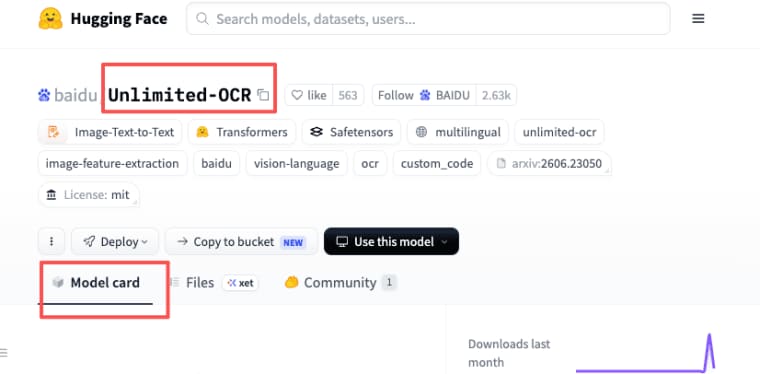
For specific costs, retries, and how failures multiply your real spend: don't trust a number you read once. Pricing and model details change. Check the Hugging Face model card and your hosting provider's current pricing as of the day you're deciding, not the day someone wrote about it.
Launch, Observe, and Improve the Product
Shipping is the start. Once real documents flow through, you learn what no benchmark tells you — which files break, where users abandon, which pages get corrected most. The model gives you 93.92% on a benchmark. Your customers give you the upside-down scan, the password-protected file, the contract in two languages. That feedback is worth more than another accuracy point.
The thing I'd tell past-me: the second build is always better than the first idea. So get a rough version in front of real documents fast, and let the breakage teach you what to fix.
Explore More Topics:
FAQ
What happens when users upload password-protected PDF files?
The model parses images of pages — it can't open an encrypted file on its own. You need a step before OCR that detects the lock and prompts the user for the password, or rejects the file with a clear message. Don't let a locked PDF silently become an empty result; that's the kind of failure that makes people think your whole app is broken.
Who is responsible when OCR changes a contract's meaning?
This is a legal question, not a technical one, and the honest answer is "it depends on your terms and your jurisdiction." Build a human-review step for anything high-stakes, keep the original alongside the extracted version so meaning can always be checked against the source, and get actual legal advice on your liability language. Please treat the latest official guidance as the source of truth here, not a how-to article.
How should the app handle pages uploaded in the wrong order?
Let users reorder before parsing, and show page thumbnails so they can catch a scrambled scan visually. One-shot parsing reads the sequence you give it, so a wrong order in means a wrong order out — fixing it after the fact is much more painful than catching it at upload.
How should the app handle documents containing several languages?
Test this specifically before you promise it. The training data and language coverage aren't fully disclosed in the public materials, so don't assume every language works equally well. Run your actual multilingual samples through it, and if a language underperforms, be upfront in your UI about which languages you officially support rather than letting users discover the gap on their own documents.


