I spent a weekend last month trying to build an iOS app around one clever AI idea, and I got the sequence completely backwards. I started in the model docs. I should have started with whether anyone would pay for the thing at all. By the time I had a working prompt, I still had no login, no payments, and no idea if the idea held up. So this is the post I wish someone had handed me first — less "here's the magic," more "here's the order I'd do it in next time."
Hi, I'm Elin. Quick version, if you're in a hurry: the AI feature is the easy 20%. The 80% that decides whether your iOS AI product survives is data, accounts, payments, and getting it past review. Validate the business before you commit to native.
Before You Build an iOS AI App
The trap I fell into — and I see a lot of non-technical founders fall into it too — is treating "native iOS" as the default. It's not the default. It's a commitment.
A native build means Xcode, an Apple Developer account, the review process, and shipping updates that wait in a queue. That's fine if you already know people want this. If you don't know yet, you're spending your most expensive resource — time — to validate something a web page could have validated in an afternoon. Auth and billing can follow the Codex Kinde guide.
So before anything else, answer one question honestly: do you have a real user with a real problem, or do you have an idea you're excited about? Those need different first steps. The first one might justify native. The second one almost never does.
What "iOS AI" Can Mean for Founders
Here's something that confused me at first. "iOS AI app" isn't one thing. It splits into two very different paths, and they have completely different cost structures.
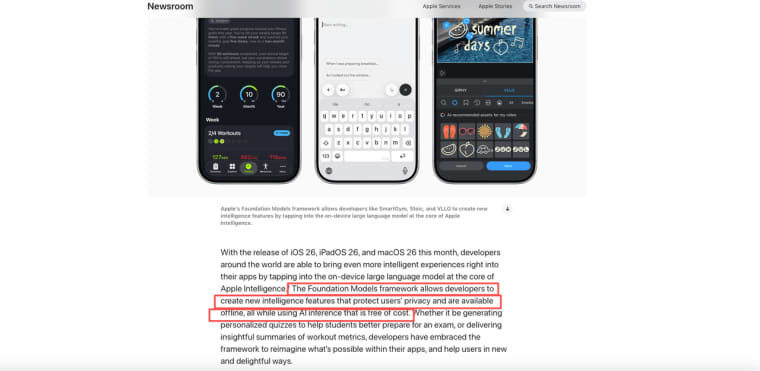
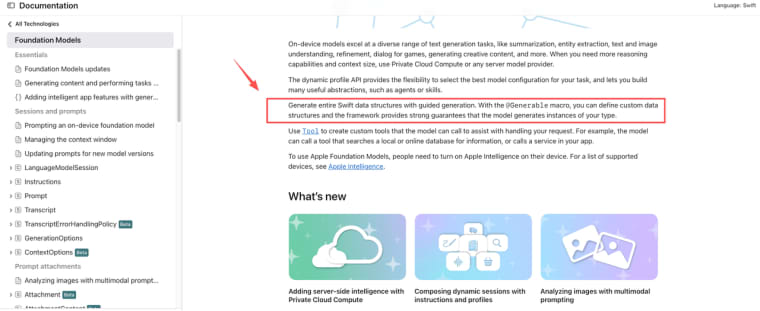
One path runs the AI on the device itself. Since iOS 26, Apple ships the Foundation Models framework, which gives apps direct access to the on-device model behind Apple Intelligence. The pitch that matters for founders: it runs offline, it keeps data on the phone, and — this is the part I had to read twice — the inference is free, because there's no server to pay for. Apple lays this out plainly in Apple's own writeup on the Foundation Models framework.
Say you're building something like "summarize my notes into one sentence a day" — that's exactly the kind of structured task on-device handles fine, and you'd never see a server bill for it.
The catch: on-device only works on Apple Intelligence–capable hardware. I checked Apple's current device list in June 2026 — it's iPhone 15 Pro and iPhone 15 Pro Max, all iPhone 16 models (including iPhone 16e), and all iPhone 17 models (including iPhone 17e and iPhone Air). The standard iPhone 15 is not on the list — it's locked out, same as anything older. If your audience is mostly on a standard iPhone 15 or earlier, that feature isn't there for them. Worth a quick re-check before you bet a core feature on it, since the list creeps forward with each hardware cycle.
The other path calls a cloud model over an API — Gemini, Claude, OpenAI, whatever. Works on any phone, costs money per request, needs a network. More reach, more flexibility, ongoing bill. I'll get into when that tradeoff actually matters in the next section.
Native iOS app vs web-first AI app
My honest take after getting burned: build web-first, validate, then decide on native.
| Web-first AI app | Native iOS app | |
| Time to first user | Days | Weeks (Xcode + review queue) |
| What you learn | Real usage from real people | Nothing until it's approved |
| On-device AI / push notifications | No | Yes |
| App Store distribution | No | Yes |
| Cost of being wrong | Low | High — weeks sunk before feedback |
A web-first AI app — something you can put behind a link today — lets real people use the thing this week. You learn what's broken from actual usage instead of guessing. Native gives you the App Store, push notifications, and on-device AI, but it costs you weeks before a single stranger touches it.
I'm not anti-native. I'm anti-native-too-early. The decision isn't web or iOS forever — it's which one earns you the next piece of information fastest.
Model Choices: Apple, Gemini, Claude, or Other APIs
This is where founders over-research and under-decide. You don't need the "best" model. You need one that fits your reach, your budget, and your privacy story.
Apple's on-device option is the cheapest to run and the strongest on privacy, because nothing leaves the phone. It's also the most limited: smaller model, device restrictions, and you write it in Swift. If you're going native and your feature is summarizing, tagging, or structured generation, read Apple's Foundation Models documentation before you reach for anything else — it might already do what you need, for free.
If you need more horsepower or you're web-first, that's where the cloud APIs come in. Which brings me to the three names everyone asks about.
Google AI Studio, Claude AI, and Gemini AI tradeoffs
I've used two of these enough to say something real, and I'll flag the one I haven't.
Gemini AI, via Google's tooling, is the fastest "describe it and see something" path I've tried. Google AI Studio's build mode docs walk through prompt-to-app, and it handles the API key server-side so it isn't sitting in your client code. One thing worth knowing and verifying yourself: the permanently-free tier may use your data to improve Google's products, while the paid tier doesn't. If you're touching anything sensitive, that distinction matters — confirm the current terms before you ship.
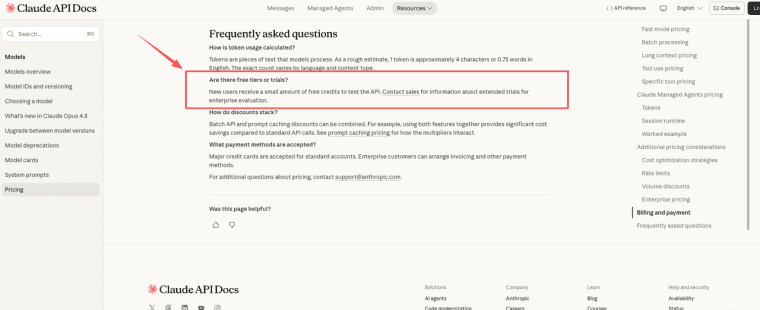
Claude AI is the one I reach for when output quality and following instructions matters more than raw speed — drafting, reasoning, structured tasks. You'd wire it in through Claude's API documentation. It's a paid API; there's no on-device free lunch here. Pricing and model names shift, so check the current page rather than trusting a number you read in some blog (including this one).
| Apple on-device | Gemini AI | Claude AI | |
| Cost | Free (no server) | Per-request | Per-request |
| Device reach | iPhone 15 Pro+ only | Any device | Any device |
| Best for | Summarizing, tagging, structured generation | Fastest prompt-to-app prototyping | Output quality, instruction-following, drafting |
| Privacy | Strongest (nothing leaves device) | Free tier may train on your data; paid tier doesn't | Paid API, check current terms |
The real choice usually isn't "which is smartest." It's: do I want zero inference cost and device limits (Apple), maximum reach with a per-request bill (Gemini AI / Claude AI), or some mix? If you forced me to pick one for a first demo today, I'd start with Claude to get the logic and copy right, then worry about swapping to Gemini for cost once there's actual usage. Pick for your situation, not the leaderboard.
What You Need Beyond the AI Feature
Okay, here's the part nobody posts about because it isn't exciting. The AI feature is maybe a fifth of the work. The rest is what turns a demo into a product someone pays for.
Data, login, payments, SEO, and user feedback
You'll need somewhere to store user data. You'll need accounts so people come back to their stuff. You'll need payments if you want revenue — and on iOS, digital goods and subscriptions have to go through Apple's in-app purchase system, not your own checkout. You'll need a way to be found (SEO for the web version, App Store listing for native). And you'll need a feedback channel, because your first ten users will tell you more than another month of building.
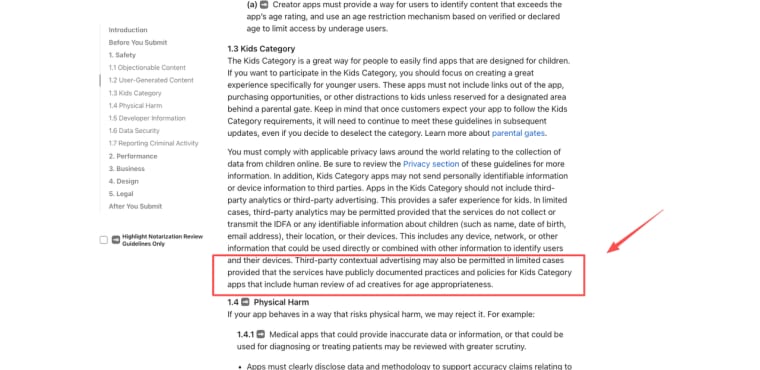
This is also where the rules bite. Apple updated its App Store Review Guidelines in November 2025, adding explicit language to guideline 5.1.2(i): if your app sends personal data to a third-party AI service, you must clearly disclose it and obtain explicit user permission first. A thin "website in a wrapper" also gets rejected for minimum functionality. I'd treat the App Store Review Guidelines as required reading, not a footnote — and assume they'll have evolved by the time you read this.
This whole stack is why I lean on a web-first launch before committing to native. AI app builders — the category of tools that bundle data, login, payments, and SEO into a single launch flow — exist precisely to let you test the business without assembling plumbing. To be clear about the boundary: that's a web-first validation path. It doesn't replace Xcode or the App Store when you decide to go native — it's how you figure out whether native is even worth it.
So where does that leave you? If you want to build an iOS app around AI, resist the urge to open Xcode first. Validate the business, pick the model that fits your reach and budget, and don't underestimate the unglamorous 80% — data, accounts, payments, and review. Get those right and "build an iOS app" stops being a months-long gamble and starts being a series of small, cheap decisions you can actually reverse. That's the version I'd do next time. Go test the idea this week — the second build is always better than the first.
Explore More Topics:
FAQ
What is an iOS AI app?
Loosely, any iOS app where an AI model does meaningful work — generating text, summarizing, answering, recommending. It can run that model on-device (Apple's framework) or call a cloud API. The "iOS" part is the platform; the "AI" part is the feature. Don't let the buzzword make it sound like one fixed thing.
How can founders start building an iOS AI app?
Start by validating the idea as a web app you can share this week, using an AI app builder or a quick API integration. Get real users on it. Only once you've confirmed people want it — and ideally pay for it — commit to a native build in Xcode. Reverse that order and you'll spend weeks building before you learn anything.
What should builders verify before choosing an AI model?
Three things: device and platform reach (on-device AI excludes older iPhones), cost per request versus your margins, and the data/privacy terms (some free tiers use your data; paid tiers often don't). Always confirm the latest details on the provider's official docs — these change, and a stale number can wreck your planning.
When is a web-first AI app better than starting in Xcode?
When you're still validating. A web-first AI app gets something in front of real users in days, with payments and data handled. Xcode and a native build make sense once the idea is proven and you specifically need what native gives you — on-device AI, push notifications, App Store distribution. For exact App Store policies and Foundation Models requirements, check Apple's official developer documentation rather than relying on summaries.