Approval is easy to describe until the approver is away. Then a request sits in an inbox and the buyer hears about it last. A low-code approval workflow should make that gap visible, not merely replace email with a form.
Our example is deliberately small: a design studio needs approval for a replacement monitor. The people and outcomes below are fictional.
Choose One Decision That Needs Approval
Pick an action that must wait for a named person. A team member requests a monitor costing up to $300. The operations lead decides; a buyer places the order. Requests outside that scope go to a person, never to silent approval.
Write the workflow approval rules first: what triggers review, which facts matter, who decides, and what approval permits. Here the trigger is submission. Approval permits an order; it does not place one. A price change before checkout may require another decision.
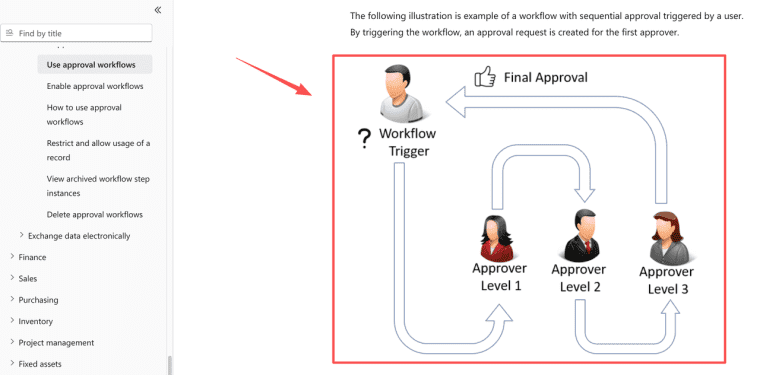
Treat this separation as deliberate design, not something the platform hands you. Microsoft's approval workflow guide distinguishes the triggering record, approval steps, and later actions. Take the separation; leave the Microsoft-specific controls behind.
Define the Request Record and Decision States
Give each request an ID; save the item, quoted amount, reason, requester, current reviewer, request owner, final owner, status, and decision note. The record should answer: "What is waiting, and whose move is it?" Here the operations coordinator is the request owner: they watch for stranded requests and assign a backup, but cannot approve on the reviewer's behalf. That ownership should survive a change of reviewer.
| Approval status | Who acts next | Allowed next move |
| Draft | Requester | Submit or discard |
| Pending review | Reviewer | Approve, reject, or request information |
| Needs information | Requester | Revise and resubmit |
| Exception | Named exception owner | Reassign, return, or close with a reason |
| Approved | Final owner | Confirm the order or flag a changed price |
| Rejected | Requester | Close or create a revised request |
| Withdrawn | Request owner | Confirm no order is in progress; retain the earlier history |
| Ordered | Final owner | Record the order reference and close |
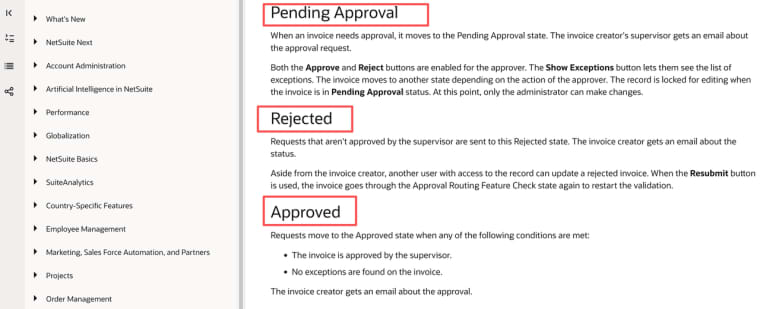
Do not collapse "approved" and "ordered." One is permission; the other is an action. Oracle's invoice approval states also distinguish pending, approved, and rejected outcomes. Your labels can be simpler, but not ambiguous.
Treat "closed" as a separate timestamp, not a substitute for the decision state. A requester may withdraw a draft or a still-pending request; the request owner checks that no order has started before marking it Withdrawn. A rejected request can be closed after the requester sees the decision. An ordered request closes when the buyer records the order reference. This avoids turning three different endings into one unhelpful "done."
Separate the Requester, Reviewer, and Final Owner
The requester supplies facts. The reviewer makes the human approval step. The final owner checks the order against the decision. One person may hold two roles, but their actions should remain distinct. This example prohibits self-approval.
Restrict the underlying data action, not just the button. Hiding "Approve" is useless if a requester can change status elsewhere. Least privilege means giving each role only the authority needed for its task; using the principle does not certify this app.
Record Why an Approval Was Granted or Rejected
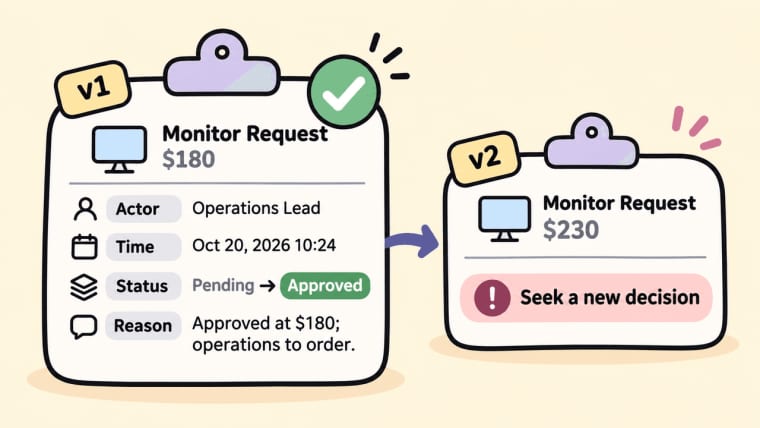
A green checkmark is a poor memory. Save the actor, time, old and new status, and reason tied to the version reviewed. For the fictional request, "Approved at $180; operations to order" beats "OK." If the quote rises to $230, seek another decision rather than editing the amount under an old approval.
Separate private reviewer notes from the requester-facing explanation. Preserve corrections instead of overwriting events. Microsoft's auditing guidance illustrates that record-change history needs configuration; a workflow screen alone is not an audit trail.
Route Exceptions to a Person, Not a Silent Automation
An exception queue needs an owner. Name the next actor and review time for missing information, an absent approver, a changed price, or a failed save. "Pending" with no owner is a parking lot.
If the operations lead is away, route to an authorized backup or show a due date. Never interpret timeout as consent. If saving fails after Approve is clicked, show "decision not confirmed" until the record is checked.
Power Automate's flow-error guidance shows timeout branches. HappySeeds does not ship a built-in equivalent. Start with a visible queue and a manual daily check. Only add alerts after you know which exception types actually recur.
Test the Workflow with an Ordinary and an Edge Case
Use fictional accounts. Submit the $180 request, approve it with a reason as reviewer, then sign in as buyer. The buyer should see the amount and record the order without changing the decision. The requester should see the approval status, not private notes.
Next, make the reviewer unavailable and raise the quote above the limit. Check the exception owner, preserve any earlier decision, and block an order against outdated terms. Try the direct request URL as the wrong user. Also click Approve twice: one decision should be recorded, not two competing events. Repeat on the published app; Preview does not prove live permissions.
For each run, write down the expected status and owner before clicking. Then compare the saved row with what each person sees. If the screen says Approved but the database still says Pending review, stop the pilot and fix that mismatch. The buyer must not decide which view to trust.
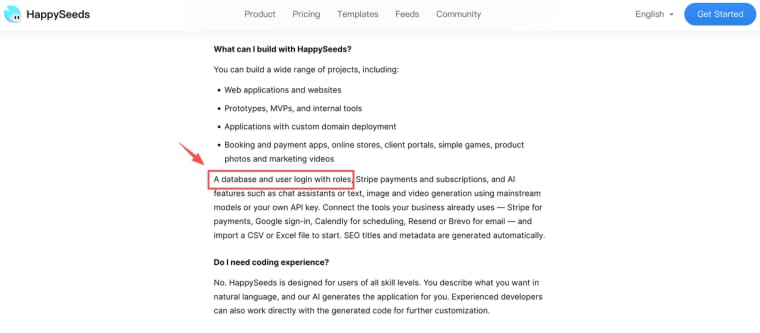
HappySeeds can build this small Web app through conversation. Its Database guidance covers saved records and testing rows from the published URL; its current FAQ describes login with roles. Ask for the form, role-specific views, and state changes, then inspect the behavior yourself. You still need to configure authorization and assign the exception owner. Do not assume reminder emails or a ready-made audit log exist out of the box.
Limits of Approval Automation
Rules can reject incomplete inputs or route a record. They cannot judge whether the purchase is wise or the reviewer conflicted. Keep those questions with people. Check organizational policy and qualified advice before using sample rules for consequential decisions.
Keep a fallback owner, a way to surface open requests, and a method to reconcile decisions made while the app is offline. Without those, the interface is not yet an approval system.
Test the Path That Breaks First
Begin with the $180 request, then remove the approver for a day. If the workflow still shows the next owner, the decision reason, and whether an order is still permitted, the first version is already useful. Only add more routes after that single path holds up under real absence.
Explore More Topics:
FAQ
Should a requester see the approver's private notes?
Set a separate rule for later requests to see decision notes: who receives them, who reviews redactions, and whether an appeal changes what is shared. Do not promise that a "private" field will never be disclosed; organizational records policy and applicable obligations may require a different answer.
How should a withdrawn request appear in history?
Mark "Withdrawn" with actor and time only after the request owner confirms no order began. Do not delete the submission or relabel it "Rejected." If the buyer already ordered, record a separate cancellation or return action instead.
Can an approval be reversed after a task is completed?
Record a reversal without rewriting the earlier decision. If the monitor was ordered, reversing approval does not cancel the supplier order. Assign a new action to the buyer.
How should older approvals be represented after migration?
Import only what the source provides: ID, outcome, date, and actor if available. Label missing reasons as unavailable. Keep a reference to the original system under your retention policy.
Who may audit a decision after an employee leaves?
Give an authorized current owner history access without reusing the former employee's login. Test that the old account loses approval rights while past decisions remain attributable.