
Build a Focused Roster or Buy Workforce Management Software?
Separate the scheduling problem from payroll, timekeeping, and compliance requirements before choosing the product category.
| Restaurant requirement | Build a focused roster | Buy workforce management software |
|---|---|---|
| Core workflow | Availability, role coverage, swaps, and manager approval | Scheduling tied to time clocks and payroll |
| Operating scope | One restaurant or a tailored approval process | Multiple locations with packaged workforce controls |
| Integration need | Selected records and notifications | Payroll, labor forecasting, and compliance modules |
| Evaluation task | Run one week with a late swap and missing role | Run a vendor trial through scheduling and payroll export |
Schedule Each Shift Around Role and Coverage Requirements
Start with locations, service periods, roles, and minimum coverage. A dinner shift may need a manager, servers, bartenders, hosts, line cooks, and dish staff. The schedule should warn the manager when a required role is missing, but it should not publish changes without approval.
Each shift record can include start and end time, location, role, assigned person, status, and manager note. Keep the coverage rule separate so it can change without rewriting every existing shift.
Collect Staff Availability Before Building the Weekly Roster
Give staff a deadline to submit regular availability, one-time conflicts, and preferred hours. Distinguish “cannot work” from “would rather not work.” The manager can then see unresolved gaps before the roster is published.
Availability is an input, not an automatic promise of hours. The published schedule remains the manager-approved source.
Employee availability and work assignments are personal data. The publisher should give staff an appropriate notice, collect only the fields needed for scheduling, define retention and deletion, restrict manager-only information, and provide a route for applicable access or correction requests. The HappySeeds Privacy Policy places end-user compliance duties on the app creator.
Route Shift Swap Requests Through Manager Approval
A safe swap flow has four steps:
- The assigned employee requests a swap or release.
- Eligible coworkers can volunteer for the open shift.
- A manager checks role, overtime, and local policy considerations.
- Approval updates the official schedule and notifies the affected people.
Until step four, the original assignment should remain visible. This prevents two employees from assuming the other person is responsible.
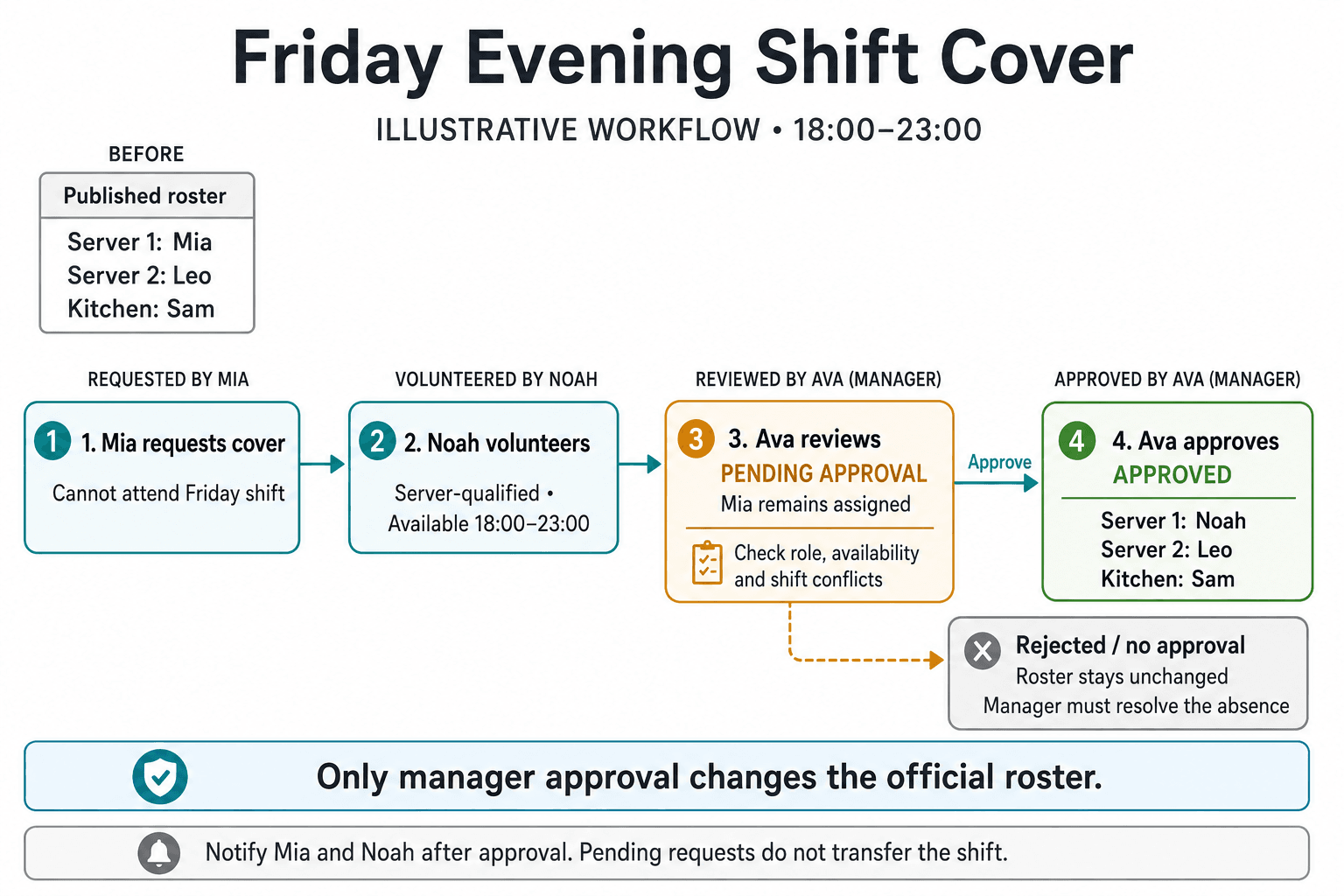
Friday Evening Shift Cover: Employee Request and Manager Approval
This illustrative staff-scheduling example follows one Friday shift from 18:00 to 23:00. The restaurant needs two servers and one kitchen employee. Mia is assigned to Server 1, Leo to Server 2, and Sam to Kitchen. Mia reports that she cannot attend and submits a request for cover; reporting the absence does not automatically remove her from the published roster.
Who Can Cover the Shift?
| Person | Role and availability in this example | Coverage decision |
|---|---|---|
| Mia | Assigned to Server 1; reports she cannot attend Friday 18:00–23:00. | Requests cover for her specific shift. |
| Noah | Server-qualified, available for the full shift, with no overlapping assignment. | Can volunteer to cover Server 1, subject to manager approval. |
| Emma | Server-qualified but unavailable on Friday evening. | Not an available replacement. |
| Leo | Already assigned to Server 2 for the same shift. | Keeps Server 2; cannot cover both server positions at once. |
| Sam | Assigned to Kitchen for the full shift. | Stays in Kitchen so that required coverage is preserved. |
| Ava | Shift manager. | Reviews and approves or rejects the request. |
Request, Review, and Approval
Mia submits “Request cover: Friday 18:00–23:00, Server 1.” Noah volunteers for that exact shift. The request becomes Pending approval, with Mia recorded as the original assignee and Noah as the proposed replacement. Ava reviews Noah's role, full-shift availability, overlapping shifts, hours, and restaurant scheduling policy before deciding.
| Request state | Official Friday roster | What happens next |
|---|---|---|
| Published, before request | Server 1: Mia; Server 2: Leo; Kitchen: Sam. | Mia reports the absence and requests cover. |
| Pending approval, after Noah volunteers | Server 1: Mia; Server 2: Leo; Kitchen: Sam. | Ava reviews the proposal. Noah has not yet taken over the shift. |
| Approved by Ava | Server 1: Noah; Server 2: Leo; Kitchen: Sam. | Update the roster and request record together, record the approval, and notify Mia and Noah. Coverage remains two servers and one kitchen employee. |
| Rejected or still unapproved | Server 1: Mia; Server 2: Leo; Kitchen: Sam. | The original assignment remains recorded, but the reported absence is unresolved. Ava must arrange cover or another staffing response. |
The approved result changes only Server 1 from Mia to Noah. Mia can see that the request was approved and she is no longer assigned; Noah sees the approved shift in his schedule. Leo and Sam retain their original assignments. These are example requirements for the app, not a screenshot of a deployed scheduling product.
How HappySeeds Builds Restaurant Shift Rules and Staff Approval Flows
Plan Mode can define the employee and manager journeys, including draft, published, requested, approved, and rejected states. Database can hold employees, roles, availability, shifts, and swap requests. Preview makes it possible to walk through a full week before the app is deployed.
This workflow does not replace payroll, time tracking, labor-law review, or manager judgment. If those functions are required, they need separate scope and appropriate integrations.
Review the HappySeeds Database setup before storing employee, role, availability, or shift records.
FAQ
It can flag missing required roles and show coverage gaps before a manager publishes the roster.
No. Availability is an input. The manager-approved published roster remains the official schedule.
Only after the defined approval step updates the official schedule and notifies the affected staff.
No. Payroll, time clocks, overtime calculations, and labor-rule compliance require separate systems or scoped integrations.
Launch with HappySeeds
Built the app but not the business? Start with HappySeeds to launch a live, monetizable AI app, or browse AI app templates to see what you can sell.