Restaurant Website Builder for Your Menu, Hours and Location

Give guests one place to check your menu, find your restaurant and get in touch. Tell HappySeeds what you need, publish on the free plan, and update the site whenever your menu or hours change.

Add your menu, photos or logo
Build my restaurant website →

Try:

Start with free credits · Publish on the free plan · No credit card

What Does a Restaurant Website Builder Do for Your Business?

A restaurant website builder helps you create and update a site for your business. With HappySeeds, you describe the pages you need instead of writing code. Your site can bring together a readable menu, opening hours, directions, photos and ways to contact you.

Choose what happens when a guest is ready to order or visit:

What you want guests to do

  1. What to put on your website
    An Order online button linking to your existing public ordering page
  2. What to put on your website
    A Reserve a table button linking to that service's booking page
  3. What to put on your website
    A request form that saves their details for you to review and confirm
  4. What to put on your website
    Your phone number with a tap-to-call link

Your Google Business Profile helps people find you on Google. Your website gives them a place to explore the menu and take the next step. Keep your business details current in both.

Why Restaurant Owners Choose HappySeeds

HappySeeds is an AI website builder for small businesses. Describe your restaurant in plain language, and it builds a website you can publish on the free plan and keep updating yourself. It's a good fit for small restaurants, cafés and bakeries that want to manage their own site and keep their existing ordering tools.

Keep menu changes in your own hands

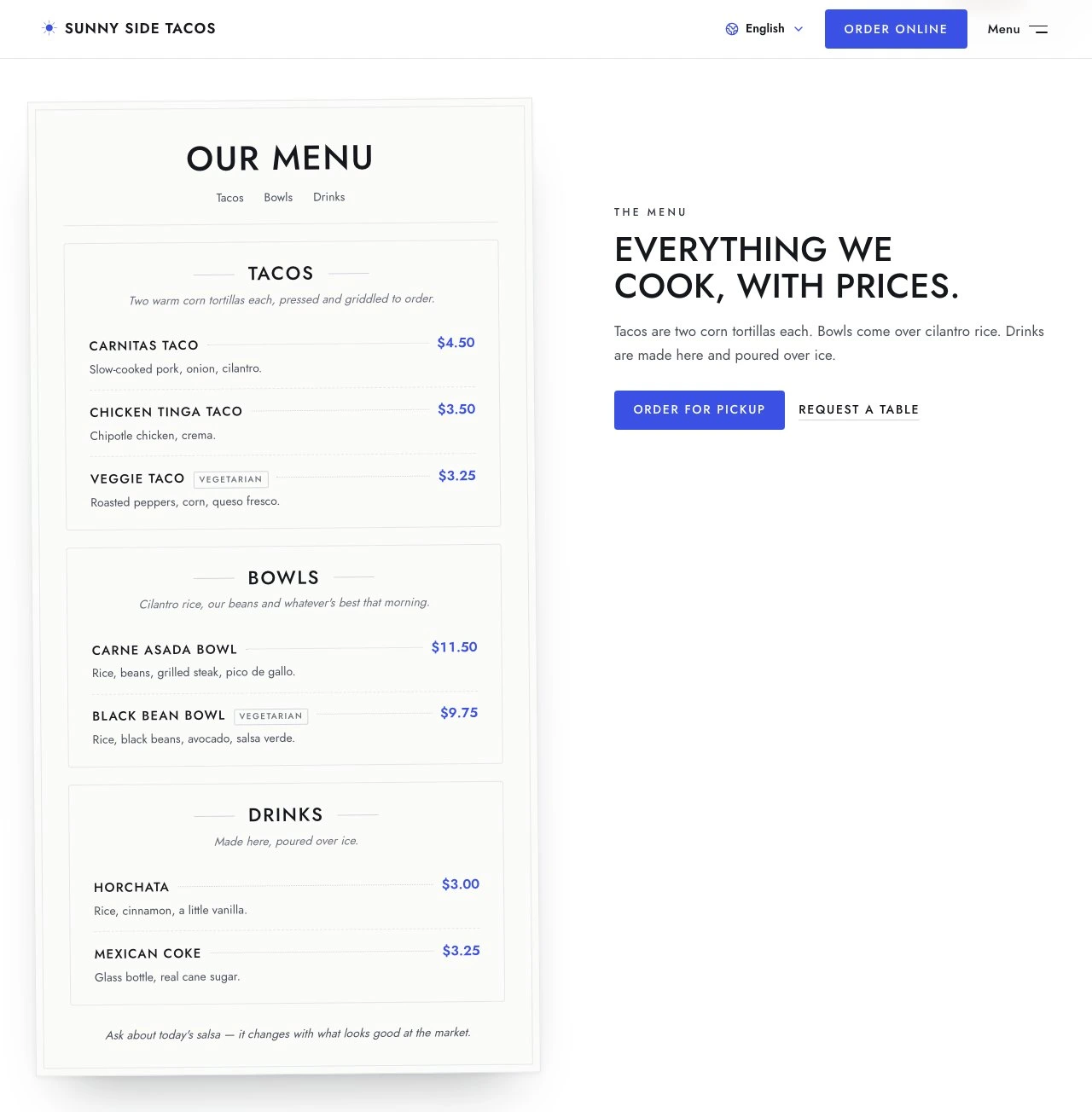
Add a lunch special, change a price or update holiday hours in plain language. Check the preview, then publish the changes when you're ready. Our sample restaurant shows a menu price and closing time updated on the live site.

See the menu update in our sample restaurant ↓
Keep the services that already work for you

If customers already order or book through another service, link to it from your website. You can build around your current setup. If you need a single system for ordering, delivery and POS, a restaurant ordering platform is the better place to start.

Handle requests the way your restaurant does

For a table or custom cake request, collect the details in a form and review them in your site's database. You decide how to follow up with the customer and confirm the arrangement.

What Will Your Restaurant Website Cost?

You can start building with free credits and publish on the Free plan. Upgrade when you want your own domain or more monthly credits for building and updates.

Free

$0

Start with free credits and publish on a HappySeeds web address. No credit card required.

Lite

$12.90/month

Monthly credits, a custom domain such as yourrestaurant.com, and removal of the HappySeeds badge

Pro

From$19.90/month

More monthly credits, with the custom domain and branding options included in Lite

Prices checked October 10, 2026. See current plans.

A Restaurant Website You Can Keep Up to Date

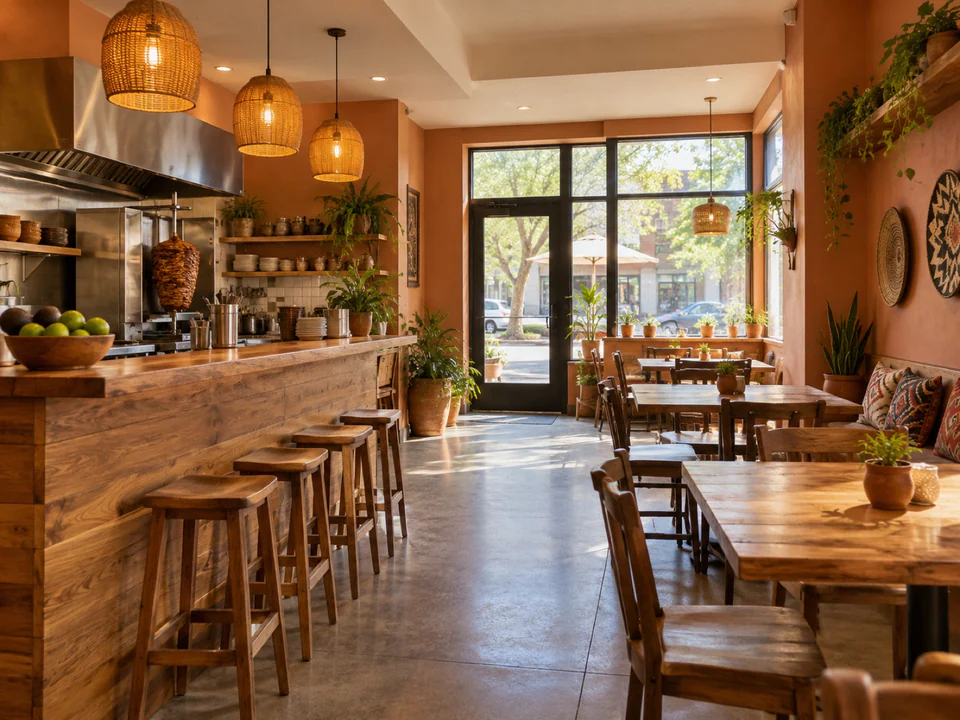
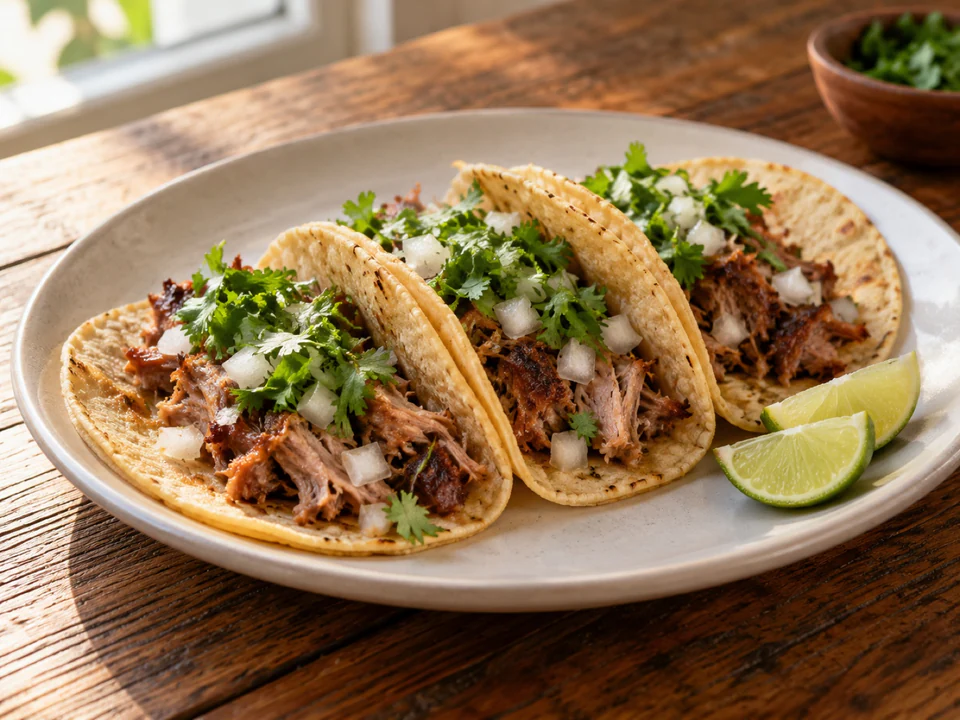
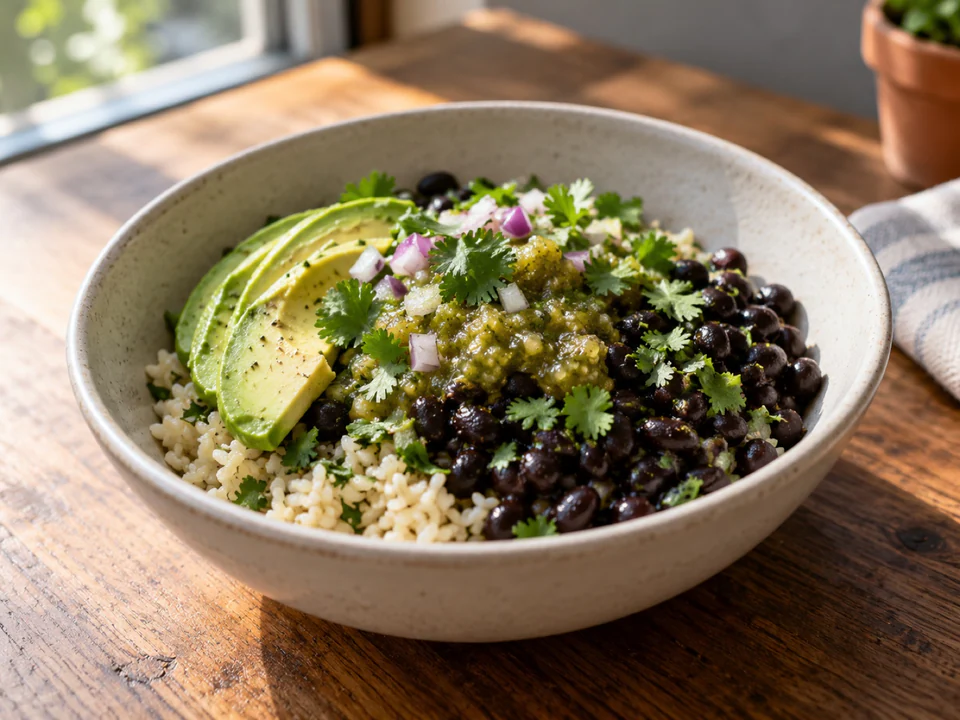
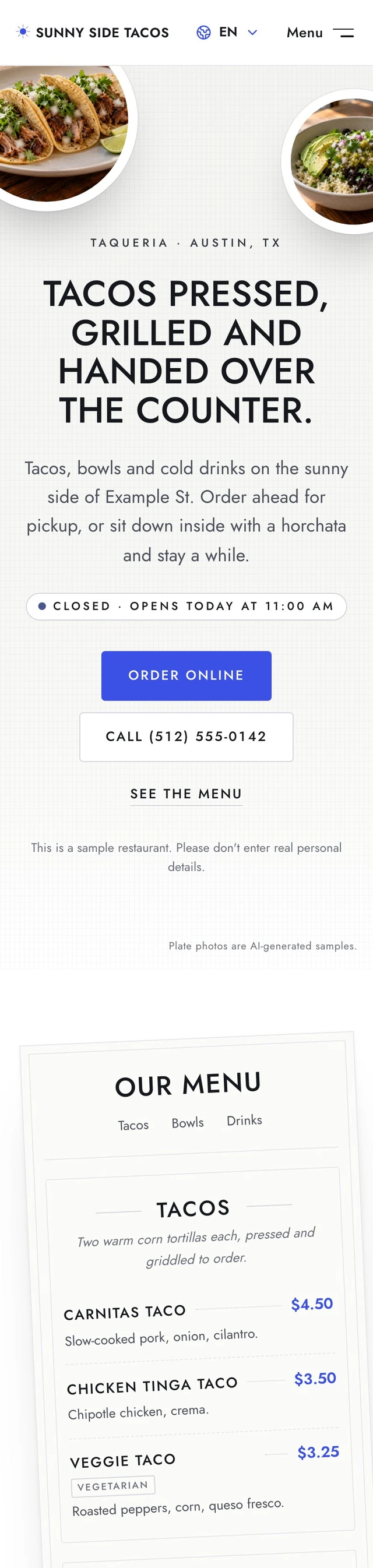
We built Sunny Side Tacos as a sample restaurant website and published it on the free plan. The restaurant details are fictional; the food and dining room photos are AI-generated sample images.

A menu guests can read, with the details they need to visit

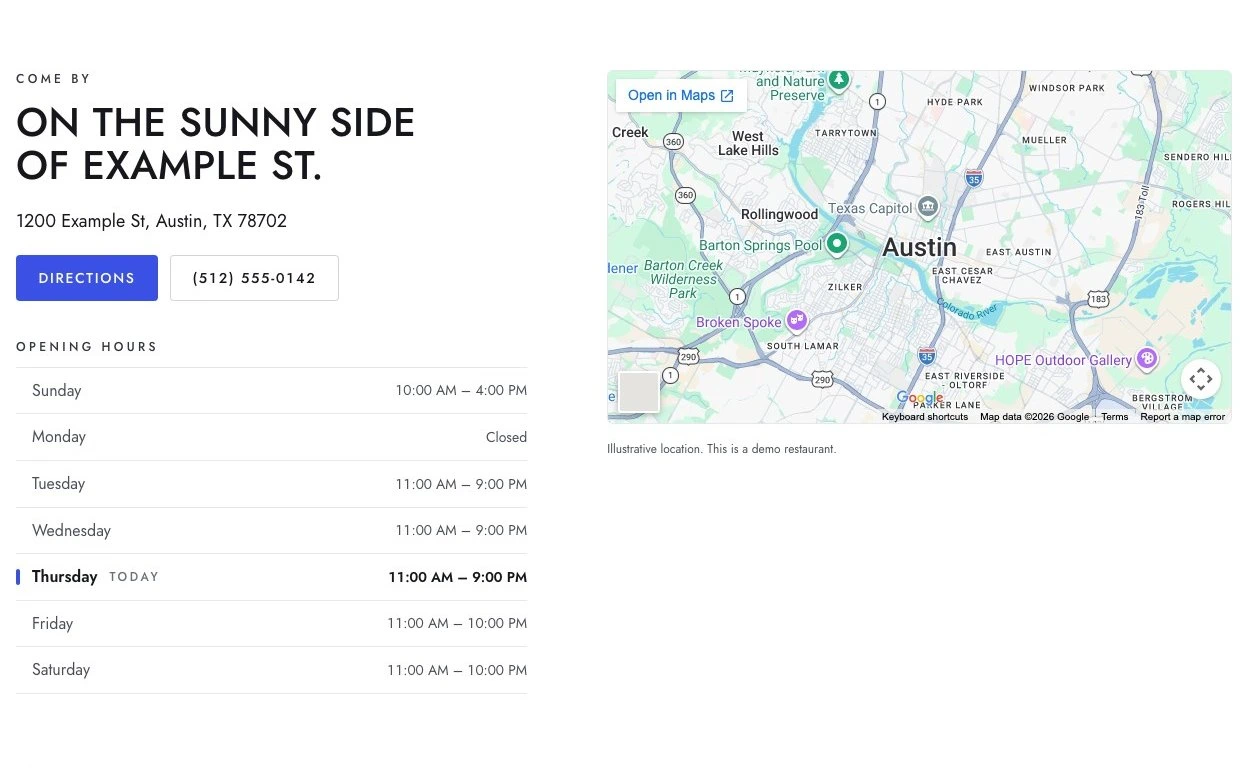
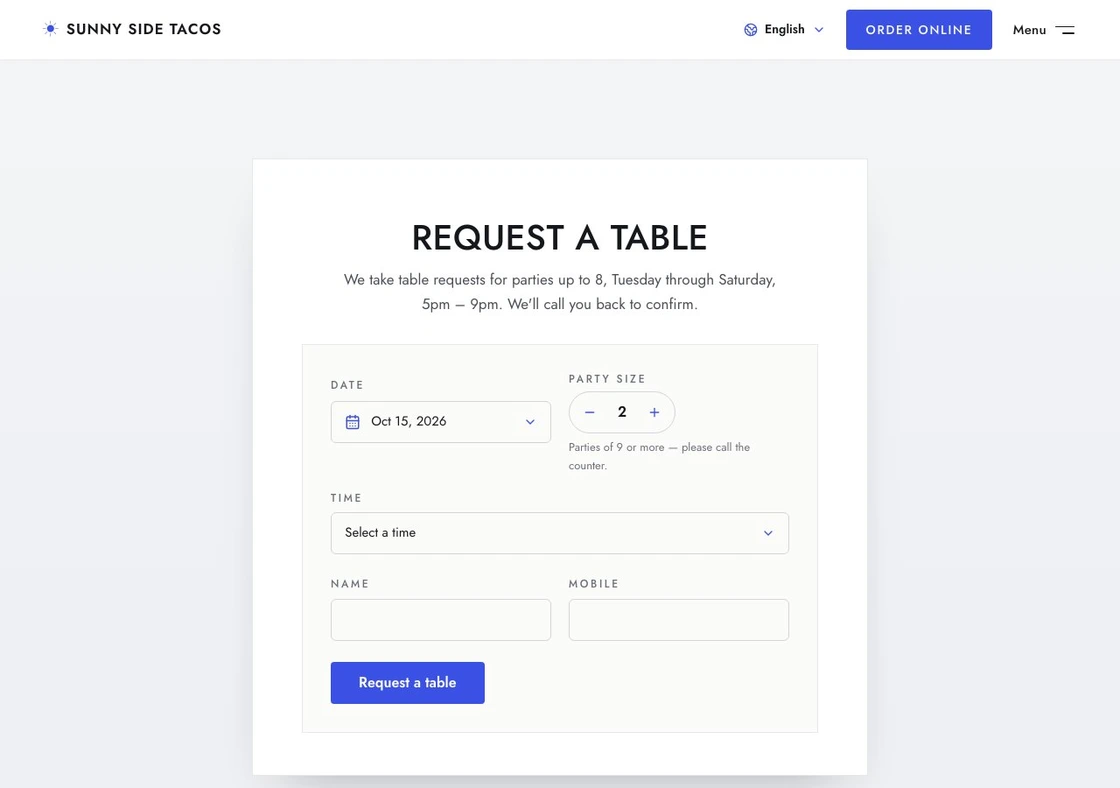
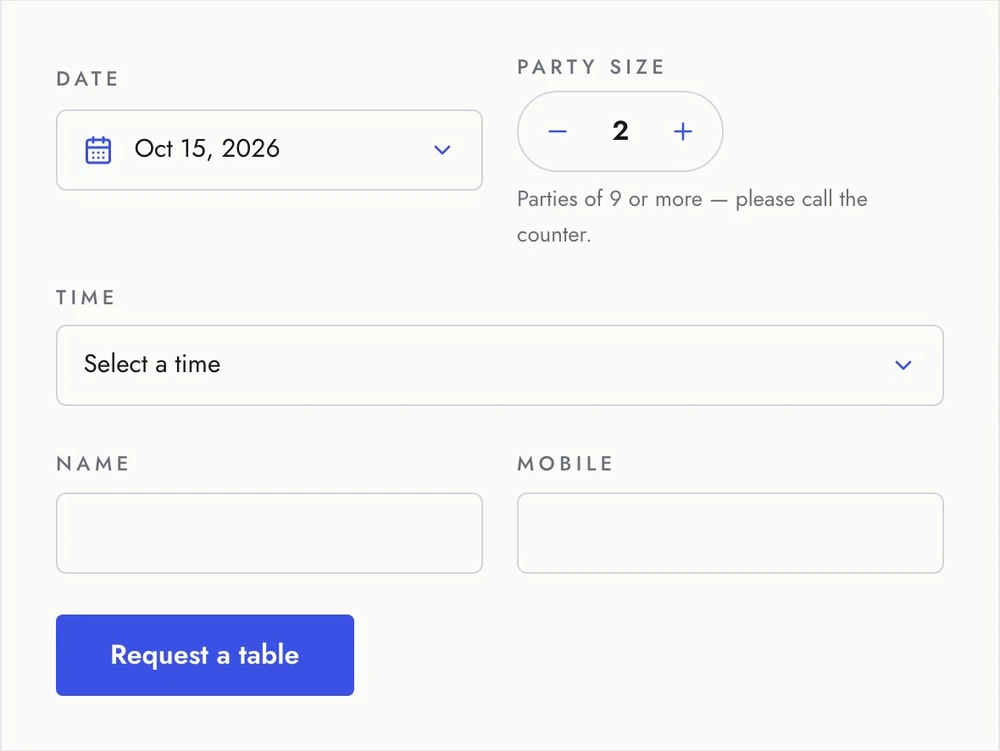
The site includes seven dishes and drinks in three menu sections, with prices and vegetarian labels. Opening hours, directions and a tap-to-call number sit alongside the menu. A table request form gives guests a way to contact the restaurant about a visit.

One update, reflected on the live site

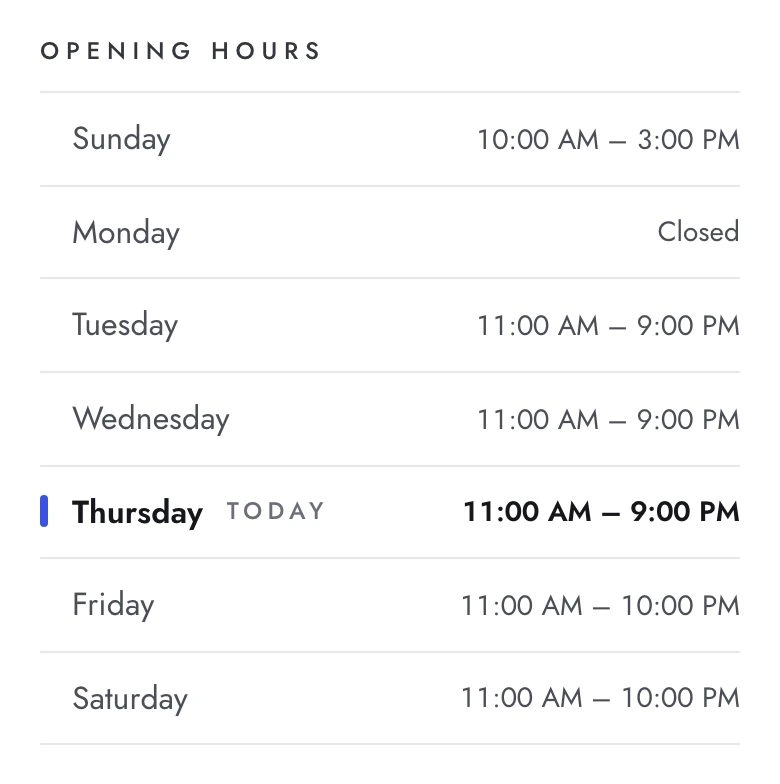
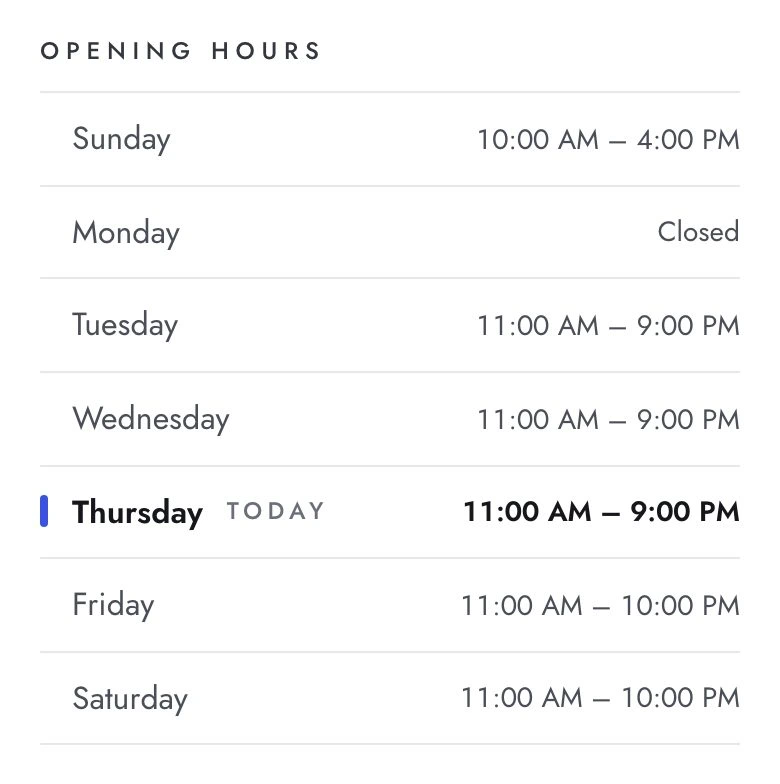
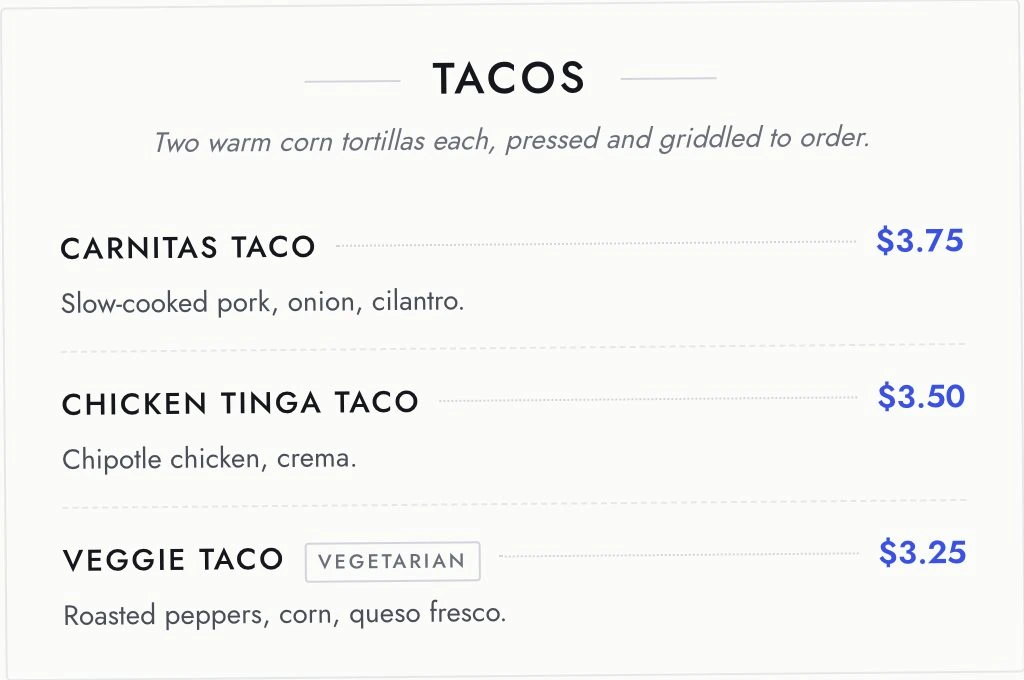
We changed the Carnitas Taco price and Sunday's closing time, then published the site again. Both changes appeared on the live site. The other menu prices and opening times stayed the same.

DetailBeforeAfter publishing the update
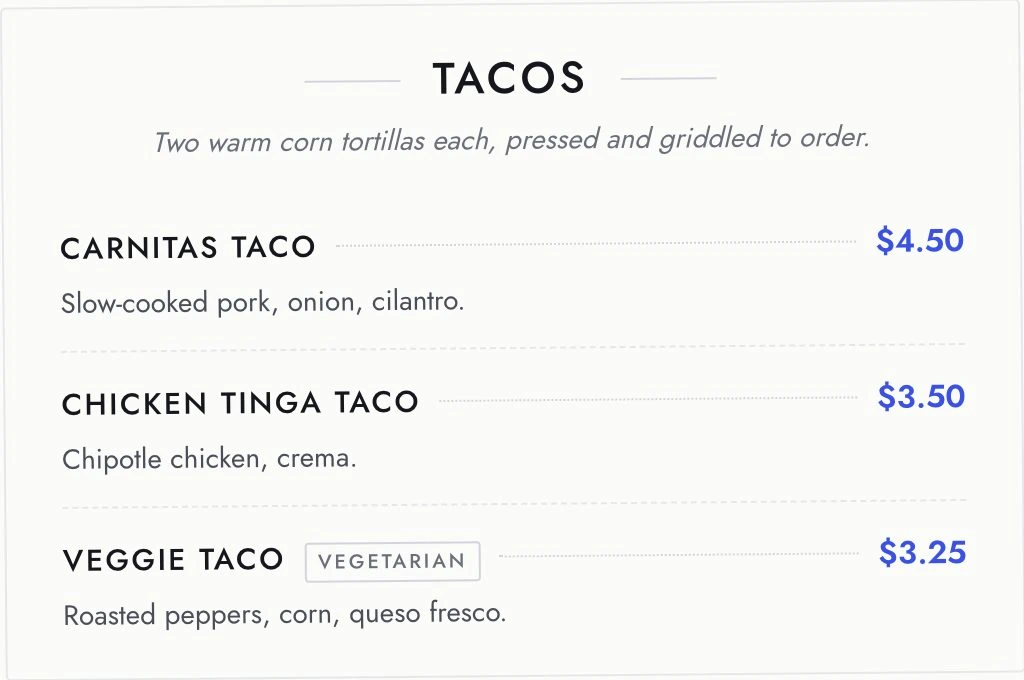
Carnitas Taco$3.75$4.50
Sunday closing time3pm4pm
Tacos section before the update: Carnitas Taco $3.75Tacos section after the update: Carnitas Taco $4.50
Hours before the update: Sunday 10:00 AM to 3:00 PMHours after the update: Sunday 10:00 AM to 4:00 PM
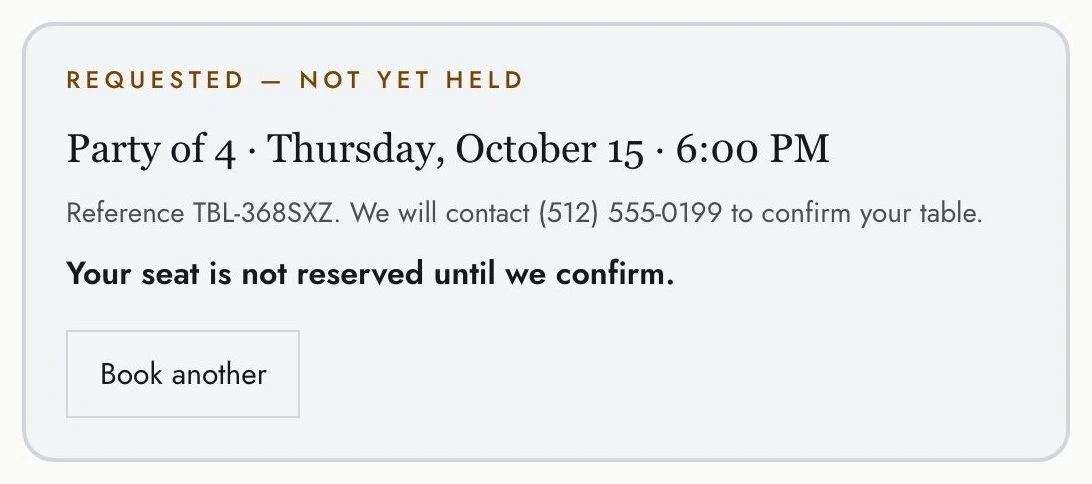
Confirmation after a table request for four: Requested — not yet held. Your seat is not reserved until we confirm.

A table request, ready for the restaurant to follow up

A sample request for four people was saved to the site's database. The guest saw: “Requested — not yet held” and “Your seat is not reserved until we confirm.”

Explore the sample restaurant ↗

This is a sample restaurant. Please don’t enter real personal details.

How to Build a Restaurant Website With the Materials You Have

Start with the information your restaurant already uses. You don't need a finished website plan before you begin.

What you already have

  1. What to bring into HappySeeds
    Copy the current dish names, descriptions and prices into your message
    What to ask for
    A menu written as page text, with the same sections and dietary labels you provide
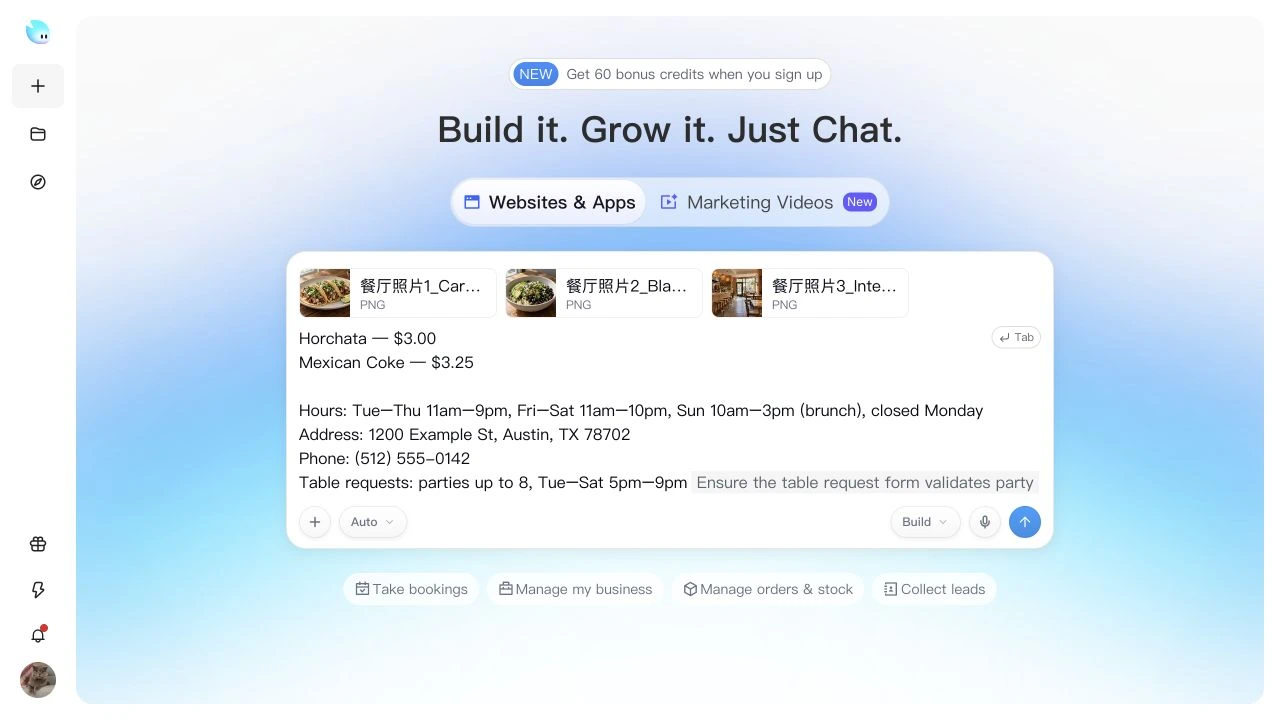
    The HappySeeds prompt box with a pasted menu, opening hours and three uploaded restaurant photos
  2. What to bring into HappySeeds
    The public page where guests place an order or make a reservation
    What to ask for
    A clearly labeled button linking to that page
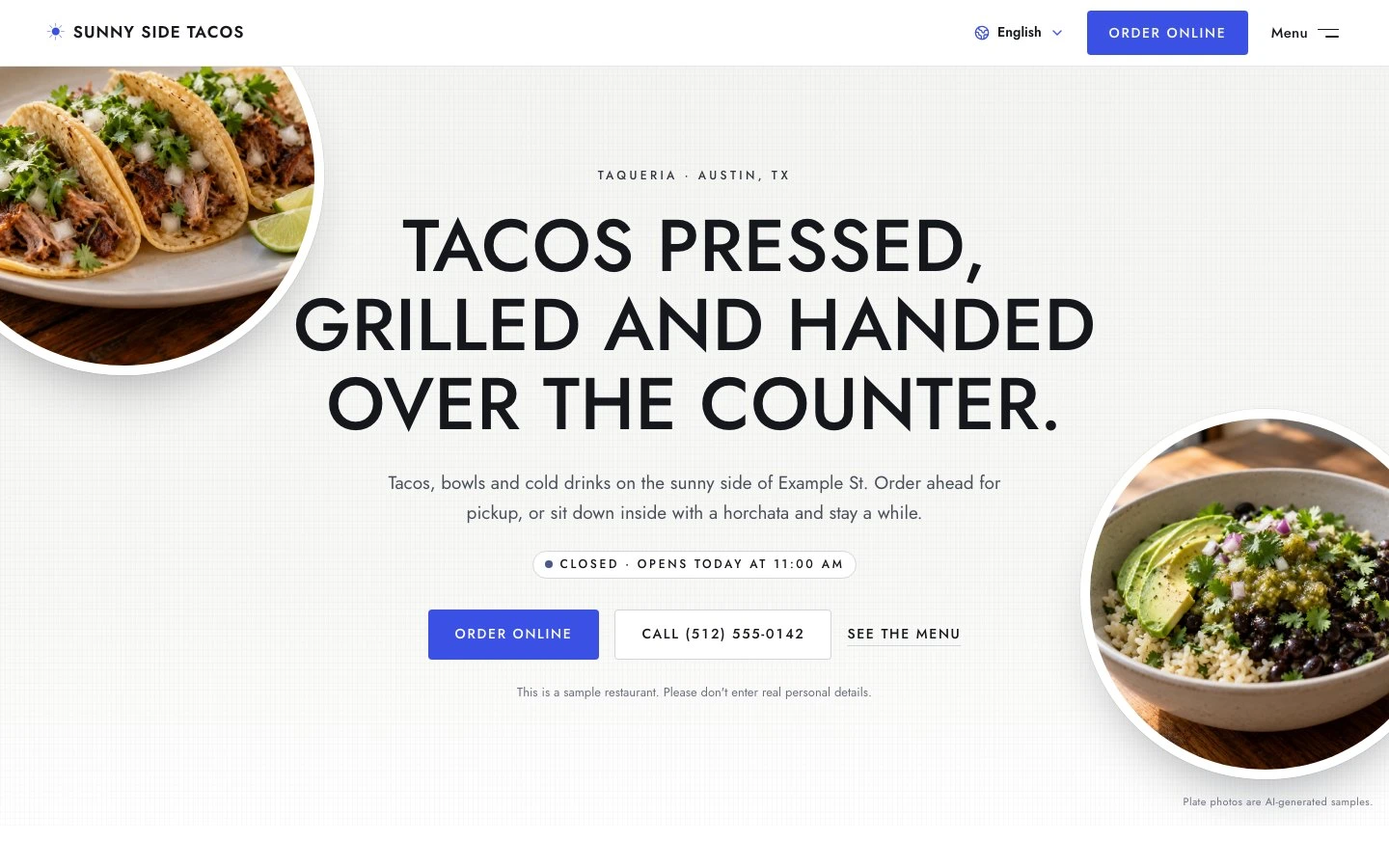
    Sunny Side Tacos home page with Order online and Call buttons below the headline
  3. What to bring into HappySeeds
    Upload photos you have the rights to use; copy over the business details you want on the site
    What to ask for
    A site built around your own food, space, opening hours and contact information
    Sunny taqueria dining room with counter seating and wooden tablesThree carnitas tacos with cilantro, onion and lime on a plateBlack bean bowl with rice, avocado and salsa verde
    AI-generated sample images
  4. What to bring into HappySeeds
    Your confirmed menu, address, opening date and contact details
    What to ask for
    A site that makes the opening information clear and shows guests how to get in touch
    Sunny Side Tacos visit section: address, Directions and call buttons, opening hours for each day and a map
The HappySeeds prompt box with a pasted menu, opening hours and three uploaded restaurant photos
Sunny Side Tacos home page with Order online and Call buttons below the headline
Sunny taqueria dining room with counter seating and wooden tablesThree carnitas tacos with cilantro, onion and lime on a plateBlack bean bowl with rice, avocado and salsa verde
AI-generated sample images
Sunny Side Tacos visit section: address, Directions and call buttons, opening hours for each day and a map

Choose photos that help guests decide

Show the food you actually serve and the space guests will walk into. A dish close-up tells a different story from a dining room photo. For a café, you might show breakfast and the counter; for a bakery, a finished cake and the details customers need to request one.

Try the first draft as a guest

Open the preview on your phone. Can you find a dish and its price, check when the restaurant is open and get directions? Follow the ordering or booking link to check it reaches the right page. If you added a request form, send a sample request and check that it was saved.

Ask HappySeeds to change anything that's missing or unclear. When the site is ready, click Deploy to publish. Publish again whenever you want an update to appear on the live site.

Keep Your Website and Google Business Profile in Step

Your website and your Google Business Profile are separate places where guests may check your restaurant's details. Google says complete, accurate business information makes a business more likely to appear in relevant local searches.

Our suggestion: when a business detail changes, check where guests will see it.

What changed?Where to check
Holiday opening hoursYour website and the special hours in your Business Profile
Phone number or addressYour website, tap-to-call or directions links, and your Business Profile
Menu prices or dishesThe website menu and any ordering service where you maintain the menu separately

HappySeeds adds SEO titles and descriptions to your pages. Keep the menu readable as page text and add your website link to your Business Profile.

Source: Google Business Profile Help, checked October 15, 2026. The update checklist above is our practical suggestion.

Build my restaurant website →

Restaurant Website Builder FAQ

Which website builder is best for my restaurant?

It depends on what you want the website to handle. Template website builders let you pick a design and edit each page in an editor. Restaurant ordering and POS platforms include a website as part of a system for online orders, delivery and payments. A designer or agency builds the site for you, and changes usually go through them. HappySeeds suits owners who want a site with their menu, hours, contact details and links to services they already use, built and updated by describing changes in plain language. If you need ordering, delivery and POS in one system, start with a restaurant ordering platform.

Can I build a restaurant website for free?

Yes. You can sign up without a credit card, start with free credits and publish on the Free plan. Lite and Pro let you connect your own domain. See the pricing section above for the current plan options and price-check date.

How do I change my menu after the website is published?

Tell HappySeeds which dishes or prices changed, review the preview and click Deploy again. Updating the website doesn't change the menu in your POS or ordering service.

Can guests book a table on my website?

Link to your existing reservation service, or add a form that saves table requests. With a request form, you review the details and contact the guest to confirm; submitting the form is not a confirmed reservation.

Can I add online ordering?

Add an Order online button linked to the public ordering page you already use. You can also offer a Call to order button. Use your existing ordering service to handle payments and delivery, and link to it from your site.

Will my website sync with my POS?

It won't read menus or orders from your POS. Keep using your current system, link to its public ordering page if it has one, and update your website when the menu changes.

Do I need to know how to code?

No. Describe your restaurant, the pages you need and the look you want. Review the result and ask for changes in plain language.

Can I use my own restaurant photos?

Yes. Upload your own food and dining room photos and tell HappySeeds where to use them. Choose pictures that represent what guests can expect at your restaurant.

Can I make an English and Spanish website?

Yes. Ask for both language versions and check the menu, opening hours and contact details in each before publishing.

Will building a website put my restaurant on Google?

Publishing gives you a public website that search engines can find, and HappySeeds adds SEO titles and descriptions. Your Business Profile is separate: keep its details current and add your website link. Publishing alone doesn't guarantee a position in search results.

Can I receive an email when someone requests a table?

Yes. You can add notifications through an email service such as Resend or Brevo, connected using your own account. Check the notification setup with a sample request before relying on it.

Put Your Restaurant on the Web

Bring your menu, hours and the photos that make your restaurant yours. Start building with free credits.

Build my restaurant website →