I've spent more time than I want to admit staring at Airtable bases full of genuinely useful stuff — client workflows, content libraries, structured research — thinking: this should be a product. Not a spreadsheet someone has to be invited to. An actual thing people can use.
Pory got me partway there. And for a while, that was enough. But there's a real gap between "my data is now accessible to clients" and "my data is now a data-backed app with paying users." Hi, I'm Elin. If you're bumping into that gap, this is what I found on the other side.
Your Data Is Useful, But Is It a Product?
Here's the question that actually matters before you pick any tool: what do you want your data to do?
If the answer is "I want clients to see their own records without logging into Airtable directly" — that's a portal problem. Pory solves it well. Embedding storage can use Codex + Milvus as the backend.
If the answer is "I want to turn my content library, methodology, or knowledge base into something people interact with, pay for, and come back to" — that's a different problem entirely. A data-backed app, not just a data display layer.
The distinction matters because tools optimized for one don't always stretch cleanly into the other.
What Is Pory?
Pory is a no-code portal builder built around Airtable. Since 2020, it's helped over 30,000 creators and operators turn Airtable data into authenticated portals without writing code or paying for extra Airtable seats. The concept is genuinely elegant: connect your bases, configure what different user roles can see or edit, and get a working web portal with login built in.
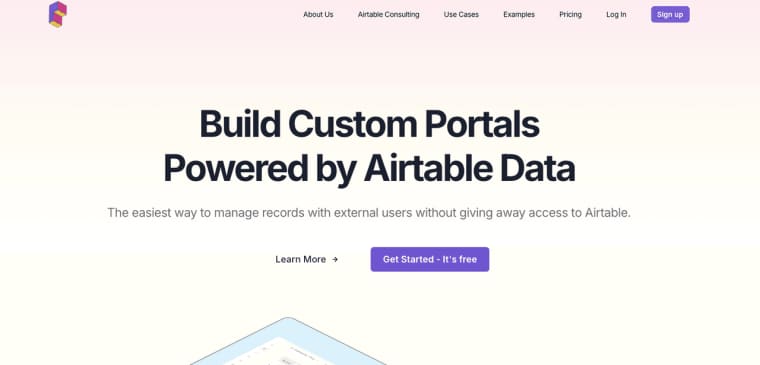
It ships templates for the most common portal types — customer portals, community directories, volunteer hubs, vendor portals. The drag-and-drop editor is fast, the Airtable sync is smooth, and for surfacing structured data to external users, it does exactly what it promises.
Airtable App Builder and Portal Use Cases
Pory's sweet spot is Airtable-as-database use cases: client portals where each customer sees only their own records, community directories where members browse and filter, internal tools where teams access shared databases without touching Airtable directly. Pory currently supports Airtable as its data source; Google Sheets and Notion have been mentioned as roadmap items in user reviews but are not yet a live integration. Worth checking Pory's help docs directly before choosing the tool based on your data source.
What it doesn't do natively: payment processing, AI model integration, custom domain with SEO configuration out of the box, or anything that would turn the portal from a viewer into an experience.
How Users Build Data-Backed Apps With Pory
The typical build flow in Pory goes: connect Airtable base → pick a template → configure permissions → publish to a subdomain or custom domain → share with users.
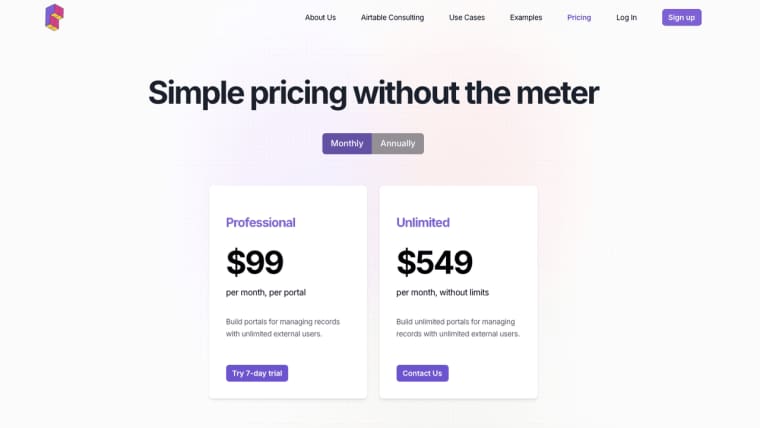
For a client portal builder use case, that's a solid 2–4 hour setup. You get role-based access, record filtering by user, and a polished UI without touching CSS. The $99/month entry plan covers one portal; the Unlimited plan at $549/month makes sense at around six or more active portals, where the per-portal cost starts to work out.
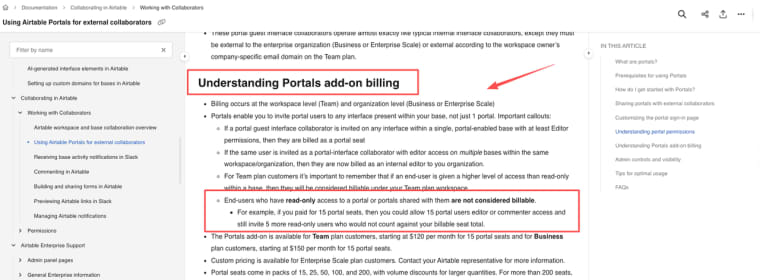
Airtable's per-seat billing model means that giving external clients direct workspace access adds up fast — every editor counts toward your plan. One thing Pory genuinely gets right: the relationship between the builder and their data stays clean. External users authenticate through Pory's own login system, which means your internal Airtable workspace doesn't get cluttered with client access. That's a real operational win for anyone running multiple client engagements from a single Airtable account.
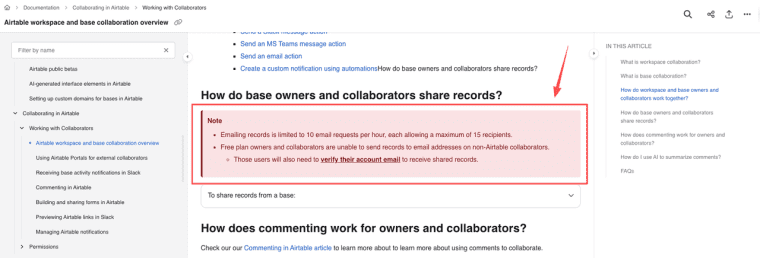
Where I ran into friction was the moment I wanted to go past "my clients can see their records" into "anyone can find this, sign up, pay, and start using it." The Airtable documentation on external sharing covers the data layer clearly — but neither Airtable nor Pory was designed to be a product distribution system. They're data infrastructure tools. Which is fine. Just know what you're choosing.
The limitation isn't really about what Pory does poorly. It's about where it stops. Pory's About page describes the mission as helping businesses "collect and turn data into beautiful portals" — and that framing is honest. Sharing data beautifully is the job. Turning that data into a sellable AI-powered product is a different job.
Data Portals vs. Commercial AI Apps
This is where I had to think carefully, because the line isn't always obvious.
Client Access vs. Paid AI Interaction
A client portal gives specific people access to specific records. It's permission-gated, data-driven, and useful — but the interaction model is essentially: browse, filter, maybe submit a form.
A commercial AI app lets anyone (or paying subscribers) interact with your data through an AI layer. Your methodology becomes a tool that responds. Your content library becomes a generator. Your workflow becomes something users execute, not just observe.
For a consultant, the difference is between "clients can log in and check their project status" and "anyone can pay to access a tool built on your expertise." Both are valid. But if you want the second one, you need something that supports AI model integration, monetization, and public-facing SEO — not just Airtable record display.
SEO, Domain, and Monetization Readiness
Pory supports custom domains. But SEO configuration, payment processing, and AI capabilities are gaps that users consistently flag in reviews — one Capterra reviewer noted that "collecting payments and other features are still under development" as of their writing.
This matters more than it might sound. For consultants and educators specifically, the whole point of turning expertise into a product is that it can be discovered, bought, and used without you in the room. A portal that requires you to invite each user manually doesn't quite get there. A public-facing app with SEO, a payment gate, and AI capabilities does.
When the goal shifts from data display to commercial product launch, a different category of tool becomes relevant: AI-native app builders like Bubble, Softr, or Glide that support public-facing pages, native payment processing, and AI integration. The tradeoff is usually a steeper setup versus Pory's focused simplicity — which is a real consideration depending on where you are in the build.
Portal Builder vs. AI App Platform: A Quick Comparison
| Pory | Softr | Bubble | Glide | |
| Primary data source | Airtable only | Airtable, Google Sheets, HubSpot + 15+ others (incl. native DB) | Own DB | Google Sheets, Airtable, SQL + others |
| Built-in payments | ❌ | ✅ Stripe | ✅ Stripe | ✅ Stripe |
| AI model integration | ❌ | ✅ Native (OpenAI, Claude, Gemini etc.) | ✅ Strong (plugins + API, very mature) | ✅ Native OpenAI + AI columns |
| Public SEO pages | ⚠️ Limited | ✅ | ✅ | ⚠️ Limited |
| Entry price | $99/mo per portal | $49/mo | $29/mo | $25/mo |
| Best for | Airtable portals | Multi-source portals | Complex custom apps | Simple mobile-first apps |
Pricing and features checked May 2026. Verify current tiers on each platform's official pricing page before committing.
The right choice depends on which column matters most to your specific build.
Checked against official sources as of May 2026. Pory pricing and feature details sourced from pory.io and third-party reviews. Worth verifying current tiers before committing to a plan.
Explore More Topics:
FAQ
Does Pory support data sources other than Airtable?
Many users ask this when evaluating tools. Currently, Pory is primarily built for Airtable with live read/write sync. Google Sheets and Notion integrations are mentioned in roadmaps or user requests but are not fully live as of mid-2026. If your data lives elsewhere, alternatives like Softr often come up in discussions.
How does Pory handle user authentication and data privacy for client portals?
A frequent question in Airtable communities. Pory uses its own login system so external users don’t need Airtable accounts, keeping your base clean. It supports role-based permissions and record filtering by user. Always review Pory’s data policy for compliance with your region’s requirements (e.g., GDPR).
What is the pricing for Pory and when does it make sense cost-wise?
Users often compare costs. Entry plans start around $99/month per portal, with higher tiers (e.g., Unlimited at ~$549/month) for multiple portals. It becomes economical when replacing per-seat Airtable costs for external users, but lighter tools like Softr may be cheaper for simpler needs.
Can I build a public-facing product or membership site with Pory?
Common inquiry from consultants wanting to monetize expertise. Pory excels at gated portals but has limitations in native payments, advanced SEO, and public discovery. For fully public AI-powered apps, users often migrate to Bubble or Softr.
Is Pory a good choice for building internal tools or team dashboards?
This is a recurring question in no-code forums. Yes, it works well for internal team access to Airtable data without extra seats, but for more dynamic internal tools with workflows or automations, users often compare it to Glide or Softr and sometimes prefer those for broader data source support.