
Client onboarding is usually where everyone is still being nice. The client is excited, the team wants to move fast, and nobody wants to be the annoying person asking for the missing login, the real approver, or the invoice status. Then delivery starts, and all those tiny unanswered things become expensive.
A strong client onboarding process does not make the relationship colder. It makes the work easier to trust. The client knows what happens next, your team knows who owns each step, and the project does not depend on someone remembering what was promised in a sales call.
What a Client Onboarding Process Must Achieve
A client onboarding process has one job: move a new client from “we agreed to work together” to “delivery can start without guessing.” That means the scope is clear enough to act on, the right people are named, important dependencies are visible, and the delivery owner knows what state the project is in.
This is different from a checklist. A checklist tracks individual tasks; the process is the operating path around them.
If you need the item-by-item execution layer, use the Client Onboarding Checklist for Agencies and Service Teams. This article focuses on how the stages connect, what should block progress, how ownership changes, and how to tell whether onboarding is actually working.
Map the Process From Agreement to Delivery

Before choosing tools, map the flow. Start with the trigger that opens onboarding, then define each stage until the project becomes active delivery. The map does not need to be fancy. It needs to be honest.
| Stage | Trigger | Owner | Required input | Decision | Output | Next state |
| Agreement | Scope approved | Account lead | Contract, price, main contact | Is the work allowed to start? | Onboarding record | Welcome |
| Welcome | Start confirmed | Project owner | Contacts, dates, channel | Who owns decisions? | Contact map | Discovery |
| Discovery | Client brief begins | Delivery lead | Goals, constraints, examples | What must delivery solve? | Discovery notes | Access setup |
| Access setup | Systems identified | Operations | Files, permissions, accounts | Is access enough and appropriate? | Access record | Kickoff |
| Kickoff | Inputs mostly ready | Project owner | Risks, milestone, review rhythm | Can delivery begin? | Activation note | Active project |
Entry Conditions and Stage Boundaries
Entry conditions stop false starts. For example, the process should not enter delivery if the agreement is unsigned, the deposit is required but unpaid, or the approver is still unknown.
Boundaries keep stages from becoming foggy. Welcome is not done until contacts and communication channels are confirmed. Discovery is not done until the goal, constraints, and first useful outcome are written down. Access setup is not done until the team has the minimum permissions needed for the work. Kickoff is not done until the first milestone and review rhythm are clear.
This is where a new client onboarding process earns its keep. It prevents "basically ready" from becoming a silent project risk.
Decisions, Owners, and Handoffs
Every stage needs one owner. Not "the team." Not "ops and delivery." One person who knows whether the stage is moving, stuck, or ready to hand off.
The account lead may own commercial context. The project owner may own client communication. The delivery lead may own inputs and risk. Operations may own billing, workspaces, and access. The handoff should include what was promised, what is missing, what the client cares about, and what could slow the work down.
A verbal handoff feels fast, but it fades. Put the decision in the record.
Design the Core Onboarding Stages
The onboarding stages should not simply mirror a task list. Each stage should create a clear change in project state.
The checklist can track whether individual items were completed. The process should answer a different question: what must be true before the client is ready to move forward?
A useful stage therefore needs three things: a defined outcome, an owner, and an exit condition.
Welcome and Expectation Setting
The purpose of the welcome stage is not to complete a set of introductory tasks. It is to establish the basic operating context for the relationship. By the end of this stage, the client should know how the engagement will run, and the internal team should know who owns the next decision.
The exit condition is not “welcome email sent.” It is that the client has a clear starting point, the communication path is known, and obvious sales-stage ambiguity has been surfaced before it reaches delivery.
If the team still does not know who can approve work, what happens next, or when the first working step begins, the stage is not complete.
Discovery and Information Collection
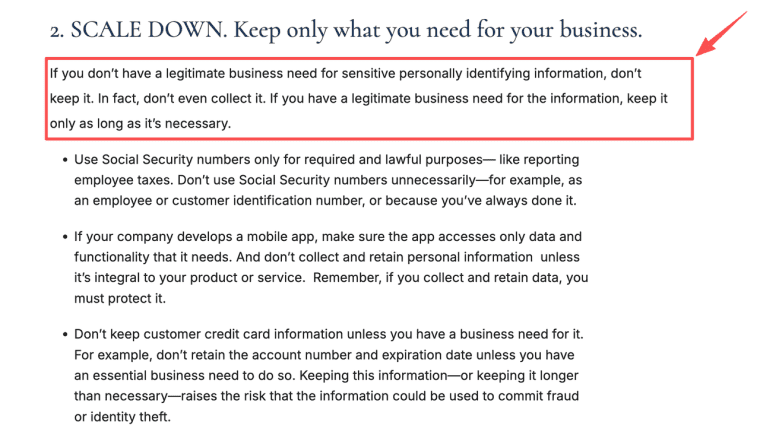
Discovery should answer why the work matters, what the client already has, what constraints exist, and what a useful result looks like. A branding agency may need audience notes, asset files, references, and approval rules. A consultant may need business goals, current process notes, metrics, internal blockers, and decision criteria.
Do not collect everything just because it might be useful later. The safer habit is to collect only what the work needs. The FTC frames this well through the principle of keeping only information with a legitimate business need, which is a practical baseline for onboarding forms, shared folders, and client records.
Access and Workspace Setup
Access setup is not glamorous, but it is where a lot of projects start wobbling. Someone has the wrong permission level. Someone sends a file but not the editable version. Someone shares a login in a way nobody wants to defend later.
Record the system, permission level, client owner, internal owner, and removal point. Access should match the work, not the relationship. If your team only needs view access, do not ask for admin access because it is convenient.
The workspace should reflect the real process: contacts, scope, open items, files, access status, risks, approvals, and the first milestone. It can live in a project board, CRM, client portal, spreadsheet, or custom app. The tool matters less than whether the next owner can understand the client state quickly.
Kickoff and Delivery Activation
A kickoff is not a ceremonial meeting. It is the bridge into delivery. It should confirm the goal, constraints, roles, risks, review rhythm, first milestone, and unresolved items.
Delivery activation happens when the delivery owner can say, "We have enough to start, and the remaining gaps are named." That last part matters. A project can start with one noncritical asset missing. It should not start with unknown scope, unknown approval, or unknown access.
Add Automation Without Losing Accountability
Automate Reminders and Routing
Automation helps when the rule is simple. Send a reminder when an intake form is incomplete. Route billing questions to finance. Notify the delivery lead when access is approved. Move a project from Discovery to Access setup when required fields are filled.
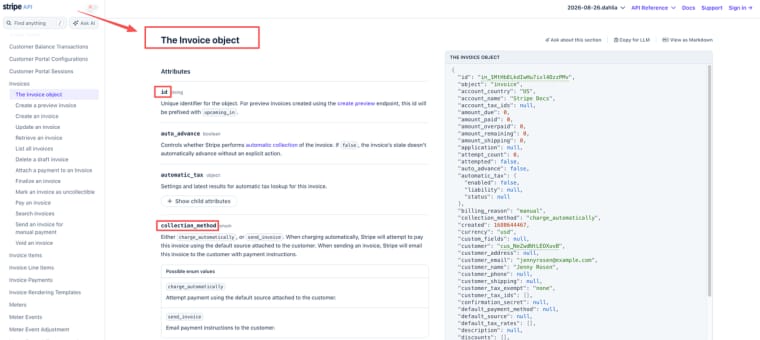
If billing is part of onboarding, connect payment state to the project record. Stripe invoice objects can support customer billing, payment status, collection method, and invoice lifecycle records, but the tool does not decide whether work should begin. Your team still needs a rule for paid, unpaid, failed, waived, and delayed payment states.
Automate predictable movement of information. Keep a human owner for judgment. Do not automate promises or exceptions simply because the workflow can route them.
Keep Human Review for Exceptions and Commitments
Do not automate promises. Scope changes, sensitive data, unusual client constraints, private-system access, refund questions, and final commitments need a human owner.
Automation should reduce nudging, not replace judgment. If a client uploads the wrong file, route it for review. If access fails, a person should decide whether the first milestone can still move forward. If the client asks for extra work, the account lead should handle it before delivery absorbs the change quietly.
Measure Whether Onboarding Works
Completion, Delay, Rework, and Client Clarity Signals
A client onboarding process should be measured by the mess it prevents. Completion alone is not enough. A process can reach 100% and still be slow, unclear, and full of reopened decisions. Track the friction between states.
| Signal | What it can reveal |
| Agreement-to-delivery-ready time | Overall onboarding cycle time |
| Time spent in each state | Where clients or internal teams wait |
| Blocker age | Whether unresolved issues have active ownership |
| Handoff reopen rate | Whether receiving teams get enough context |
| Client clarification volume | Whether expectations are clear |
| Delivery questions after activation | Whether onboarding closed too early |
| Time to first useful milestone | Whether onboarding helps work begin efficiently |
Start with the measurements that explain delay. If onboarding time rises, find out whether the delay comes from the client, internal review, unclear ownership, or rework.
My favorite test is simple: can a new team member understand the client state, the next decision, and major open risks in five minutes?
If yes, the process is doing something useful.
A useful process also makes delay visible before it becomes a delivery problem. If one client spends five days in a state that normally takes one, the team should be able to see why: missing input, unclear ownership, internal review, or a client-side decision. That is more actionable than simply marking onboarding as “in progress.”
Where HappySeeds May Fit the Workflow
HappySeeds may fit when the process needs to become a small, stateful onboarding app instead of another static document. That might mean intake forms, saved client records, project states, internal notes, review steps, or a lightweight client-facing view.
For this use case, the better references are practical. HappySeeds supports project organization, links, visibility, and ongoing edits, and its database layer is designed for saved form submissions, dashboards, listings, orders, comments, and other app records. If the workflow includes client-sensitive information, review the privacy terms that govern information handling before putting real client data into any app.
This is not a claim that automation removes responsibility. HappySeeds may help shape the workflow, but your team still owns the process, the review rules, and the client promise.
Limits and Trade-Offs
A clean process can still fail if people treat it like theater. The map only works if stage owners update it, blockers are named, and exceptions are handled before they turn into delivery problems.
The main trade-offs are speed versus safety, convenience versus record quality, automation versus judgment, and flexibility versus scope control. Cross-border records, onboarding fees, subcontractor access, retainer terms, and client data retention can raise legal, tax, privacy, or contractual questions. This article is operational guidance, not legal, tax, or compliance advice.
Make the Handoff Obvious
A practical client onboarding process makes work feel calmer because the next step is visible. The client knows what to send. The team knows who owns the decision. Delivery starts with fewer surprises. Map the stages, keep the handoffs honest, and let automation handle the nudges while people keep responsibility for the promises.
Explore More Topics:
FAQ
How should onboarding restart after a long project gap?
Restart from the last verified state. Reconfirm scope, contacts, access, billing status, decision makers, and the first milestone. A paused project should not resume from memory because client priorities, team members, and permissions may have changed.
Does a retainer need the same process as one-time work?
A retainer usually needs a lighter start and a stronger recurring rhythm. Define monthly inputs, reporting cadence, approval windows, and what counts as out-of-scope work before the first cycle begins.
How should renamed client entities affect onboarding records?
Keep the old name, new name, effective date, and approving contact in the record. If invoices, contracts, permissions, or reporting are affected, verify those items separately instead of only renaming the workspace.
Should clients be charged a separate onboarding fee?
Sometimes, if onboarding includes meaningful setup work such as migration, configuration, discovery, or compliance-heavy intake. The fee should match real value and should be reviewed against the service agreement, tax treatment, and client expectations.
How should cross-border teams handle onboarding records?
Decide where records live, who can access them, how long they stay there, and which client or jurisdictional requirements apply. Do not move sensitive onboarding records across tools or countries just because the workflow feels easier.


