
Hi, Elin here. Grok 4.6 Cursor access matters because Cursor is already where many teams turn ideas into working code. A stronger model inside that environment can change early product work: research, structure, implementation, debugging, and visual iteration may move faster. But it does not turn a prototype into a launched product by itself.
The useful question for founders is not "Can Grok 4.6 write more code?" It is "Which parts of my build workflow improve, and which launch responsibilities still belong to my team?"
Why Grok 4.6 Is Available in Cursor
The release connects a new model with an established coding environment
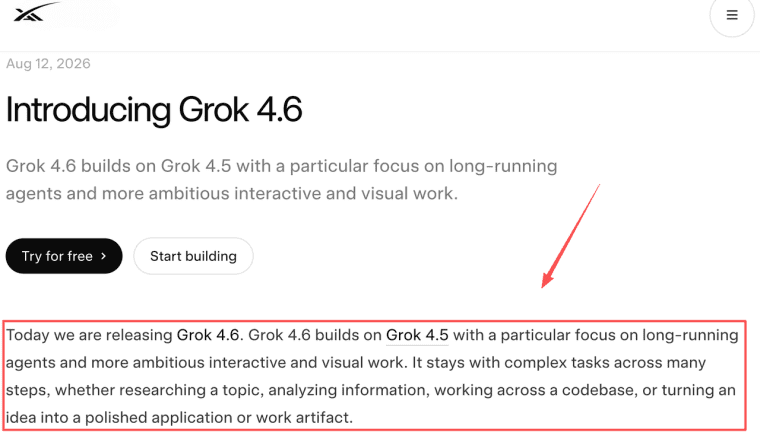
xAI introduced Grok 4.6 on August 12, 2026, with a focus on long-running agents, interactive projects, visual work, coding, research, and knowledge work. The same release lists Grok 4.6 availability in Cursor and Grok Build, while also noting broader API and partner access.
That matters because Cursor AI coding is not a blank prompt box. It is a coding environment where a model can inspect files, suggest changes, revise code, and support longer development loops. For a coding agent for startups, that combination can make early implementation feel less fragmented.
Still, Cursor access should be verified before a team changes its workflow. Plan availability, included usage, regional access, rate limits, and policy terms can change.
What Better Coding Can Change in Early Product Work
Research, structure, implementation, and visual iteration may move faster
A better model can help a founder or technical collaborator move from a rough idea to a clearer first version. Grok 4.6 may help research unfamiliar domains, organize the app structure, implement core interactions, and refine visual or interactive projects through feedback.
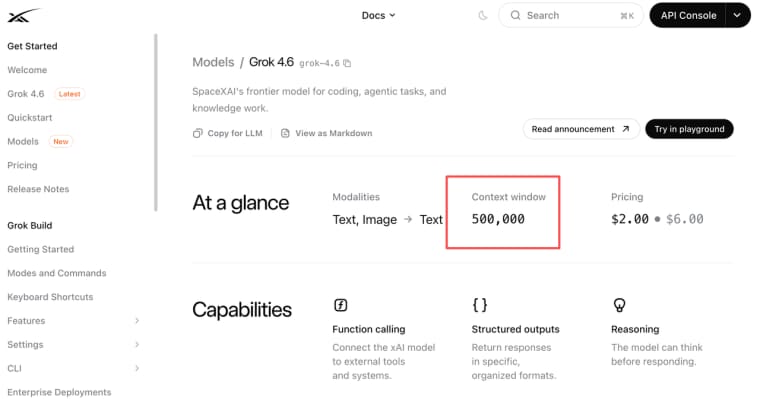
The model details also matter for planning. xAI lists Grok-4.6 with text and image input, a 500,000-token context window, function calling, structured outputs, reasoning, and current API pricing. Those model boundaries for context, inputs, tools, and cost are useful when a product touches large codebases, screenshots, design references, or long research tasks.
But faster code is not the same as better product judgment. If the user job is vague, the model may build a polished version of the wrong thing.
What It Does Not Change About Product Launch
User demand, data, payments, compliance, distribution, and support remain product responsibilities
Grok 4.6 in Cursor can help build, but it cannot validate demand, price the offer, own customer support, or decide what data should be stored. A real product launch checklist still includes user research, data permissions, payment flows, privacy review, analytics, onboarding, error states, support, and deployment ownership.
This is where many AI coding workflow gains stop. The app may compile, but customers still need accounts, saved data, refunds, invoices, domain setup, and a way to recover when something breaks. Model upgrades do not remove those obligations.
Which Teams Are Most Likely to Notice the Difference
Code-owning founders, technical collaborators, and non-technical teams have different needs
Code-owning founders may benefit most because they can review changes, test behavior, and decide when to merge. Technical collaborators may also gain speed if Grok 4.6 helps them understand a codebase or produce a stronger first pass.
Non-technical teams may notice less direct benefit. If no one owns the code path, a faster coding model can still leave questions about deployment, security, maintenance, and handoff. For them, Grok 4.6 in Cursor may be useful through a developer, agency, or technical cofounder rather than as a self-serve product path.
Questions to Ask Before Changing Your Build Workflow
Project complexity, review capacity, deployment ownership, and maintenance shape the fit
Before switching your build workflow, ask what kind of app you are building. A landing page, internal tool, and paid SaaS all need different review depth. Ask who can review generated code, who owns deployment, who manages secrets, and who responds when a user reports a bug.
Also ask whether the project needs ongoing maintenance. If the app will keep changing after launch, the team needs version control, prompt notes, test cases, rollback habits, and clear ownership. Cursor can help with code work, but the team still owns the product system.
When HappySeeds May Be a Different Fit
A guided customer workflow may suit teams that do not want to own the code path
HappySeeds should not be described as natively connected to Grok 4.6 or Cursor. It is a different route for teams that want to shape a customer-facing workflow without owning every coding, deployment, and maintenance step directly.
For non-technical founders, HappySeeds' AI app-building workflow may be worth considering when the priority is forms, saved results, payments, domains, and user experience around a narrow product idea. Cursor may fit code-owning teams. HappySeeds may fit teams that want to validate the customer workflow first.
Limits and Trade-Offs
Model access, security review, debugging capacity, and team responsibility constrain the benefit
The benefit of Grok 4.6 Cursor access is constrained by model availability, usage limits, cost, security review, and debugging capacity. Teams should not claim that a model upgrade automatically creates production-quality code, meets accessibility requirements, or satisfies compliance obligations.
Regulated teams should be careful with synthetic data during prototyping. Synthetic examples may reduce exposure, but they do not automatically solve privacy, bias, retention, or compliance requirements. This article is general information, not legal, compliance, or security advice. Use depends on the applicable regulations, organization policy, data classification, and qualified review.

Build Faster Without Skipping Launch Ownership
Grok 4.6 in Cursor may help teams move faster from idea to working code, especially when they can review and maintain the result. The product builder's job is to keep the launch boundary clear: use better coding help where it fits, but keep demand, data, payments, support, and long-term ownership visible before shipping.
Explore More Topics:
FAQ
Does a Cursor-built app need separate accessibility testing?
Yes. Code generation does not replace accessibility testing. Teams should still check keyboard navigation, labels, contrast, form errors, screen reader behavior, and mobile usability before launch.
How should teams version prompts used during a build?
Keep important build prompts near the code or project notes with date, purpose, files affected, and reviewer. This helps future maintainers understand why a feature was built a certain way.
What happens when Grok 4.6 changes during development?
Treat model changes like dependency changes. Re-test key flows, compare outputs, check regressions, and avoid merging generated changes without review.
Can regulated teams use synthetic data during prototyping?
Sometimes, but synthetic data should still be reviewed for realism, leakage risk, and policy fit. Do not use it as a shortcut around security or compliance review.


