
Start with the promise you can keep: practical resources for an ongoing task, lessons people can work through, access to a service, or conversations with other members. Say what is available when someone joins and what you will add or provide over time.
Membership website builder for your courses, resources, and community
Describe your membership in plain words, and HappySeeds builds a website where members sign in to the content and services they joined for—free, paid, or tiered—without writing code.
What is a membership website?
A membership website gives people access to content, services, or a shared space based on their membership: public pages introduce your offer, and a member area delivers what people joined to receive. HappySeeds is an AI builder for non-technical owners who want to build one around their own benefits and rules: describe your offer in plain language and get public pages, member sign-in, the content each membership level can open, and an admin area for content and member records. For paid memberships, you connect your own Stripe account and check how payments affect access before inviting members. As of October 2026, you can publish for real users on the free plan, which starts with 30 free credits and no credit card, and paid plans start at $12.90 a month.

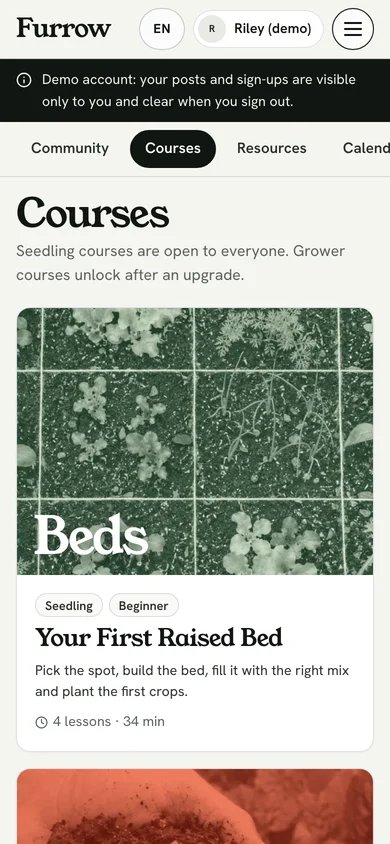
Choose how people qualify. You might offer free membership, charge for access, or give different levels different benefits. Recurring payments make sense when the value continues over time; a membership does not have to be a monthly subscription.
What is the best platform for creating a membership site?
It depends on what members need and what you must keep. For a ready-made course or community workflow, a hosted course or community platform fits. To define your own member rules, pages, or tools without writing code, an AI or no-code builder such as HappySeeds fits, as long as you configure the integrations and check the member journeys. If existing pages must stay where they are, look at a membership plugin for your current website. The table below adds more routes; the same membership can fit more than one.
1
Is a ready-made course or community tool all members need?
YesA hosted course, content, or community platform
2
ThenBuild it with HappySeedsDescribe your own member rules, pages, and tools without writing code.Must your existing pages stay where they are?
YesA membership plugin for your current website
| If this is the deciding requirement… | Consider this route | Check before choosing |
|---|---|---|
| You want a ready-made course or community workflow | A hosted course, content, or community platform | The exact learning or discussion tools, payment options, and member limits included |
| Your public website and member area should be managed together | A website builder with membership features | Which pages and benefits can be restricted, and on which plan |
| Existing pages must stay where they are | A membership plugin or add-on compatible with your current website | Whether it protects those exact pages and connects to your payment setup |
| Dues, directories, events, and organization records must work together | An association membership system | Whether it fits your existing administration and member records |
| You want your own member rules, pages, or tools without writing code | An AI or no-code builder such as HappySeeds | The rules to describe, integrations to configure, and member journeys to check |
| You want someone else to build and maintain a defined specification | A developer or implementation partner | Scope, ongoing maintenance, and who manages the website and payment accounts |
For individual client files, project progress, and approvals, see how to create a client portal.
For a broader Web app project, explore the free app builder.
Running an association or club?
If members mainly need shared resources, a directory, or event sign-ups, you can build those around your own rules. If you must preserve an existing association management system, use its required record and billing connections to screen your options first.
Why build your membership website with HappySeeds?
Describe the pages, member roles, and content you need, then refine the site through conversation.
Build around the way you work. Ask for a resource library, member directory, course area, or a tool your members use. Define who can access it and what you need to manage.
Keep the core services together. Hosting and a database are included. Add member login and connect your own Stripe account for checkout or subscriptions, following the setup instructions.
Keep improving the same project. Use conversation to change pages, content, and rules as your membership develops. Check the changes and deploy again to update the live site.
This route fits when you want to specify your own member experience and are ready to configure payments and check access before launch. Use the requirements template to make those decisions concrete.
What features should a membership website include?
Start with the features that deliver what members join for: a way to join and sign in, access rules for each membership level, and the content or tools themselves, such as course areas, resource libraries, member discussions, directories, or event sign-ups. You can build these with HappySeeds; include the features and rules you want in the build request so the site matches the membership you plan to run.
-
Build lesson pages or a library of guides, videos, and downloadable resources. Specify the categories, the order members should follow, and which membership levels can access each item. Add your own teaching materials and tell HappySeeds how members should find them.
-
Build a space for member posts, questions, and replies. Describe who can start a discussion, who can reply, and how an administrator should manage posts. Decide whether discussions belong beside a lesson, inside a topic, or in a shared member area.
-
Build member profiles, a directory, or pages where members can register for events. Specify the profile fields, who appears in the directory, and who can sign up. For a club or association, tie these choices to the benefits included with membership.
How do I create a membership site?
To create a membership website with HappySeeds, describe the benefits, member roles, content, and joining rules first. Add your existing materials, build a first version, and check it from a member's point of view before expanding it.
Use this outline and replace the brackets with your own decisions:
Build a membership website for [who it serves]. Members join to get [the main benefit]. Public pages: [offer, benefits, and how to join]. Member area: [course pages, resources, discussions, directory, or tools]. Membership levels: [names and what each level can access]. Joining: [free sign-up, approval, or paid membership]. Payments, if needed: connect my Stripe account for [one-time or recurring charges]. Show me the setup steps I need to complete. Access changes: [when access starts, what happens after cancellation, and when access ends]. Administration: I need to [add content, manage member records, or review sign-ups]. Existing materials: I will provide [content files and an optional CSV or Excel member list]. Start with [the first benefit members must be able to use].


Read through the first version as a visitor, a member, and an administrator. Ask for specific changes—such as “show the resources for this membership level” or “add a category for new lessons”—then check the revised behavior.
If you only need to collect applications or event registrations, start with a form and its saved submissions; add a member area when people need ongoing access.
Make the pages feel like your business
Provide your name, logo, writing, and content categories. Describe the public introduction and the page members should reach after signing in. Ask for changes to the wording and page organization as you review the site. Lite and Pro support a custom domain when you are ready to use your own address.
Decide who can access each part of your site
You can build access rules for visitors, members, membership levels, and administrators. Define access for the content itself, as well as the links and menus people use to reach it.

| Role or status | A starting rule to specify |
|---|---|
| Visitor | Read the public offer and see how to join |
| Member | Open the content included with their membership |
| Member on a particular level | Open the benefits assigned to that level |
| Administrator | Manage the content and member records needed to run the site |
Before inviting members, check a restricted page by opening its direct address as well as following the menu. Try the visitor, member, and administrator journeys and confirm that each gets the access you intended. Hiding a link alone does not define the page's access rule.
Take membership payments through your own Stripe account
HappySeeds supports Stripe checkout and recurring subscriptions through your own Stripe account. Configure the payment integration and your membership offer before accepting payments.
Illustration · needs setup
- 1Sign up
Join Furrow
Continue - 2Payment
Grower membership
- Price
- $15 / month
- Renews
- Monthly
Paid to the club's own account
- 3Log in
Member sign-in
Log in - 4Logged in
Welcome, Priya
- Level
- Grower
- Paid through
- Nov 21
LibraryAll downloadsOpen
- Decide the price, currency, and billing schedule for each paid membership.
- Follow the Stripe setup guide to connect your account and configure payment notifications (Stripe calls them webhooks) so the site can receive payment updates.
- Specify how those updates should affect membership access, then check the payment and member journeys before launch.
Membership payments go to your Stripe account. Payment processing charges are separate from the cost of building and running the website.
Stripe setup guide →Set access rules for payment, cancellation, and expiry
A paid membership needs rules for when access starts and ends. With HappySeeds, you can build these rules around your Stripe integration; configure them to match your offer and check that the site follows them.
Illustration
A member cancels renewal on Oct 21
Paid through Nov 21. The site follows the policy you chose and explained.
Keep access until the period ends
- Renewal canceled Oct 21
- Benefits stay open
- Benefits end Nov 21
End access now
- Renewal canceled Oct 21
- Benefits end Oct 21
- Member sees your stated policy
| Event | Decide what the site should do |
|---|---|
| A payment succeeds | Grant the agreed membership benefits after the site receives the payment update |
| A member cancels renewal | Keep access until the paid period ends, or end it sooner if that is the policy you have chosen and explained |
| The paid period expires | End the benefits that depend on an active paid membership |
| A payment fails | Define whether access continues for a grace period or pauses, and how the member can resolve it |
| A member changes level | Apply the benefits and timing you have chosen for that change |
Make the cancellation and access policy clear before a member pays. Canceling a future renewal and ending access today are different decisions. Check the rules you have chosen in the finished site before relying on them.
How much does it cost to build and run a membership website?
The cost depends on your plan and usage, payment processing, and any separate services such as a domain. With HappySeeds, you can build and publish for real users on the Free plan; building and revisions use credits, and the amount depends on what you ask for. Paid plans start at $12.90 a month (as of October 2026), and Lite and Pro add monthly credits, a custom domain, code export, and GitHub sync. Membership payments go to your own Stripe account, with Stripe’s processing charges separate.
- Publish for real usersFree
- Building and revisionsUse credits
- Monthly creditsLite and Pro
- Custom domainLite and Pro
- Code export and GitHub syncLite and Pro
Paid to HappySeeds
- PlanFree to publish for real users; Lite and Pro from $12.90 a month
- CreditsUsed for building and revisions; the amount depends on the request
Paid to other providers
- Payment processingYour payment provider’s fees on member payments
- Your own domainDomain registration
- Added servicesAny service you choose to connect
Ask other platforms about
- CommissionA share of membership payments on top of the subscription
- Member-count pricingA bill that changes with registered or active members
For any membership platform, separate these costs before comparing a headline price:
| Cost to check | Question to ask |
|---|---|
| Building and ongoing platform use | What does the plan include, and what usage or features require an upgrade? |
| Platform commission | Does the platform take a share of membership payments in addition to its subscription price? |
| Member-count pricing | Does the bill change with registered members, active members, or contacts, and which definition does it use? |
| Payment processing | What does the payment provider charge for the transactions you expect? |
| Your own domain and added services | Which costs are separate, including domain registration and any services you choose to connect? |
Use the same expected membership size and payment pattern when comparing plans. A low monthly subscription alone does not tell you the full operating cost. See current HappySeeds pricing for plan details.
Bring in your member list and work with your existing website
You can upload a CSV or Excel file as input when building with HappySeeds. For a member list, explain what each column means and how the records should be used in the new membership area. Check the imported information and member access before inviting people to use it.
members.csv your upload
nameemaillevelDana Kimdana@…growerLuis Ortizluis@…seedlingAva Brooksava@…grower

You can also embed a newly built HappySeeds form or page in an existing website. Start by deciding whether you need a new member area alongside the old site or must restrict pages that already exist there.
If existing pages must stay in place and become members-only, check that the membership solution can protect those exact pages before choosing it. Embedding a new page answers a different requirement.
For records and files assigned to each individual client, use the client portal guide to plan that workflow.
Client portal guide →Keep members coming back
Plan what members will do after their first visit. Organize the content around their next useful action, make new material easy to find, and tell them when to expect the next update or activity.
Make the next useful thing easy to find
Group resources by topic or by the task members are trying to complete. Keep the starting page useful for new members and give returning members a clear way to find recent additions. If discussions or events are part of your offer, include a clear route to join them and decide who will keep them active.
Check the live site and keep it current
Publish from Deploy to get a public website address; hosting is included. Members may open the site in a phone browser, so check sign-in, navigation, and a member-only page on a phone before sharing it.
You can view visits to your published project. Use those observations alongside member feedback to decide what to improve. Ask for changes in the chat, check them, and deploy again so the live website has the latest version.
- LiveVersion 1Members use the public address
- ChatAsk for the change“Add a Recently added shelf to the library”
- PhoneCheck itSign in, menu, one member-only page
- DeployPublish againChat edits alone leave version 1 live
- LiveVersion 2Same address, latest version
Membership website builder FAQ
What is a membership website?
A membership website gives people access to content, services, or a shared space based on their membership. Membership can be free, paid, or divided into levels with different benefits.
What is the best platform for creating a membership site?
Base your choice on the benefits you offer, the existing website you must keep, and the setup you want to handle. A hosted platform can suit a ready-made course or community workflow; an AI builder such as HappySeeds can suit a member experience you want to define yourself.
Can I build a membership website without coding?
Yes. With HappySeeds, describe the pages, benefits, member roles, and rules in plain words. Review the first version, ask for changes, and complete any login or payment setup your site needs before publishing.
Can I create a membership site for free?
Yes. The HappySeeds Free plan lets you build with credits and publish for real users. The credits needed depend on your requests and revisions. Lite and Pro add monthly credits and features such as a custom domain.
Can I build courses or a community with HappySeeds?
Yes. You can build course pages, resource libraries, discussions, member profiles, and event sign-ups. Include the particular features and access rules in your build request.
What features should a membership website include?
Start with the benefits members join for, a way to join and sign in, the right access rules, and a way to manage content and member records. Add payments, discussions, or events when your offer needs them.
Can I charge recurring membership fees through Stripe?
Yes. HappySeeds supports recurring subscriptions through your own Stripe account. Follow the integration setup instructions, configure how payments affect membership access, and check the finished member journey.
What should happen to access after a member cancels?
Decide and explain the policy before taking payment. A member might keep access until the paid period ends, or access might end sooner under your chosen policy. Configure and check that rule separately from stopping future renewals.
Can I add membership features to an existing website?
You can embed a newly built HappySeeds form or page in an existing site. If you need to protect pages already on that site, check that requirement separately when choosing your membership solution.
Can I use a member list from a spreadsheet?
Yes. Upload a CSV or Excel file as input and explain how its columns should be used in the membership website. Review the resulting records and access rules before inviting members.
Can an association or club build a member website?
Yes. You can build shared resources, member directories, and event sign-ups around your organization's rules. If you must keep an existing association management system, check its required connections before choosing the website route.
Can I use my own domain for the membership website?
Yes. Lite and Pro support custom domains. Publish the project, then follow the domain setup instructions to connect your own website address.
Start building your membership website
Start with the benefit people join for. Describe your content, member roles, and access rules, then build and refine your membership website with HappySeeds.
Start building free →