
Fashion boutique website
Present a focused range of shirts, trousers, outerwear, and accessories with product details and size selection.
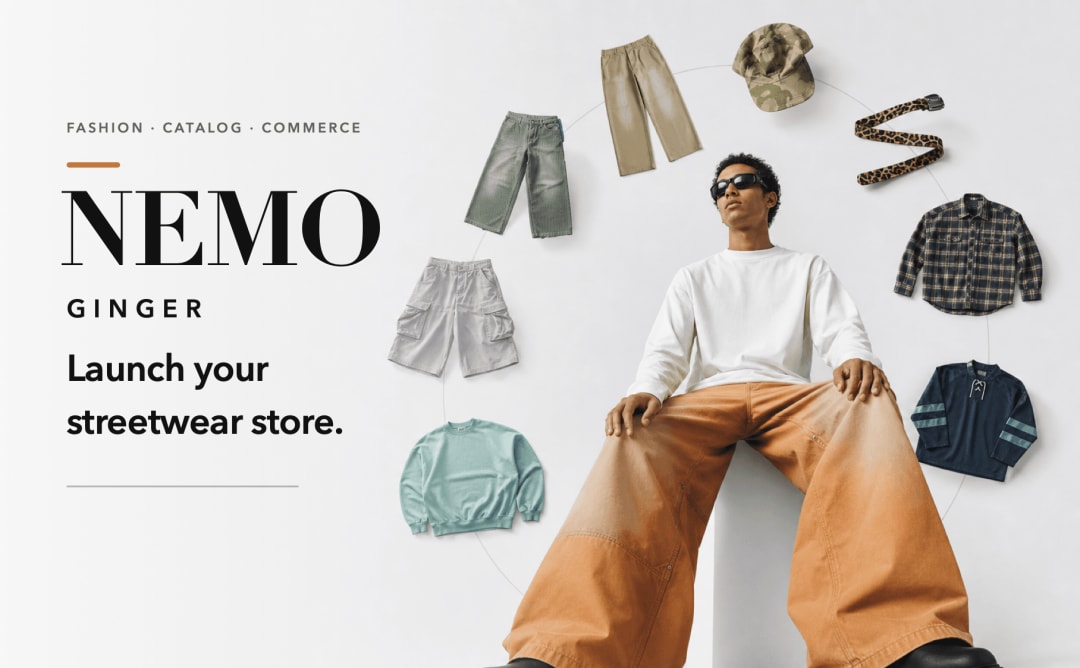
Spin Clothes Shop is a clothing store website template for independent brands and small fashion boutiques. Shoppers browse a rotating product display, open a piece, choose a size, and add it to the cart. Start with the nemo ginger sample store, replace the products and branding, and connect a payment provider before accepting real orders. The current checkout is a demo.
Use this clothing brand website template to give a small collection more than a long wall of product cards. Spin Clothes Shop brings clothes into a circular display that visitors can rotate, with a grid view for a more familiar browse. Product details, sizing, and the cart stay close to the collection, giving you a visual starting point for a fashion storefront. Adapt the sample menswear to your own range and use the demo purchase flow to plan your store setup.
Use the template Open a copy in HappySeeds and choose the collection you want to feature.
Replace the sample store Update the brand name, product images, descriptions, sizes, prices, and About content. Remove any languages you do not plan to maintain.
Prepare the purchase flow Connect your payment provider and configure shipping, returns, customer contact details, and order handling for your business.
Test and publish Check the product display on desktop and mobile, test size selection and checkout, and publish when your store is ready. Review current publishing options on the HappySeeds pricing page.
Present a focused range of shirts, trousers, outerwear, and accessories with product details and size selection.
Give a seasonal edit or small product launch its own visual storefront.
Adapt the product information and options for bags, belts, hats, or other accessories.
Introduce the collection through a circular browsing experience, with a grid view as an alternative.
Give shoppers ways to narrow the collection without leaving the storefront.
Bring product images, descriptions, sizing, care, materials, and shipping information into one view.
Carry a selected size into the cart, with quantity controls and item removal.
Preview a checkout summary with item totals and shipping before connecting live payments.
Adapt the About and collection imagery, update store information, and choose which language versions to keep.
Its rotating product display gives shoppers a visual way to explore a collection. They can also switch to a grid and open a product to review its details and size options.
Yes. Menswear is the sample collection. Replace the products, images, categories, and size information to fit your own clothing brand or fashion boutique.
The current demo includes a cart and a demo checkout. Connect and test a payment provider, shipping rules, and order handling before accepting real purchases.
Yes. Customize the store name, product images, descriptions, prices, sizes, and brand content in HappySeeds. Check the product and cart flow after making changes.
You can describe the changes you want in HappySeeds and review the result in the preview. Payment and publishing connections still need to be configured for your own store.
Replace sample contact details and store policies, review each language you keep, and test browsing and checkout on desktop and mobile. See HappySeeds pricing for current publishing options.