I broke three production apps last year. Two of them were mine. So when xAI shipped Grok Build and half my timeline started asking whether it could finally replace hiring a developer, my first reaction wasn't excitement — it was "okay, but who owns this thing when it breaks at 11 pm?"
If you're a non-technical founder choosing between Grok Build and a no-code AI app builder, this is the breakdown I wish I'd had before I picked wrong — twice. I'm Elin. By the end you'll know which one actually gets you to a live, paying app, and which one just hands you a pile of code to babysit.
Why Founders Compare Grok Build and AI App Builders
They get pitched as rivals. They're not really solving the same problem — which is exactly why founders keep stalling on the choice. Before writing a word of this, I went and read xAI's own Grok Build announcement, because I didn't want to compare it against something it never claimed to be. You can also look at using Codex alongside Claude Code when one agent is not enough.
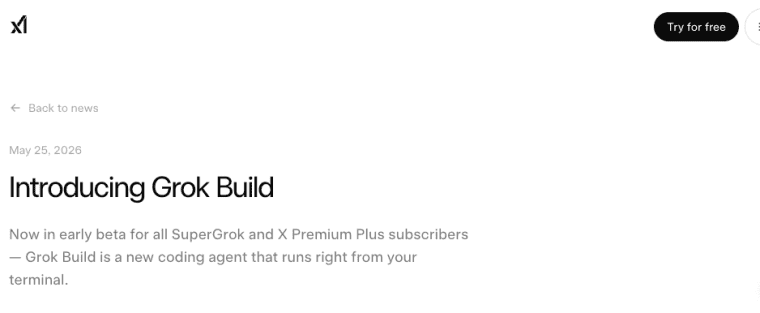
Here's the fork you're actually standing at: reach for Grok Build, the terminal coding agent everyone's posting demos of, or a no-code AI app builder that promises to take you all the way to a live, paying product?
The 30-second version: Grok Build writes and runs code in your terminal, and it's genuinely good at that. It does not hand you a login system, a database, payments, or a deployed app sitting on a domain — you're expected to bring all of that. A no-code AI app builder skips the terminal and aims at the whole launch. Live in a codebase already? Grok Build. Want a real product without wiring up the rest of the stack yourself? The builder. Here's how I'd actually decide.
Grok Build vs AI App Builders: Core Difference
These two tools sit at opposite ends of the "how much do I want to touch code" spectrum. Once you see that, most of the confusion clears up.
Terminal-first coding agent vs guided app launch workflow
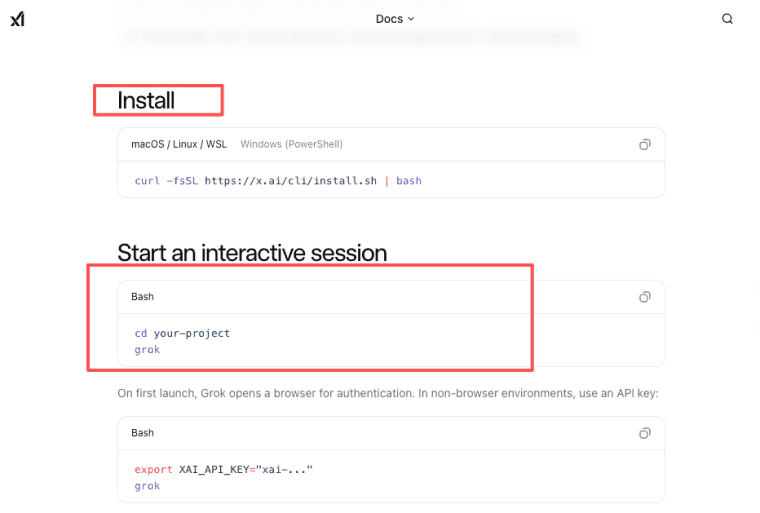
Grok Build is an agentic CLI — a coding agent that lives in your terminal. Per xAI's Grok Build getting-started docs, you install it, run grok inside a project, and drive it through an interactive terminal interface, headlessly in scripts, or through the Agent Client Protocol so other apps can call it. It's powered by a model called grok-build-0.1, it plans multi-step work, edits files, runs commands, and spins up parallel subagents on bigger tasks. The crowd it's chasing is the same one using Claude Code or Codex CLI — terminal-first builders who are comfortable in a repo.
An AI app builder works the other way around. No terminal. You describe what you want, it plans the pages and flows, and the workflow points at one thing: shipping something people can actually use and pay for.
| Grok Build | No-code AI app builder | |
| Where it runs | Your terminal / repo | A browser-based workflow |
| Built for | People comfortable in code | People with the idea, not the stack |
| What you get | Code, edits, commands run | A live app you can publish |
| What you still wire up | Auth, DB, payments, hosting, domain | Mostly handled inside the flow |
| Learning curve | You need to be okay in a codebase | Describe it, refine it, launch |
What "it built my app" actually leaves you holding
This is the part I had to learn the expensive way. Code was never what broke my apps. The boring infrastructure around the code is what broke them.
Grok Build can absolutely scaffold a working app. But a Grok Build app — the files it generates — still isn't a product until something handles user accounts, stores real data, takes money, gets deployed somewhere, and answers on a domain you own. xAI frames the tool honestly as a coding agent, not an app platform, and that distinction matters more than the demos suggest. If you don't already know how to stand up the rest, "it built my app" is the start of the work, not the end of it.
What Non-Technical Founders Should Evaluate
Don't compare these tools on "which writes better code." Compare them on the parts that decide whether you ever launch.
Planning, data, payments, SEO, domain, and maintenance
Walk your idea through the full path and ask where each piece comes from.
Planning is the cheap insurance step. Grok Build has a plan mode where you approve or rewrite the plan before it touches anything — use it. Builders front-load planning too, just without the terminal.
Data and payments are where founders quietly get stuck. Taking money sounds like one button and it isn't. Skim Stripe's online payments documentation once and you'll see the checkout flows, webhooks, and edge cases involved. With Grok Build, that's code you (or someone) maintain. With a builder, it's usually part of the launch flow.
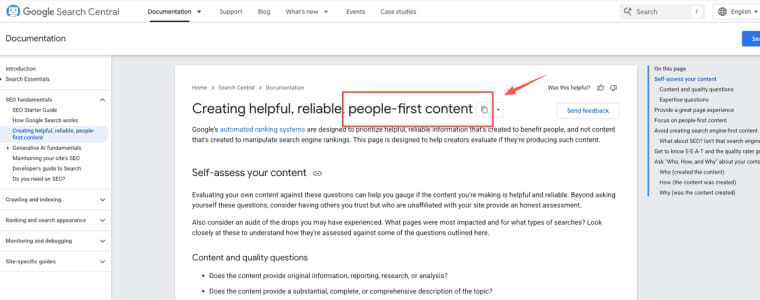
SEO and a custom domain decide whether anyone finds the thing. Google is blunt about what it rewards now — its guide to helpful, people-first content leans hard on real first-hand experience and trust. A raw codebase gives you none of that for free; you set up metadata, sitemaps, and DNS yourself.
The maintenance question that bites later
Here's the one nobody asks before they start, and everybody asks at 11pm: who fixes it when it breaks?
If Grok Build generated your app, the answer is you, or whoever can read the repo. That's fine if you're heading toward a dev hire anyway. It's a trap if you're a solo founder who can't debug a failing deploy. Builders trade some of that control for not having to be on call for your own infrastructure. Neither is wrong — but pick the trade on purpose, not by accident. I picked wrong twice.
When Grok Build May Fit Better
Reach for Grok Build when code is the point, not the obstacle.
It's the stronger choice if you're comfortable in a terminal, you have (or plan to hire) someone who is, or you want full ownership of the code and the freedom to take it anywhere. It also shines for building developer tooling and automating workflows. On the API side: grok-build-0.1 was released on May 29, 2026, as a public beta on the xAI API, meaning you can drop it into your own agent loop via an API key without needing a SuperGrok subscription at all — priced at $1/M input and $2/M output tokens. For the CLI itself, SuperGrok ($30/month) and X Premium+ ($40/month) both give full Grok Build access as of May 24, 2026.One caveat from someone who's been careless before: if you're going to feed it client or user data, read xAI's data and privacy FAQ before you paste anything sensitive. Policies change; check the current version.
When a No-Code AI App Builder May Fit Better
Reach for a no-code AI app builder when "live and paying" matters more than "I own every line."
This is the better fit if you never want to open a terminal, you're trying to validate something commercially this month, or you're a consultant or creator turning expertise into a sellable tool. Platforms in this category aim at the whole arc: plan, build, publish, take payments, point a domain at it. I'll be honest about the downside, because the honesty is the whole point of these posts: you trade some code control, and platform lock-in is real, so check how you'd export or move your app before you depend on it. Ask that question early and a builder removes a genuinely brutal amount of friction.
So which one?
If you can read a repo or you're hiring someone who can, Grok Build is a serious tool and worth trying. If you're a founder who just wants the thing live and taking payments, a builder will get you there with far less to break. I haven't put months into Grok Build — it's only weeks old — so the Grok-side facts here come straight from xAI's docs, dated June 2026, and the rest comes from breaking enough of my own apps to know where the cracks show up. Open both, run your actual idea through each, and notice which one stalls first. That's your answer.
Explore More Topics:
- Momen Alternative: Choosing the Right AI App Builder for MVPs
- Create.xyz Alternative: Faster Ways to Launch AI-Powered Apps
- Bubble App Builder Review: Is Bubble Right for Your Startup?
- WeWeb Alternative: Choosing the Right Frontend-First App Builder
- Grok 5 Pricing for AI App Builders: What Founders Should Actually Plan For
FAQ
What subscription is required to access Grok Build?
Grok Build beta is available to SuperGrok and X Premium+ subscribers. The CLI itself requires a paid tier (often the higher plans for full usage), while the underlying grok-build-0.1 model is also accessible via the xAI API with separate token-based pricing.
How does Grok Build fit into app building?
Both are terminal coding agents, but the architectures differ. Grok Build runs each subagent in its own isolated Git worktree — Claude Code's subagents share the same workspace. On SWE-Bench Verified, Grok Build scores 70.8% versus Claude Code/Opus 4.7 at 87.6% — a meaningful gap at the top end, though Grok Build is still in early beta. Claude Code is the more mature tool today; Grok Build is the more architecturally interesting one. If you're migrating, your existing CLAUDE.md and MCP configs carry over to Grok Build without changes.
What should non-technical founders check before using Grok Build?
Whether you're comfortable in a terminal, who maintains the app after it's built, and how data and payments will actually work. Also confirm pricing, access tiers, commercial-use terms, and data handling on xAI's official pages — those details shift, so treat the latest official docs as the source of truth, not a summary.
Can non-technical founders use Grok Build effectively?
Generally not as a standalone solution. It is CLI-first and assumes comfort with terminals, repos, and code review. Most non-technical founders find no-code/low-code AI app builders far more accessible for shipping a product.
Is Grok Build production-ready for commercial products in 2026?
For experienced developers or teams with engineering support, yes — many are using it to accelerate real projects. For solo non-technical founders, it’s better as a code assistant alongside other tools rather than a complete end-to-end solution.