The costly part of AI advertising is rarely the first generation. It is the fifth draft that changes the product color, invents a claim, or cannot be repaired without starting again.
I'm Elin. So do not choose an AI video ad generator by demo quality. Ask whether it can turn your material into an ad that survives review and revision. I checked current official product, pricing, help, privacy, and terms materials on September 28, 2026. This is a reproducible buyer test, not a claimed paid-account trial.
What Should an AI Video Ad Generator Produce?
A usable generator should produce more than an attractive MP4. The ad needs traceable sources, editable claims, controlled scenes, readable captions, the required aspect ratio, and a route back to the project when revisions arrive.
An AI ad video generator can create a plausible scene while getting the product wrong. A mug gains a handle; a software demo shows a nonexistent button; a presenter makes an unsupported promise. Define approval first. For a 15-second ad, require accurate product and logo details, a hook within two seconds, supported claims, legible captions, the correct CTA, and a watermark-free 9:16 export. "Looks good" is not an acceptance test.
Match the Generator to Your Starting Material
Start with what the business owns: a product page, approved script, photographs, or footage. Beginning from a blank prompt often creates extra review work.
Product URL or Store Listing
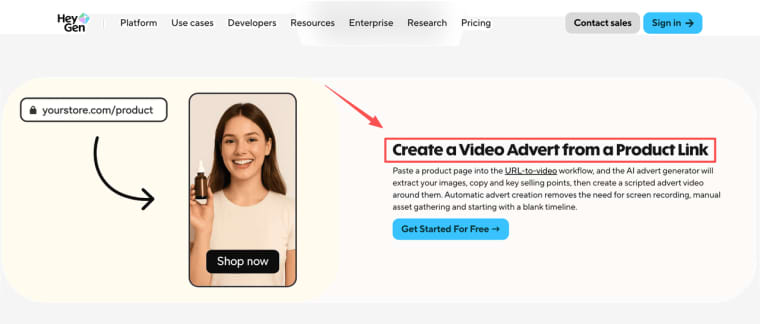
URL-first tools suit pages with approved images, benefits, price, and copy. HeyGen documents URL-to-video extraction of product information and media, while Creatify accepts links from sources including Shopify, Amazon, and app stores.
Check the imported price, variant, images, and claims. If the listing changes often, save the source version used for the campaign.
Script or Creative Brief
Script-first generation suits teams that know the offer. Specify the audience, one hook, approved claim, prohibited wording, scenes, CTA, duration, and channel before rendering.
An AI video ad creator may rewrite the script, quietly turning "designed for daily use" into "guaranteed to last." Lock approved claims and test whether they survive. AdCreate exposes model, duration, and resolution choices in its text-to-video workflow, but every final claim still needs review.
Product Images, Footage, or Reference Creative
Use asset-first generation when accuracy matters more than novelty. Upload real packaging, interface captures, footage, and logos. A reference ad can show pace or structure; it does not grant permission to copy another creator. Name the pattern, such as "problem, demonstration, proof, CTA," and execute it with brand-owned material.
Compare the Controls That Shape the Ad
These controls reveal whether an AI video ads creator supports repeated production rather than one lucky render.
Product Scenes, UGC Formats, and Synthetic Presenters
Synthetic UGC is not a testimonial. It is a fictional or authorized presenter performing a script. Arcads focuses on AI actors, custom avatars, lip-sync, product video, and multilingual delivery, while HeyGen covers presenter-led ads and product demos. Neither proves that a particular product-in-hand scene will work.
Inspect hands, packaging, labels, reflections, and screens. A believable face cannot rescue an inaccurate product.
Hooks, Scripts, Voices, Lip-Sync, and Captions
Test hooks while keeping the offer, presenter, scenes, duration, and CTA fixed. Otherwise, a better result reveals nothing about which change helped.
For voice, test names, product terms, prices, and regional pronunciation. Review lip-sync at normal speed and without audio. Check caption timing, line breaks, punctuation, and safe placement. An ai ad video maker with 100 voices is less useful than one that handles your vocabulary reliably.
Brand Accuracy, Scene Editing, and Regeneration
When one shot fails, can you repair it, or must you regenerate everything? Check whether you can replace a clip, preserve the script, change only the voice, restore a prior version, and see the regeneration cost.
Test small label text, similar color variants, and a logo near the frame edge. Record whether each error can be corrected locally. That tells you more than a showcase reel.
Aspect Ratios, Resolution, and Export Options
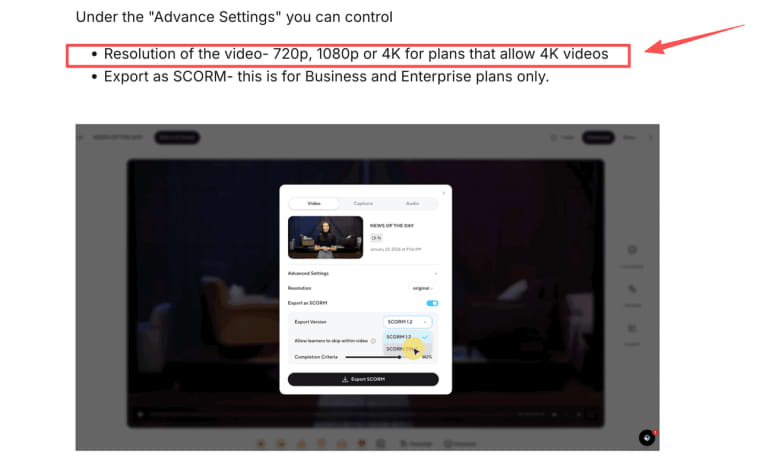
Set the delivery specification first: aspect ratio, duration, resolution, watermark status, caption file, audio access, and external editability. HeyGen distinguishes 720p, 1080p, and eligible 4K exports, with plan and source-quality conditions. AdCreate lists multiple social ratios. Verify the exact plan before buying credits.
Test Every Shortlisted Tool with the Same Brief
Use one realistic product brief: a 15-second vertical ad for a seller-owned travel cup, with four approved images, one phone clip, a fixed price, one verified feature, one CTA, and a brand palette. Request a faceless version and a synthetic-presenter version.
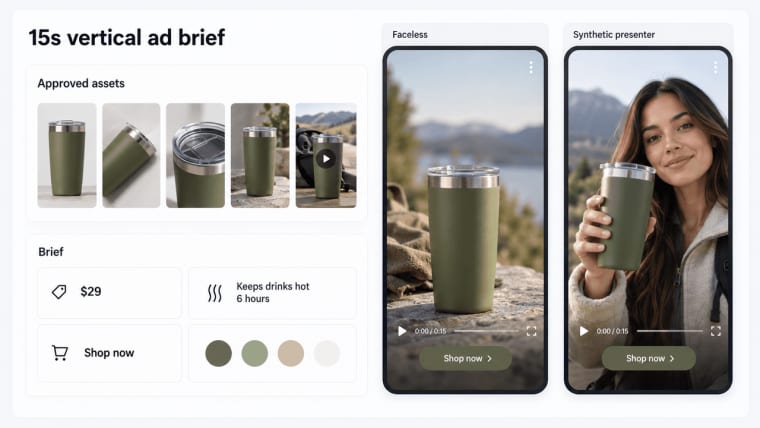
Score product accuracy, claim fidelity, hook control, captions, correction effort, export compliance, credits, and reviewer confidence. Record failed attempts. The best AI video generator for ads is the one that passes this test with tolerable correction work, not the longest feature list.
Check Commercial Rights, Data Use, and Disclosure Rules
Commercial use is not one checkbox. Confirm input rights, output licenses, avatar or stock restrictions, and terms inherited from third-party models. AdCreate's current terms preserve user responsibility for inputs and platform compliance. Creatify's terms likewise place input-rights and commercial-use responsibility on the user. Read the current plan wording.
For client footage, faces, unreleased products, and scripts, check retention, training language, deletion routes, subprocessors, and regional handling before uploading.
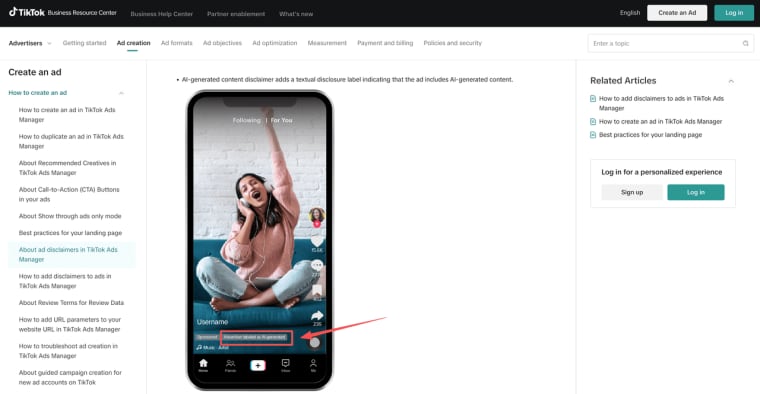
Disclosure varies by channel and market. TikTok Ads requires an AI-generated content disclaimer for qualifying synthetic or manipulated media. Check every destination; export does not equal publication clearance.
Compare Credits and Cost per Approved Ad
Do not compare monthly prices alone. Credits may depend on duration, model, resolution, generation, or revision. Creatify distinguishes standard video use, revisions, and variable Agent or Ad Flow costs. AdCreate notes that model, duration, resolution, and complexity affect consumption.
Calculate:
Cost per approved ad = (plan allocation + extra credits + editing labor) / approved ads
Include failed drafts, caption repairs, and rerenders. Cheap generation can become expensive after four attempts.
Choose a Tool for Your Real Production Workflow
Use the starting material and correction path to narrow the shortlist:
| Production need | Tools worth testing first | Decision to verify |
| Store URL to multiple ad drafts | Creatify, HeyGen | Extraction accuracy, variant handling, and revision cost |
| Presenter-led synthetic UGC | Arcads, HeyGen, Creatify | Actor rights, product accuracy, voice, and lip-sync |
| Script-led ads with broader model and timeline control | AdCreate | Scene repair, model-specific credits, and external editing |
| Brand-owned footage reshaped for channels | Creatify, AdCreate | Upload limits, asset reuse, aspect ratios, and export quality |
| Reference-led product ads with conversational revisions | HappySeeds | Reference reuse, product accuracy, light-editing limits, and export fit |
This is not a universal ranking. A seller may value URL-first speed; an agency may prioritize handoff, scene repair, and predictable revisions. Choose the ai video ad creator your team can operate repeatedly.
Where HappySeeds Fits in an AI Video Ad Workflow
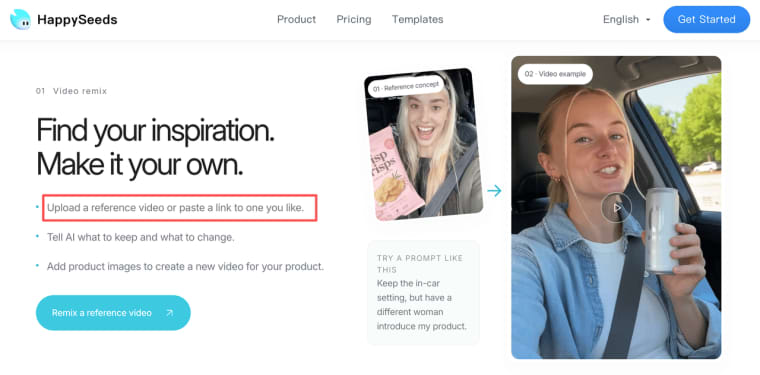
Sometimes the useful starting point is not a product page or a finished script. It is a reference video with the right pace, hook, or shot sequence. HappySeeds AI Video lets a seller upload that reference or paste a link, explain what should stay and what should change, then add product images to create a new version for the brand. Teams can also begin with a written idea or a single product image when no reference video exists.
The workflow is aimed at merchants, creators, and marketing teams producing product demonstrations, launch clips, social content, and other repeat video tasks. After generation, users can refine elements including the script, scenes, voiceover, captions, music, brand colors, and aspect ratio. That makes HappySeeds relevant inside this generator comparison, especially for a team that prefers to describe revisions conversationally instead of learning a conventional timeline editor.
It should still face the same test as every other candidate: use the same source assets, claims, duration, and export requirement, then count inaccurate drafts and correction effort. Its editing is positioned as lightweight, so buyers who need detailed frame-level compositing should verify that boundary before choosing it as their main production tool.
Choose for Usable Ads, Not Feature Count
The winning tool turns real inputs into accurate, reviewable ads without hiding correction work or rights questions. Use one shared brief, count failed generations, and compare cost per approved asset. It is less glamorous than a demo reel, but much closer to the work you are buying.
Explore More Topics:
FAQ
Can a contractor work inside a client-owned generator account?
Possibly. Use a named seat or approved role, not shared credentials. Confirm who can view assets, spend credits, export projects, and remove access.
What evidence proves which model created an approved ad?
Keep the project ID, export date, model label, plan receipt, brief version, source manifest, and approval record. Editing or upload may remove embedded metadata.
Can an exported ad be re-edited if its cloud project disappears?
An MP4 preserves the result, not editable scenes. Archive the best export, captions, audio, sources, script, fonts, and any project export.
What happens when a saved presenter leaves the avatar library?
Existing exports may remain usable under the applicable license, but future regeneration can change. Approve a replacement and avoid making one avatar essential.
Should a brand archive prompts and source files with the final MP4?
Yes, where policy permits. Keep the approved brief, source rights, prompts, versions, edits, disclosure decision, final export, and sign-off.