The awkward question with Adalo is not whether it can make an app. It is which version users actually need. A field worker may want an installed phone app with camera access. Their manager may want the same records on a desktop. A customer may only need a link.
Distribution is therefore the first decision, not the final publishing chore. Elin here. This Adalo review uses official materials checked October 6, 2026, plus one reproducible operations brief. It is not a private-account hands-on benchmark.
Quick Verdict: Choose Adalo for the Right Output
Adalo is a strong candidate when a founder needs a database-driven app on iOS, Android, and the web, with visual control after AI creates the starting structure. Its clearest advantage is one managed project serving several form factors.
Choose it because native distribution or device behavior matters, not because "mobile app" sounds more serious. Store release brings developer accounts, signing, testing, metadata, review, and update work. A responsive web app avoids some friction but can behave differently around cameras and notifications.
Adalo fits products whose core loop is login, view records, create or update something, and return later. Be more cautious when downloadable source code, complex permissions, localization, or fine-grained team governance is essential.
How Adalo Combines AI and a Visual Canvas
The current Adalo AI app builder is not chat alone. Ada can generate starting screens, navigation, database collections, relationships, and authentication. The founder then uses a multi-screen canvas to move components, connect data, and refine layouts. Adalo's product workflow combines AI generation with direct canvas editing, so the prompt begins the build rather than becoming the permanent interface.
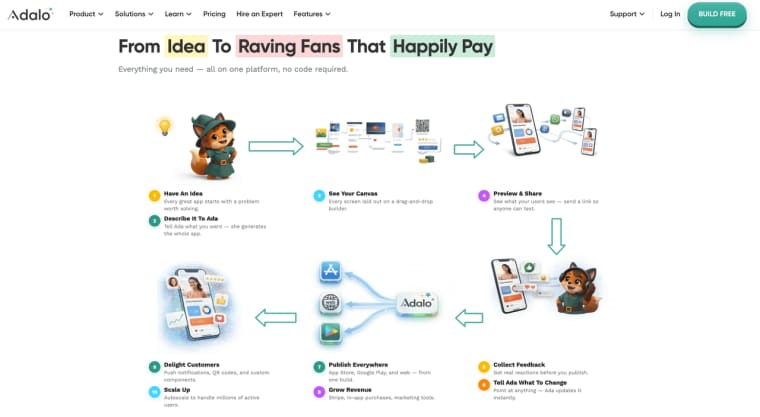
That suits someone who wants to see the whole screen map. It also exposes a risk: generated screens do not prove that permissions are correct. A list can look private because the interface filters it while the database still serves records too broadly. Adalo distinguishes visual conditions from database-level permissions controlling served records and fields. Test both.
AI reduces blank-canvas work. It cannot decide who may edit a rejected inspection or whether a web user should see a mobile-only action. Put those rules in the brief before they become scattered canvas conditions.
Test One App Across Mobile and Web
Shared Data, Navigation, and Responsive Behavior
Use one narrow brief instead of building three attractive demos:
Build a site-inspection app. A technician signs in, opens an assigned location, captures a photo, records pass or fail, and submits the inspection. A supervisor reviews the same record on desktop. If the supervisor rejects it, the technician receives a notification and can resubmit.
This is a proposed acceptance test, not a reported result. Each step creates evidence: owner, timestamp, status, photo, review note, and decision. A technician must not see another technician's assignments, and a desktop supervisor should not inherit cramped mobile navigation.
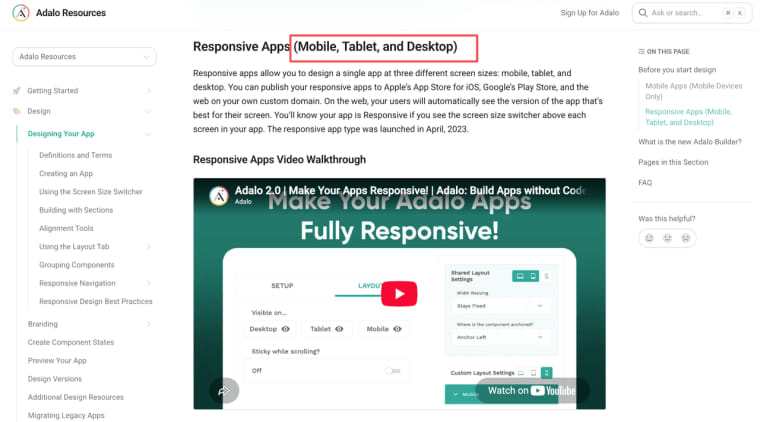
Adalo supports Mobile and Responsive layouts. Its design guidance covers mobile, tablet, and desktop breakpoints, while Mobile apps retain a phone-oriented layout on the web. Responsive mode still needs inspection. Long labels, tables, image previews, modals, and keyboard use can expose awkward desktop behavior.
Use three test accounts: technician, supervisor, and unrelated user. Submit on a real phone, review in a fresh desktop browser, reject it, and confirm the state changes without granting the wrong person edit access. Repeat with a slow upload, missing photo, duplicate tap, and revoked notification permission. The failed update is more revealing than the polished first screen.
Review the App-Store Publishing Path
Build, Signing, Submission, and Ongoing Updates
Adalo can generate native iOS and Android builds, but the founder still needs developer accounts, identifiers, icons, screenshots, privacy information, store descriptions, and release ownership. Keep credentials in company-controlled accounts, not a freelancer's personal login.
For iOS, the build moves through App Store Connect. Apple expects TestFlight testing, listing material, build selection, and review submission; its workflow also covers updates and in-app purchases. Adalo helps with the build, but Apple controls acceptance.
Google Play has separate setup and testing paths. Certain new personal accounts must complete a closed test before production access; the current requirement includes tester participation and a continuous testing period. Put that time in the launch plan.
Test changes as native builds when they touch cameras, deep links, notifications, payments, or sign-in. Web and store updates reach users differently, so record which version is live on each channel. One project should not mean one unchecked release everywhere.
Pricing, Ownership, and Maintenance Trade-Offs
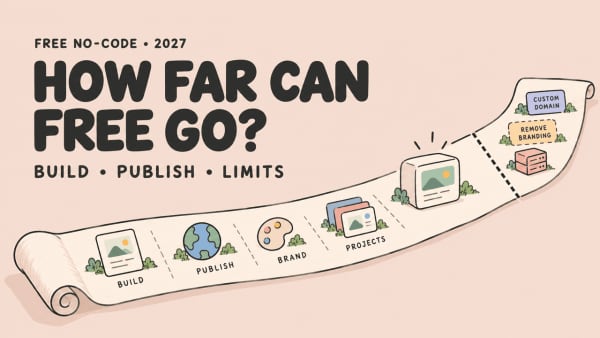
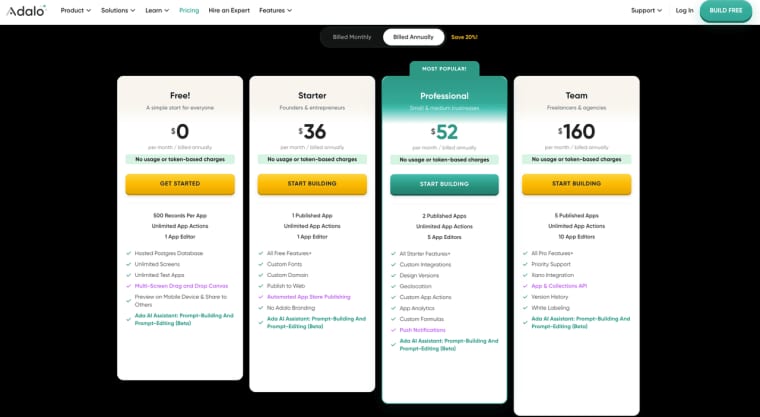
Adalo pricing is organized around plans, published apps, editors, storage, and feature access rather than metering each end-user action. On September 30, 2026, the official options listed were Free, Starter at $36 per month when billed annually, Professional at $52, and Team at $160. Free included 500 records per app and allowed builders to publish and share a Web app on an Adalo subdomain. Publishing on a custom domain or through the Apple App Store or Google Play requires an eligible paid plan; Starter included one published app and those publishing options. Recheck monthly rates, add-ons, storage, integrations, and editor limits before purchase.
Also budget for developer accounts, APIs, payment processing, support, store assets, privacy work, and repeated build review. Contractor access and handoff add operating cost.
Ownership has two parts. Adalo states that makers own the app's associated intellectual property and can export app data. That is not a portable source repository. Current official help does not establish full source-code export, so obtain written confirmation if independent deployment is required.
Managed hosting removes server work but makes recovery discipline important. Keep a release log, export business data, document third-party accounts, and test a repair path. Adalo has a public service-status history, but your team still owns launch and customer communication decisions.
Who Should Choose Adalo
Adalo makes the most sense for a focused no-code mobile app with a built-in database and a genuine reason to use app stores. The inspection example fits when technicians need cameras or push notifications while managers share the same records.
It can also fit membership, booking, directory, community, or two-sided workflows when the team can define relationships and permissions. The canvas helps founders who want direct screen control after generation.
Investigate other Adalo alternatives when the release is search-discovered, a standalone codebase is required, or multilingual interfaces are central. Adalo's current help says built-in multiple-language support is unavailable. The Adalo alternative guide for nontechnical founders covers that separate category decision.
When HappySeeds May Be Worth Considering
HappySeeds becomes relevant when an app-store build is unnecessary for the first test. Imagine the inspection idea becoming a public self-assessment: a customer answers questions in a browser, saves a result, and pays for a report. That is a Web-first customer journey, not the same operations product.
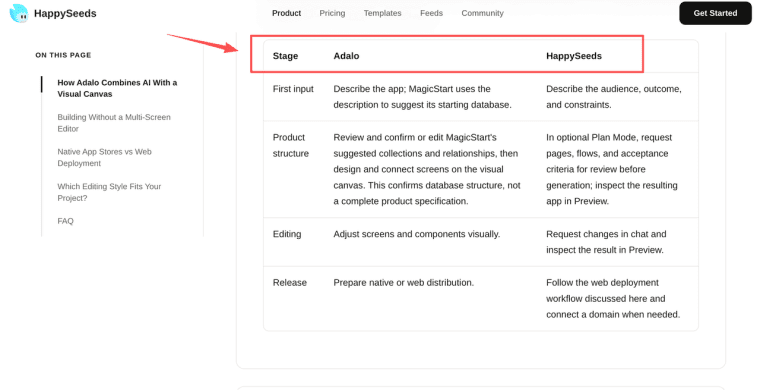
For that version, HappySeeds may suit a nontechnical founder who wants to define the journey before refining the interface. Its Adalo-specific workflow comparison draws the split: Adalo combines AI, a visual canvas, and native distribution; HappySeeds uses Plan Mode, chat-led iteration, Preview, and Web publishing. Data, authentication, permissions, Stripe flows, SEO, domains, and failures still need configuration and testing.
HappySeeds does not replace Adalo's native store path, and no direct migration is documented. Stay with Adalo when installation or native device behavior is required. Consider HappySeeds when proof can happen in a browser and the hard part is the paid customer flow.
Choose Distribution Before the Builder
Decide the release channel first. If users need an installed experience, device behavior, and a store listing, Adalo's AI scaffolding, visual editing, shared data, and native publishing deserve a controlled pilot. If a browser is enough, the store workload may solve the wrong problem.
Run the inspection brief, including rejection, on actual devices and roles. Then price the plan, store accounts, maintenance, and handoff together. The answer is not "native is better" or "web is easier." It is the output your first real workflow can justify.
Explore More Topics:
FAQ
Does Adalo publish a public status page for build-system incidents?
Yes. It covers app editing, published apps, publishing, the Collections API, and analytics. Check current components and incident history before release. A green indicator cannot explain an app-specific configuration failure, so retain internal release notes.
Can an Adalo project be transferred to a client's own team account?
Adalo documents a support-assisted transfer. The client needs an account and a suitable plan. Custom Actions may be tied to the original team and require recreation, so test handoff before the final invoice.
Does Adalo document accessibility support for generated apps?
I did not find a current public accessibility conformance statement covering finished apps. Test keyboard operation, focus order, labels, contrast, text resizing, errors, screen readers, and native device accessibility on release builds.
Can one Adalo app support multiple interface languages?
Adalo's current guidance says built-in multiple-language support is unavailable. Manual translated content is not a maintained localization system. Test language switching, right-to-left layout, dates, currency, validation, and store metadata before promising multilingual delivery.
Does Adalo offer role-based permissions for project collaborators?
End-user permissions and builder collaboration differ. App users can receive conditional experiences, but invited editors receive broad app access. Adalo also warns that simultaneous editing may lose changes. Confirm ownership, deletion authority, and review duties before inviting contractors.