The phrase "Glide app" now hides a product split. Search results still lead to the familiar spreadsheet app builder, while Glide's main story has moved toward GlideOS, an AI-led environment for internal business software. Treating them as one unchanged product makes comparisons unreliable.
I checked the public product, pricing, and sign-up route on October 5, 2026. The GlideOS start button led to Google, Microsoft, or email sign-in. I stopped there, so this Glide Apps review provides a reproducible operations test, not a claimed authenticated build.
Quick Verdict: Glide for Data-Driven Business Software
Glide remains most convincing when work already has rows, owners, statuses, approvals, dates, and repeated updates. Think inventory checks, service requests, field inspections, or vendor tracking. Here, data is the app's spine.
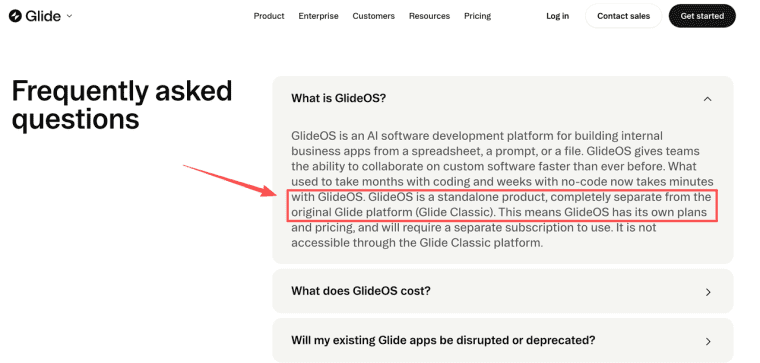
The main caution is identity. GlideOS is a standalone product separate from Glide Classic, with its own workspace, subscriptions, and AI-assisted build model. Classic documentation cannot automatically prove what GlideOS includes.
Shortlist Glide when an operational dataset and internal user group already exist. Pause if the product needs native app-store distribution, an undefined customer journey, or portable source code.
What Glide Apps Has Become in GlideOS
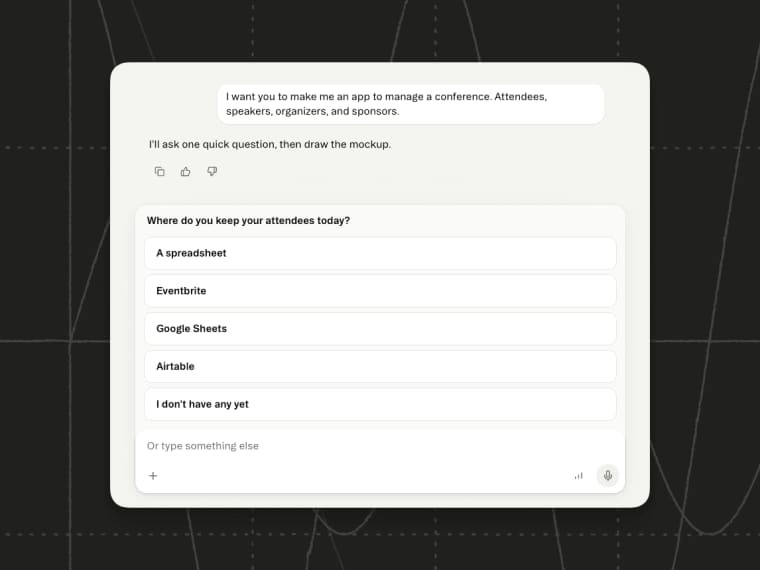
GlideOS shifts the starting point from arranging screens around a spreadsheet to describing a tool around business data. A project can begin from a spreadsheet, file, or prompt, then share data and context across its apps.
Glide Classic did not silently become GlideOS. The products have separate access and pricing. Existing customers should identify which product owns their project before comparing plans, roles, publishing, or maintenance.
Spreadsheet Context, Business Data, and AI-Assisted Building
The spreadsheet heritage still matters. Glide fits teams that can provide a real operational source instead of asking AI to invent a data model from a vague paragraph.
Recent GlideOS release notes describe connecting live data before generating the mockup. If the source contains Request ID, Site, Assigned Technician, Status, Due Date, and Approval, the first interface can expose missing owners or ambiguous statuses before visual polish begins.
AI-assisted building does not resolve duplicate IDs, mixed dates, unexplained abbreviations, or free-text statuses. Fix those before import and keep a clean source copy. A neat dashboard built on a confused spreadsheet is still a confused system, only easier to click.
Evaluate One Operations Workflow
Use one ordinary workflow, not a showcase app. This proposed test is a field-service request tracker: a dispatcher creates work, technicians update assigned jobs, and a manager approves completion. Customers stay outside version one.
Use ten realistic records, including an overdue job, missing assignee, duplicate site, and closed request. That small mess is useful. Clean demo data hides operational problems.
Import, Roles, Actions, and a Real Data Update
Run the test in this order:
| Check | Action | Passing evidence |
| Import | Connect the prepared sheet or file | IDs, dates, statuses, and assignees map to the intended fields |
| Roles | Open the app as dispatcher, technician, and manager | Technicians see assigned work; managers see the approval queue |
| Action | Mark one request complete and attach a note | The status, timestamp, and note change once, without creating a duplicate |
| Source update | Change one due date in the connected business source | The app reflects the update through the documented sync path |
| Failure | Remove a required value or interrupt an update | The user sees a recoverable error and the original record remains trustworthy |
Do not confuse a hidden component with protected data. Confirm what each user can retrieve and change, then repeat the test after renaming a source column. One schema change can quietly break an action or filter.
Finally, inspect the changed source record. If the team cannot locate the approved value, the workflow is not ready to replace the spreadsheet.
Keep a one-page test record beside the build. For each role, note the starting row, action taken, expected change, observed change, and recovery result. Add a screenshot only where it proves a permission or failure state. This gives the next maintainer something better than "it worked when we launched."
What Web and PWA Distribution Means
Glide's Help Center describes Glide apps as PWAs and says direct Apple App Store or Google Play publishing is unsupported. Current GlideOS materials separately describe published apps that can be installed directly on desktop or mobile; verify the current GlideOS distribution route if native-store presence is required.
That can suit internal tools: no store review queue, and published changes reach the working URL. It fits poorly when store presence, native distribution, or device-specific features are firm requirements.
Test the oldest phone in use, switch networks, upload a field photo, and resume a half-finished form. "Works on mobile" does not prove reliability in a warehouse, basement, or customer site.
Automation and Ongoing Maintenance
Automate only after the manual status update works. A completed job might enter a manager queue, send one notification, and record approval. Add and observe each step separately. A bad mapping can otherwise send the wrong message to everyone before lunch.
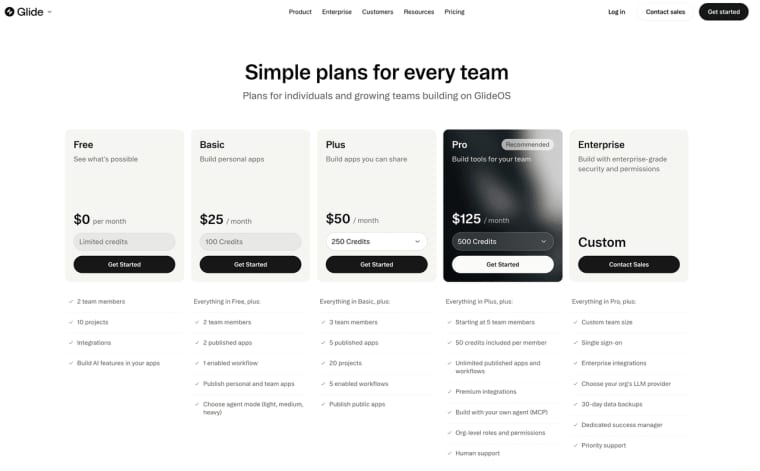
GlideOS plans meter publishing, workflows, team access, and AI credits differently. As checked on September 30, pricing runs from a free tier with no published apps through Basic, Plus, Pro, and Enterprise. Public publishing and broader organizational controls unlock at different levels. Recheck the matrix; older comparisons may describe Classic.
Give maintenance to a named owner: source credentials, failed workflows, schema changes, user removal, and republishing. If a personal Microsoft or Google account controls the connection, staff turnover becomes an app dependency. Use a recoverable business account.
Strengths, Trade-Offs, and Best-Fit Use Cases
Glide's strongest use case is not "any app without code." It is no-code business software attached to structured work, where different people need useful views and actions around recognizable records.
The trade-offs are concrete. GlideOS and Classic require separate evaluation. PWA delivery is not native distribution. Publishing, workflows, permissions, audit features, and support vary by plan. External sources add authentication and sync risks.
Glide suits request queues, inventory workflows, field checklists, vendor trackers, and dashboards. It is less obvious when the hard part is defining a public offer, paid customer journey, or separately owned codebase. Then the spreadsheet may be the wrong center.
When the Workflow Becomes a Customer Product
Glide makes sense while the product is mainly a set of records and actions for employees or partners. The decision changes when the same workflow must attract a customer, explain an offer, collect input, handle payment, and deliver a result without staff guiding every step.
HappySeeds may fit that second job. A nontechnical founder can define the customer journey, build the Web App through conversation, and use small chat-led revisions with Preview to check each change before publishing. Database records, sign-in, permissions, Stripe flows, SEO settings, and the live domain still require deliberate configuration and testing.
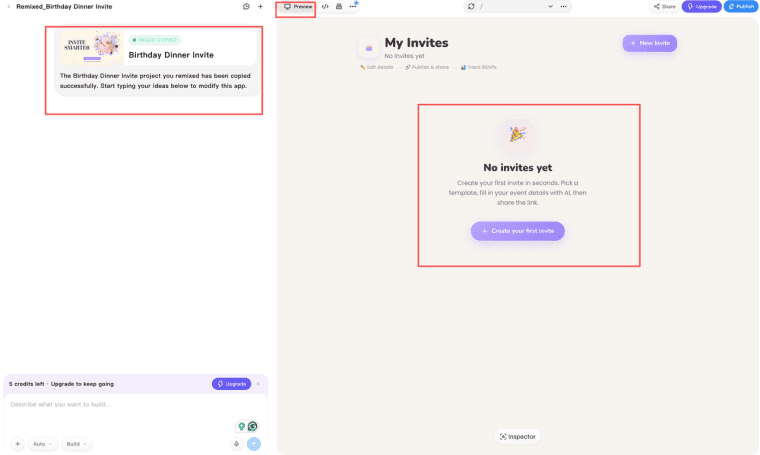
This is not a Glide migration route. If outside users only need controlled access to operational records, Glide may remain the simpler choice. Consider HappySeeds when the harder problem has become the public offer, paid outcome, and customer journey rather than the spreadsheet behind them.
Keep Glide Close to the Data It Serves
Glide makes sense when a team can put a real table on the desk and explain who changes each field. GlideOS adds a conversational build route, but ownership, permissions, failed updates, and maintenance remain.
Build the service tracker before the grand operations platform. If one technician can update one assigned job, one manager can approve it, and the underlying record remains trustworthy, the tool has earned its next workflow. If that basic loop is still fuzzy, another dashboard will not rescue it.
Explore More Topics:
FAQ
Can a Glide app be duplicated into a separate client-owned team?
Glide Classic supports duplication and team transfers, but SQL sources, Big Tables, workflows, and credentials can complicate them. Building inside a client-owned team is cleaner. Confirm GlideOS transfer behavior before promising a handoff.
Does Glide support right-to-left interfaces for operational apps?
I found no current official promise of complete right-to-left behavior across GlideOS layouts, inputs, tables, and generated text. Test representative Arabic or Hebrew labels, dates, mixed-direction content, and mobile screens.
Can a company export an audit history of changes made in Glide?
GlideOS lists audit logs among Enterprise controls, but public material does not define every export format, event, or retention period. Ask whether logs cover data changes, builder edits, publishing, permissions, and workflow runs, then request a sample.
Can Glide send transactional email from a company's own domain?
Glide can trigger email workflows, but sender domains, authentication, replies, and delivery reporting depend on the chosen route. Do not assume system emails use the company's domain. Test SPF, DKIM, replies, bounces, and unsubscribe handling where relevant.
How are user-data deletion requests handled inside a Glide app?
Removing an app user is not the same as deleting their operational records. Map connected spreadsheets, databases, files, integrations, workflow logs, and backups. Define who confirms deletion and what must be retained. This is an operational checklist, not legal advice.