I built a little tool recently, got it generating, exported it, and stared at the folder thinking, okay, now what. That "now what" is the gap nobody warns you about. Vercel Drop closes one specific part of it — the part where you have working files and just need them online. It does not close the rest. I'm Elin. This post is about exactly where the line sits, because I crossed it the hard way, and you don't have to.
Quick version for the busy people: Vercel Drop is the fastest way I've found to get an AI-generated project from a folder to a live URL with no Git and no terminal. It is not a launch. Your demo being online and your product being ready for paying users are two different finish lines, and the distance between them is where most first builds quietly die.
What Vercel Drop Solves for Builders
Here's the actual thing it does, and it's narrower and more useful than the hype makes it sound.
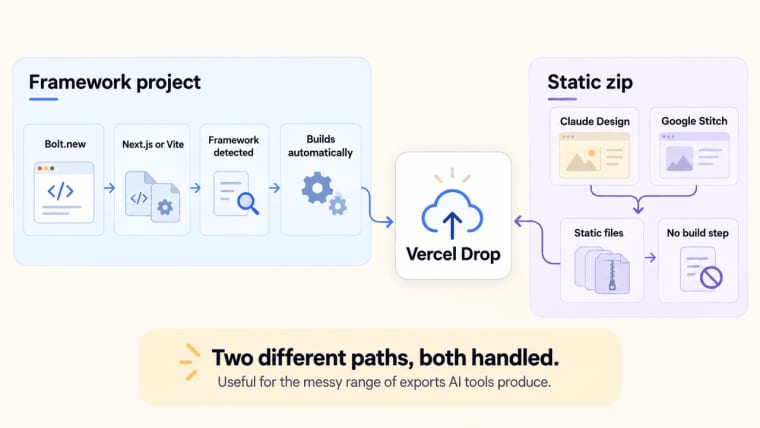
You drag a file, folder, or .zip onto a page in your browser. Vercel uploads it and publishes it straight to production with a shareable URL. No repo to connect, no CLI to install, no local setup. Vercel Drop handles both static sites and framework projects. It detects and builds supported frameworks such as Next.js, while static files are served as-is without a build step.
That second part matters more than it looks for our crowd. AI tools export in messy ways. Some give you a framework project, some give you a static zip. Vercel's launch announcement specifically calls out three tools: Bolt.new exports are framework projects (Next.js or Vite), so Vercel detects the framework and builds them. Claude Design and Google Stitch exports are static files with no framework, so they deploy as-is with no build step. Two different paths, both handled — which is what makes Drop genuinely useful for the range of things AI tools spit out.
Before sharing the URL, I'd check that the app can do more than load.
Imagine a Bolt notes app that already uses Supabase for sign-in and saving notes. Here's how you'd deploy it and publish one update.
- Export and check. In Bolt, choose Export → Download from the project-title menu. Check the ZIP for
package.jsonand source folders. Remove any private credentials. - Deploy. Upload the ZIP at vercel.com/drop, choose your team, name the project, and click Deploy. Vercel detects the framework and builds it.
- Restore the configuration. Bolt's Secrets values aren't included in the export. Add the required Production variables using the names your code expects, then redeploy. Keep private credentials on the server.
- Use the app. Sign in, save a note, and reload. Check that a second account cannot read it. If sign-in redirects fail, review the provider's allowed redirect URLs.
- Publish a change. Edit a screen and export again. For a project without Git, drag the updated folder onto the existing project in Vercel's dashboard. Recheck the production address and saving flow.
If something breaks:
| Symptom | Check first |
| Build fails | Build Logs and variables needed during the build |
| Homepage returns 404 | Static export's index.html or Root (/) selection |
| An external-service feature fails | Production variables; redeploy after correcting them |
| Saved notes are missing | Database connection, request errors, and access policies |
I tested this with a static export and it was genuinely a few seconds to a live link. That part is real. No notes.
Where you upload the next version matters. The public Drop page creates a new project. To update an existing project without a Git connection, drag the revised folder onto that project in the Vercel dashboard. Connecting a repository is another option when you want automatic deployments from changes in Git. A stable project address does not, by itself, require Git.
Deployment Is Not the Same as Product Launch
This is the section I wish someone had sat me down for.
Deployment means the code is running on a server somewhere people can reach. Launch means a stranger can show up, do the thing your app promises, and you can handle what happens next. Those sound similar. They are not similar.
When I dropped my first thing live, I felt done. I sent the link around. And then the questions started — can people log in? Where does their data go? How do I charge them? — and I realized I had shipped a demo wearing a production URL. l need to work with the production configuration.
From demo URL to user-ready app
A demo URL is something you show. A user-ready app is something people use without you in the room. The transition looks small and isn't.
Walk through it honestly. Your vercel app is live — great. Now: a real user lands on it. Can they create an account? Does anything they type get saved, or does it vanish on refresh? If two people use it at once, do they see each other's stuff (bad) or their own (correct)? Can you tell if anyone even visited?
Use those answers to decide the next action. Missing behavior needs an app change; an existing integration may need production configuration. A successful deploy alone does not distinguish between the two.
What AI Apps Still Need After Deployment
After deployment, separate features the export already contains from configuration it still needs. Adding production credentials can connect existing code to a service; it cannot create a missing login flow, database schema, or checkout.
Login, database, payments, analytics, SEO, and permissions
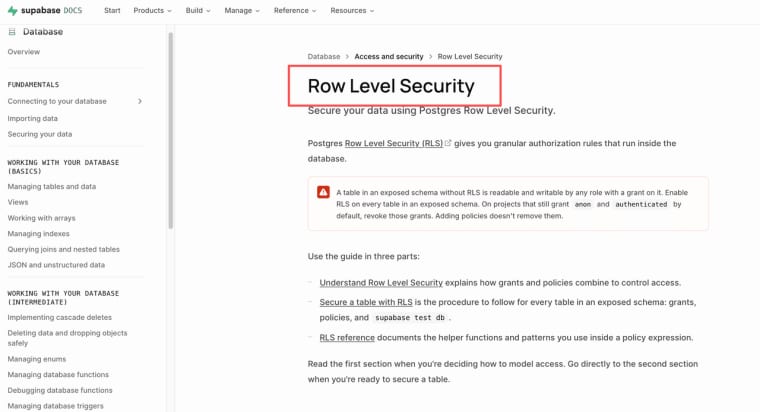
Login and a database. If the export uses Supabase, check its connection, auth settings, and Row Level Security policies. Use a publishable or legacy anon key in browser code; keep secret and service-role keys on the server. Missing login or database features still need to be built.
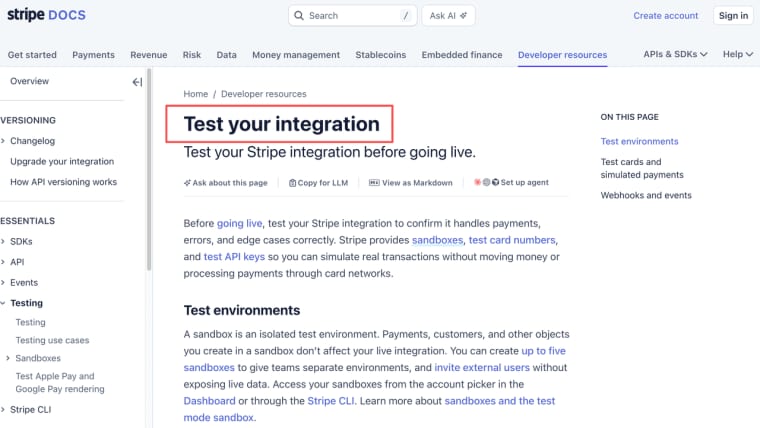
Payments. If checkout already exists in the export, verify its production configuration; otherwise, payment integration is still application work. That's a separate integration with its own keys, webhooks, and a fair amount of testing before you trust it with a real card. If you use Stripe, its payment testing guide covers successful and failed payments you can check before going live.
Analytics. Check whether tracking is already included and configured. For Vercel Web Analytics, enable it in the dashboard and add the integration required by your framework. After publishing, confirm that visits appear. If you later add a custom domain, review your analytics configuration and Search Console coverage for that domain rather than assuming the existing setup covers it.
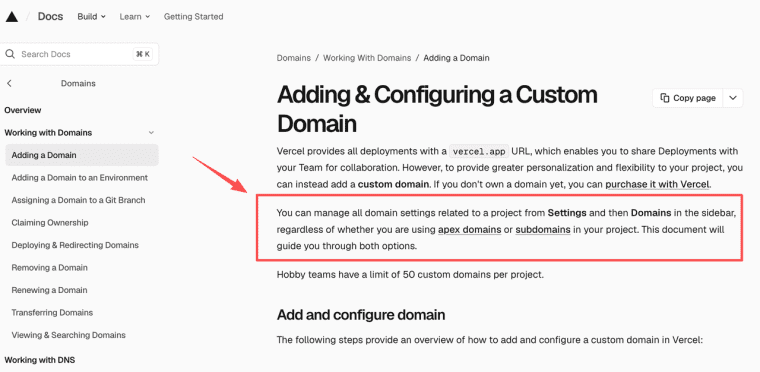
SEO and custom domain. Vercel gives every project a .vercel.app URL, but for anything production you want your own domain. The good news: you can add a custom domain to any project, drop it or not. The domain configuration docs walk through adding it in Settings → Domains and updating DNS at your registrar. It's not hard, but it's a deliberate step with DNS propagation waiting attached.
Permissions and the quiet backend ceiling. Authentication tells the app who signed in; authorization determines what that person may access. Test those rules with separate accounts. For Supabase-backed records, review the relevant Row Level Security policies.
If the export uses Vercel Functions, compare the workload with the current execution, memory, and payload limits for your plan and configuration. An app using an external backend needs that service checked too. A slow request or background task calls for a workload review, rather than an assumption that every growing app must leave Vercel.
When Vercel Drop Is Enough vs When It Is Not
Let me just be direct, since the docs won't pick a side and I will.
Drop is genuinely enough when:
| Situation | Why Drop fits |
| Sharing a prototype for feedback | One URL, seconds, throwaway is fine |
| A static site with no accounts or data | No backend needed, deploys as-is |
| A one-off landing page or portfolio | Custom domain optional, nothing to persist |
| Showing a client a working concept | A shareable deployment lets the client review the exported experience |
Plan additional work when:
- The export lacks a required feature, such as account management, saved data, checkout, or access rules.
- Existing integrations still need production credentials, provider settings, or testing.
- Your team needs reviewed changes, previews, and automatic releases through a repository.
- The workload exceeds the limits of the services you have selected.
Drop can deploy an app that already contains these features. It does not build missing ones for you. If you are using an AI app builder, check what its export includes before deciding whether the next job is configuration, further development, or a different release workflow.
HappySeeds, which publishes this guide, offers chat-based app building with its own publishing and hosting, including database, login, Stripe, and SEO metadata features. Drop handles deployment of an existing export. Compare the product work you still need with the release workflow you want, and verify each product's current terms before choosing.
So that's the map. Vercel Drop is a genuinely great way to get an AI-generated project live without touching a terminal — I'd reach for it again tomorrow for a prototype. Just go in knowing it hands you a deployed app, not a launched product. Get the URL live, feel the small win, then ask the real question: who's this for, what do they need to do, and what happens after they do it. That second build, the one where you answer those — that's the one that actually ships.
Explore More Topics:
FAQ
Can I connect a Git repository to a project deployed via Vercel Drop later?
Yes. Connect a repository in Settings → Git. By default, production-branch changes update the live app; other branches create previews. Share the project's production URL rather than a deployment-specific link.
How do I add persistent user data and authentication after using Vercel Drop?
Start by checking whether the export already includes authentication and database code. If it does, configure the production connection and test the access rules. For a Supabase frontend, use the appropriate publishable key and Row Level Security policies. If those features are missing, they must be implemented before deployment settings can connect them.
Does Vercel Drop support custom domains, and how long does it take?
Yes. Add the domain in the project's domain settings and apply the DNS records Vercel displays. Check the configuration status before sharing it. Timing depends on the DNS provider and existing records; adding a custom domain does not require a Git connection.
When should I stop relying on Vercel Drop and switch to full Git workflow?
Vercel restricts Hobby to personal, non-commercial use. Commercial use requires Pro or Enterprise under its current guidelines. Check the plan terms before publishing a paid app, a business landing page, or paid client work; the absence of checkout does not automatically make a deployment non-commercial.