I spent three weeks last quarter paying frontier-model prices for a feature that rephrases one sentence.
That's the embarrassing part. The feature worked great. It just didn't need the most expensive brain in the building to do it, and I didn't figure that out until I actually read my usage dashboard and felt my stomach drop. So this is the post I wish someone had handed me before I wired up the wrong model: a plain-language look at GPT-5.4 Mini for AI apps, written for people who are building a product, not benchmarking a model. No parameter charts. Just: when is the smaller, cheaper option actually enough, and when does it quietly wreck your user experience.
Quick reality check before we go further — I'm writing this from the founder seat, not the ML-engineer seat. If you want SWE-Bench leaderboards, this isn't that. If you want to stop overpaying for features that don't need it, keep reading.
The 30-second version: A smaller model handles most of the boring, high-frequency stuff in an app — chat replies, form parsing, short drafts, simple agent steps — for a fraction of the cost. You reach for something stronger when a task needs deep reasoning, long multi-step work, or zero tolerance for a wrong answer. Docs sites can be driven from the Codex Mintlify setup. The skill isn't picking "the best model." It's matching the model to the job.
What GPT-5.4 Mini Is Good At (For Builders, Not Coders)
Here's the framing that finally clicked for me. GPT-5.4 Mini isn't a downgrade of a big model. It's a different tool for a different shape of work.
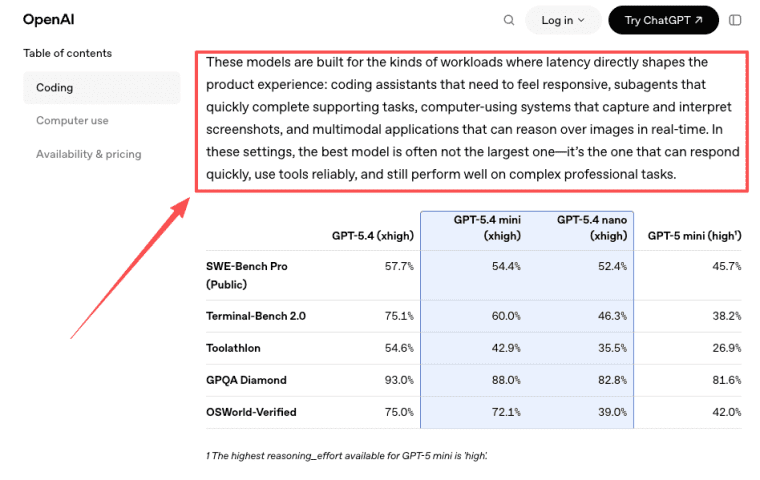
I went and pulled up the actual source on this before writing it, because I didn't want to paraphrase from memory. According to OpenAI's own announcement for GPT-5.4 mini and nano, these smaller models are built for workloads "where latency directly shapes the product experience" — and the line that stuck with me is that in those settings, the best model is often not the largest one, it's the one that responds fast and uses tools reliably. That's a product statement, not a parameter flex. It's basically describing every interactive feature you've ever shipped.
What Mini is genuinely good at, in builder terms: responding quickly, following instructions, handling images and text, calling your tools, and doing it at a price that doesn't punish you for having users. The official guidance even nudges you here — OpenAI's GPT-5.4 mini model page now openly says that for most new low-latency, high-volume workloads, you should start with GPT-5.4 mini. When the vendor tells you to start small, that's worth hearing.
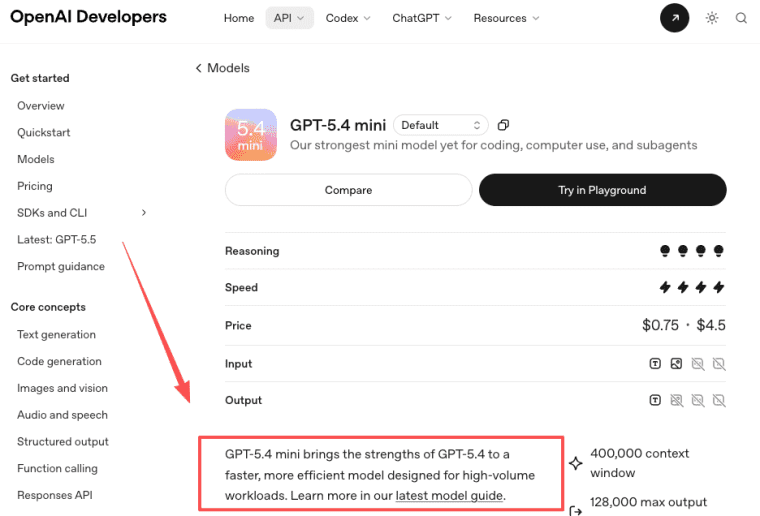
One honest caveat I have to flag: I saw conflicting context-window numbers for this model across third-party trackers. If long documents are central to your feature, go check the official model page yourself rather than trusting my paraphrase. The point that matters for when to use smaller models isn't the exact ceiling — it's that Mini is tuned for high-frequency, short-interaction work, not for being your one model for everything.
Product Features Where a Smaller Model Usually Works Well
Chat, Forms, Drafts, Light Agents
This is where I'd actually default to Mini, and where I've watched it hold up.
Chat and support replies. Most in-app chat is not a philosophy seminar. It's "where's my invoice," "how do I reset this," "summarize what I just pasted." A smaller model handles that conversational, well-scoped back-and-forth comfortably, and the speed makes the whole thing feel better. A snappy okay-answer beats a slow brilliant one in a chat box. Every time.
Form parsing and structured extraction. Turning a messy paragraph into clean fields — name, date, category, intent — is a near-perfect Mini job. It's repetitive, it's high-volume, and you usually have validation downstream anyway. Paying frontier prices per submission here is just lighting money on fire.
Short drafts and rewrites. First-draft email copy, a product description, tightening a clunky sentence, generating a few subject-line options. The kind of thing where a human is reviewing the output anyway. My read: if a person is going to edit it regardless, you rarely need the biggest model to produce the starting point.
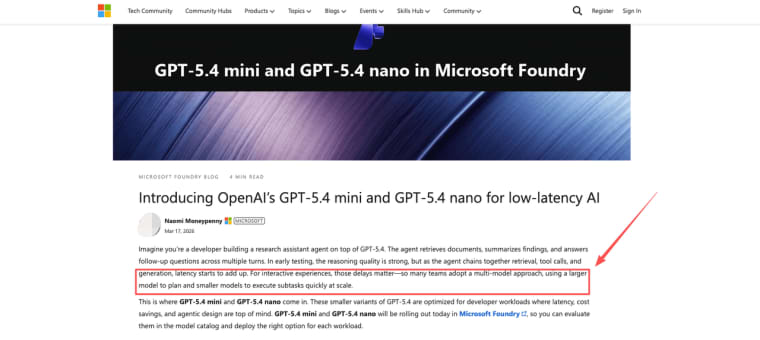
Light agents and sub-tasks. This one took me longer to trust, so I went looking for how the bigger teams actually structure it. Microsoft's Azure AI Foundry write-up on the smaller GPT-5.4 variants describes a multi-model pattern I now use as a mental model: a larger model plans, and smaller models execute the quick sub-steps at scale. So a "light agent" — fetch this, classify that, format the result — is exactly Mini's lane. You don't need a genius to look something up. You need something fast and reliable that won't bankrupt you at volume.
When Mini Starts to Feel Too Weak
Okay, plot twist, because I don't want this to read like an ad.
There's a point where you can feel a smaller model straining, and ignoring it costs you trust with your users. Here's where I've personally hit the wall.
Long, chained reasoning. When a single request needs five logical steps that depend on each other — analyze, infer, cross-check, decide, justify — smaller models start dropping threads. The answer looks fluent and is subtly wrong, which is the worst failure mode because nobody catches it until a user does.
High-stakes correctness. Anything where a confident wrong answer has real consequences — money, legal, medical-adjacent, irreversible actions. If a mistake isn't cheap to fix, the model-cost savings stop being savings.
Messy, ambiguous instructions. Give a smaller model a vague, contradictory prompt and it tends to pick a lane and commit — sometimes the wrong one. Stronger models are better at holding the ambiguity and asking the right clarifying move.
The tell, in plain terms: if you find yourself patching outputs with more and more validation logic, retries, and "are you sure?" follow-up prompts, the model is quietly telling you it's the wrong size for the job. I ignored that signal once for about a week longer than I should have. The fix wasn't a better prompt. It was a bigger model on that one path.
How to Decide Between Mini and a Stronger Model (AI App Model Choice)
The mistake I see — the one I made — is treating AI app model choice as one global decision. "Which model is my app on?" Wrong question. The right question is per-feature.
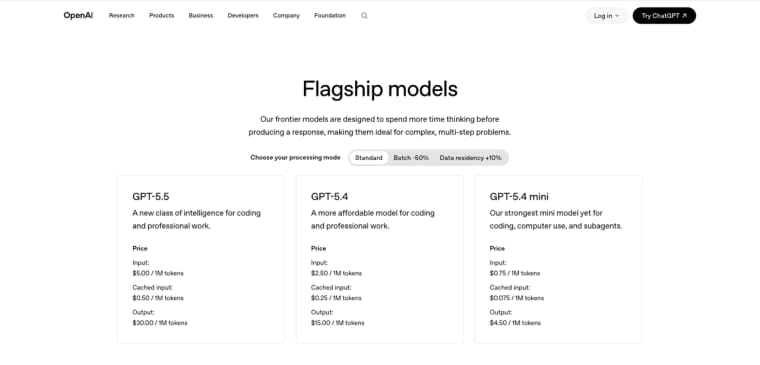
Here's the cost reality that makes this matter, and I'm dating it because pricing moves.Mini is meaningfully cheaper than the frontier tier — confirm current numbers on the OpenAI GPT-5.4 mini model page before you budget anything, because these numbers shift. The point that doesn't shift: Mini's job is to be the cost-optimized option for the work that doesn't need frontier intelligence. That gap is the whole reason to route by feature.
Mini vs Stronger Model: Quick Decision Reference
| Dimension | GPT-5.4 Mini | GPT-5.4 / GPT-5.5 |
| Speed | Fast — built for low-latency | Slower at comparable scale |
| Best task shape | Short, high-frequency, scoped | Long, multi-step, high-stakes |
| Chained reasoning | Drops threads on 4+ steps | Handles reliably |
| High-stakes correctness | Risky if no human review | Better for zero-tolerance tasks |
| Ambiguous instructions | Picks a lane and commits | Holds ambiguity better |
| Human reviews output | Usually fine | Overkill |
| When to reach for it | Interactive, repetitive, draft work | Deep reasoning, legal/financial, agent planning |
Pricing verified June 2026. Always check OpenAI's official pricing page before committing a budget.
My working decision rule, feature by feature:
- Is the task high-frequency and short? → Start with Mini.
- Does a wrong answer cost real money, trust, or safety? → Go stronger.
- Does it need long, multi-step reasoning in one shot? → Go stronger.
- Is a human reviewing the output anyway? → Mini's probably fine.
- Not sure? → Build it on the stronger model first to see "good," then try dropping to Mini and compare. Cheaper to downgrade a working thing than to debug a broken cheap thing.
You don't have to commit your whole product. You can run a strong model on the two paths that need it and Mini on the other twenty.
Real Product Examples Using Smaller Models
Concrete is better than abstract. Artificial Analysis's breakdown of GPT-5.4 mini shows it scoring well above the median for its price tier on their intelligence index while generating output fast, which lines up with what these features actually need.
- An AI intake form for a consultant — parses a client's free-text description into a structured brief. High volume, human reviews it. Mini.
- A course companion chatbot that answers "what module covers X" and quizzes learners on what they read. Conversational, scoped, latency-sensitive. Mini.
- A support triage agent that reads a ticket, tags it, and routes it. Classify-and-route is textbook small-model work. Mini.
- A draft generator inside a CRM that writes a first-pass follow-up email the user edits before sending. Human-in-the-loop. Mini.
- A research assistant that synthesizes a long thread of documents into a single nuanced recommendation a user will act on directly. That's the one I'd put on a stronger model — the stakes and the reasoning depth both argue against Mini.
Four of five are fine on the smaller model. The exception isn't about prestige. It's about consequence and reasoning depth.
So that's my honest read on GPT-5.4 Mini for builders: it's not a lesser model, it's the right-sized one for the parts of your app that don't need a genius. Pick per feature, not per product. Start small where the task is small.
One conservative note to close on. Everything cost-and-spec related here is a snapshot — I checked it in June 2026 and flagged the dates, but model pricing, context limits, and availability shift fast, so verify the official model page before you commit a budget. If you're genuinely unsure whether a feature needs more horsepower, build it on the stronger model first, confirm the experience is good, then test whether Mini holds up — and only switch if it does. Downgrading something that works is calm. Debugging something cheap that's secretly broken is not.
I still have one feature I haven't moved off the expensive model, because I haven't tested the swap carefully enough to trust it yet. When I do, I'll update this. Until then — go look at your own dashboard. You probably have at least one feature paying too much.
Explore More Topics:
FAQ
Is GPT-5.4 Mini good enough to run real product features?
Yes, many shipped features already use it successfully — in-app chat, structured extraction, short drafts, and light agent steps all work well. It shines in high-frequency, low-latency scenarios where speed matters more than maximum intelligence.
Can a smaller model like GPT-5.4 Mini run a real product feature?
Yes, plenty of shipped features run on small models. Chat, extraction, drafts, classification, light agent steps. The honest line is "is gpt 5.4 mini good enough" depends entirely on the feature, not the model. For high-frequency, well-scoped tasks, it's not just good enough, it's the smarter call.
When should I upgrade from a mini model to a stronger one?
When you notice subtle wrong answers in multi-step reasoning, when correctness is high-stakes, or when you're stacking validation hacks to compensate. If you're fighting the model, it's the wrong size.
Does using a smaller model mean a worse user experience?
Often the opposite. For interactive features, the speed of a smaller model can make the experience feel better than a slower, larger one. UX gets worse only when you put Mini on a task that genuinely needs more reasoning than it has.