Use Templates and Marketplace
Templates and Marketplace help you discover public starter projects, preview them, save the useful ones, and remix a strong base into your own project.
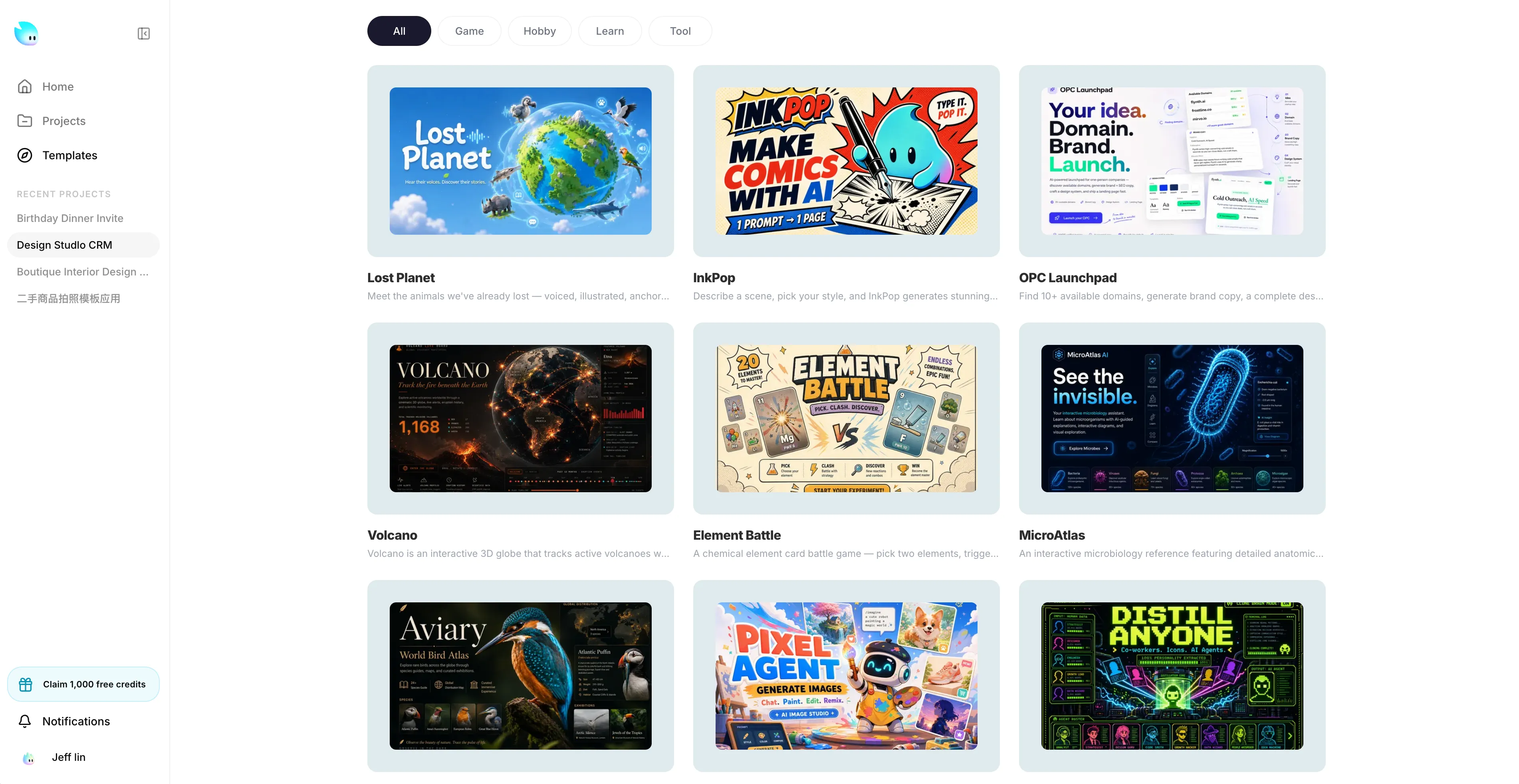
Why use templates
Use a template when the main structure of the product already exists and you want to adapt it instead of inventing the whole page in chat.
Templates are especially useful when you want to:
- get inspiration before choosing a direction
- start from a strong public example instead of a blank project
- remix an existing project into your own version
- reduce trial-and-error in early prompting
- save AI messages and prompt effort on layout and page structure
In practice, a good template gives you a head start on structure, section order, visual rhythm, and common UI patterns. You then spend your AI messages on the parts that actually need to become yours.
When to start here
Templates are a better starting point than a blank project when:
- you know the type of app or page you want, but not the exact design yet
- you found a public project that is already close to your use case
- you want to test several directions quickly
- you need a result fast and do not want to burn time on first-pass layout generation
- you want to reuse a proven public structure, then rewrite the brand, copy, and details
Common examples:
- finding inspiration for a landing page, portfolio, or product site
- using a polished public app as the base for your own version
- remixing a creator’s public project, then replacing the content and branding
- launching a simple campaign, tool, or prototype with less prompting
Why this saves time
Starting from a blank prompt usually means spending extra messages on:
- page structure
- section order
- component patterns
- placeholder content cleanup
- repeated visual corrections
Starting from a close template can reduce that work. Instead of asking AI to invent the whole page, you can say things like:
- keep the structure, rewrite the copy for a SaaS audience
- remix this template for a coffee brand
- keep the sections, replace the visuals and tone
- turn this public project into a bilingual version
That usually means fewer broad prompts, fewer retries, and less wasted generation.
What Marketplace does
The Marketplace is not only a gallery. It is a working starting-point library for discovering, previewing, saving, sharing, and remixing public projects.
Depending on the template, you can use the Marketplace to:
- browse public templates by direction and category
- preview a template from its screenshot or live deployment
- inspect the author name
- star a template to save it as a favorite
- copy or share the public link
- remix the template into a new project of your own
If you publish your own project with sharing and remix enabled, it can also become discoverable by other people as a reusable public starting point.
What remix means
Remix means creating your own project from an existing public one.
Use remix when the public project already has:
- the right structure
- a similar audience or flow
- useful sections you would otherwise describe from scratch
- a visual direction worth adapting
Remix is usually better than cloning the entire idea in a prompt. You get a real starting point immediately, then change what matters:
- brand
- copy
- images
- layout details
- feature emphasis
Important: public discovery and remix are controlled by the original project’s sharing settings. Private projects are not meant to be used this way.
How to choose well
Do not choose only by color or aesthetics. Choose by how much expensive setup work it already removes.
Check these first:
- does the page flow already match your goal
- are the sections close to what you need
- is the preview quality high enough to trust as a base
- is the project public and remixable
- would adapting this be easier than explaining your target from zero
The best template is usually not the prettiest one. It is the one that removes the most setup work.
After you remix
After you open a template or remix a public project, avoid asking for a total rewrite immediately.
A better sequence is:
- Keep the structure and replace the brand, audience, and value proposition.
- Rewrite the hero, CTA, and key sections.
- Remove sections you do not need.
- Adjust visuals, spacing, and tone.
- Publish only after the result clearly feels like your project rather than the source.
This is safer than one giant redesign prompt, and it usually produces cleaner results faster.
